NVIDIA GeForce RTX 5060 GPU Review: Blackwell At Just $299 [Updated]


We also spent some time overclocking the MSI GeForce RTX 5060 to see what kind of additional performance we could wring from the card. We had great success overclocking with the RTX 5080 and RTX 5070 Ti, so we were interesed to see what the smaller Blackwell GPU could do...
Overclocking The MSI GeForce RTX 5060
As we've already mentioned in numerous articles at this point, Blackwell-based GeForce RTX 50 series cards feature GPU Boost, which scales frequencies and voltages up and down, based on the GPU's workload at the time -- power and temperatures permitting. Should a temperature or power limit be reached, GPU Boost will drop down to the previous boost frequency and voltage stepping, in an attempt to bring power and temperatures down gradually and not cause any significant swings in performance.
To overclock an RTX 50 series card, the maximum boost clock, the memory clock, and power limit can be tweaked to increase performance. Altering the fan speed curve and GPU voltage (when applicable) can allow for further tuning when supported.

Like previous-gen cards, the MSI GeForce RTX 5060 is usually voltage or power limited to prevent damage and ensure longevity, and it's those limits that will usually determine your success when overclocking. You can see the card hitting those limits in its stock configuration above. With the MSI GeForce RTX 5060, the power target can be increased by up to a whopping 10%, but the GPU voltage could not be altered, at least not in the latest beta version of MSI's Afterburner we used. That said, we were able to increase the GPU and memory clocks quite a bit over their default values, in addition to cranking up that power limit.

We upped the power target to its maximum and used the GPU and memory frequency offsets in Afterburner to manually alter the MSI GeForce RTX 5060's frequencies. We increased the GPU and memory clock offsets incrementally until the test system was no longer stable, showed on-screen artifacts, or performance peaked due to hitting a power or other limit.
In its stock configuration, the MSI GeForce RTX 5060 hit a 2,715MHz boost clock and peaked in the mid 60°C range, while maintaining its 28Gbps memory data rate (effective 14,000MHz). While overclocked, however, we were able to take its GPU clock all the way up to 3,037MHz with a 28.9Gbps memory speed.
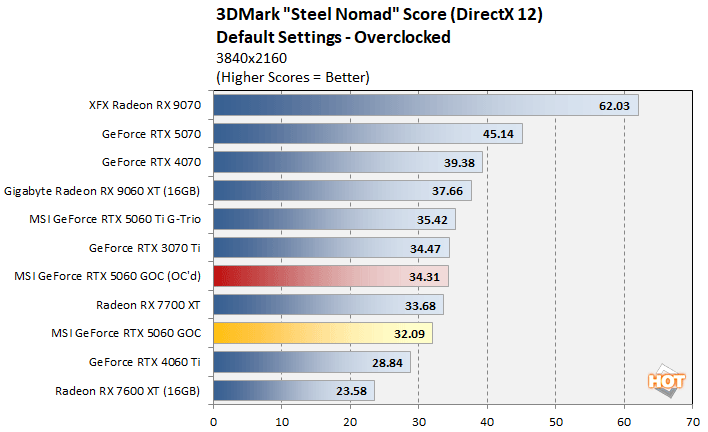
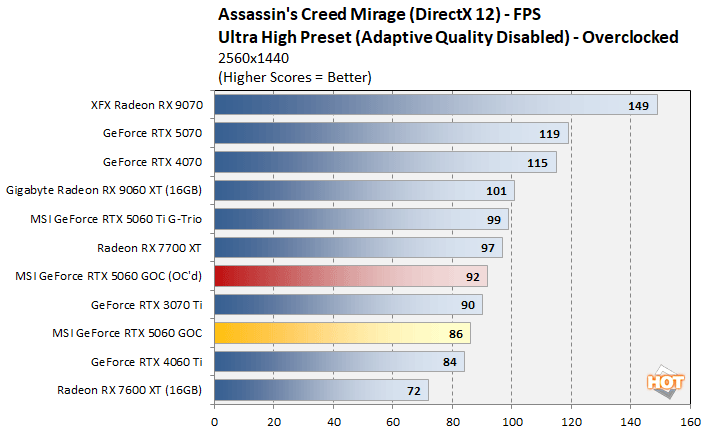
With the MSI GeForce RTX 5060 overclocked, we re-ran some benchmarks and saw some really nice performance gains, of about 7%. Just like the other members of the RTX 50 series. it appears NVIDIA is being somewhat conservative with the RTX 5060's recommended clocks and power limit.
We should also mention, that while overclocked the MSI GeForce RTX 5060 remained very cool. We saw temperatures peak at only 66°C, which was right in-line with stock and the fan speed maxed out at only 44%.
Total System Power Consumption
Throughout all of our benchmarking and testing, we also monitored noise output and tracked how much power the GPUs were consuming in our test system. Our goal here is to give you an idea as to how much power each GPU used while idle and also while under a heavy workload.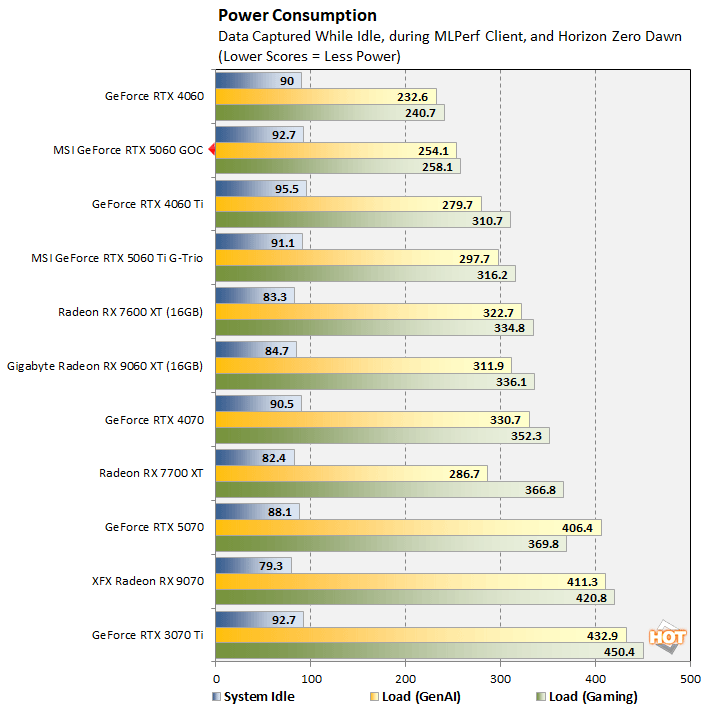
The Blackwell based GeForce RTX 5060 is relatively power friendly. Despite offering better performance and more featured than the Ada-based GeForce RTX 4060, the newer RTX 5060 only consumed a few additional watts, and is the second-most power friendly of the pack when under full load.
Noise is a non-issue with GeForce RTX 5060 card we tested as well. At idle or when under light loads, the card is effectively silent. It's fans spin down considerably when idle, and it's basically inaudible over the other fans in a system. When under a heavy, sustained workload, the fans will spin up, but we would not consider it loud by any means. It is audible, but is relatively tame versus high-end GPUs.MSI GeForce RTX 5060 Review Summary & Conclusions
By now, we suspect most of you knew how the GeForce RTX 5060 would perform and had a rough idea where it would land relative to its counterpart in the outgoing RTX 40 series and competitive AMD Radeon offerings. Like the other members of the GeForce RTX 50 series, the RTX 5060 is about 20% - 30% faster than the previous-gen GeForce RTX 4060 with traditional rasterization, and in a few cases it can hang with the GeForce RTX 4060 Ti. The GeForce RTX 5060, however, supports all that NVIDIA’s Blackwell architecture has to offer and as such, it’s much better suited to some AI and creator workloads, especially for those working with high quality video.
For the $300-ish that this MSI GeForce RTX 5060 is currently being sold for, it’s actually a decent value relative to other cards in its price range, but its 8GB memory and pared-down configuration aren’t ideal in 2025. If you absolutely can’t spend more than 300 bucks on a GPU, and want something from the latest generation, the RTX 5060 will do its job well. As is always the case in these lower price brackets, however, there’s a lot more performance to be had – and some additional future proofing – if you can part with a few more dollars. The Radeon RX 9600 XT with its 16GB can be had for about $379 and RTX 5060 Ti 16GB cards are available for only slightly more. We know that’s more than 20% higher than the RTX 5060, but that’s also money well spent for a modern gaming PC.