NVIDIA DGX Spark Review: A GB10-Infused Mini AI Development Powerhouse


Calling Plays From NVIDIA's Book
When you first start looking through NVIDIA's playbooks for the Spark, it starts off pretty simple: configure the Spark to be accessible over the network, install NVIDIA Sync, connect through Visual Studio Code, and generally get up and running. The playbooks all have three pages: a plain-language explanation of what users will achieve as they walk through the steps, the step-by-step guide, and troubleshooting steps if users run into trouble. Where the terminal is used, each command has a handy copy button that grabs plain text suitable for pasting into the terminal.We picked the first playbook in the "getting started" guide: build ComfyUI to get started with local generative AI in a web browser. This is a web app built in Python available on a public GitHub repository that we cloned. We used the guide to set up a virtual environment so that we could install any Python dependencies we wanted without trashing the main installation (which is both common sense and a best practice when working with Python) and serve the app from the Spark to our workstation.

ComfyUI is an open-source project that can run on just about any hardware, and handles a host of workloads. Primarily, it represents tasks as a flowchart showing a step-by-step guide to generating images from other images, text, and other inputs. Everything is editable within the UI, including the image size, randomizer seeds, the text and image prompts, and so on.
Since this is a review of the NVIDIA DGX Spark and not a ComfyUI tutorial, we'll just stick to what's available. We generated images on a couple of Stable Diffusion models that would likely fit into a consumer GPU's local memory, and then jumped over to Qwen Image 20B that has many more steps and out far outstrips any consumer GPU a thousand bucks and under, including the GeForce RTX 5080.
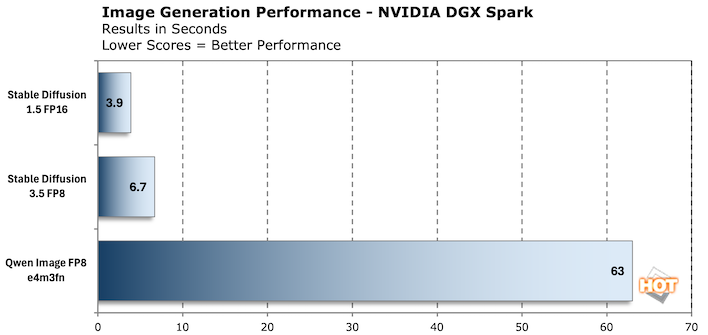
In the chart above, we generated 10 images with a resolution of 512x512 and the console reported the time in seconds to generate the images. We averaged the time of the last three, to ensure the model was good and warmed up. It's also important to note that Qwen Image FP8 is a completely different workload that integrates the Qwen 2.5 LLM with the Qwen image model, and it uses prompts to draw text. The results are decent, but do have that telltale sign of AI image generation, often denoted by garbled words.

The signs aren't random; these are text in the Qwen Image workflow's default prompt. It explicitly calls out what should be on each sign. The larger the text, the more likely it was to be right, and then as signs go down the road they start to fall off in quality.
The next playbook we took on was to install WebUI and Ollama. Where ComfyUI was a Python application that ran on more-or-less bare metal, WebUI is a Docker container that you can just pull and run. NVIDIA's instructions set it up to be reusable, so if you run a docker stop open-webui command or restart the machine, it's just a docker start open-webui away.
The app's interface isn't that different from ChatGPT or any number of other local LLM interfaces like LM Studio. In fact, it's accessible using OpenAI-style APIs from any computer that can reach it. We had to dig a bit to get to performance stats, as the tokens per second are not displayed in the UI. They are, however, buried in the responses. We tested Gemma 3 27B, Deepseek R1 32B, and GPT-OSS 20B.
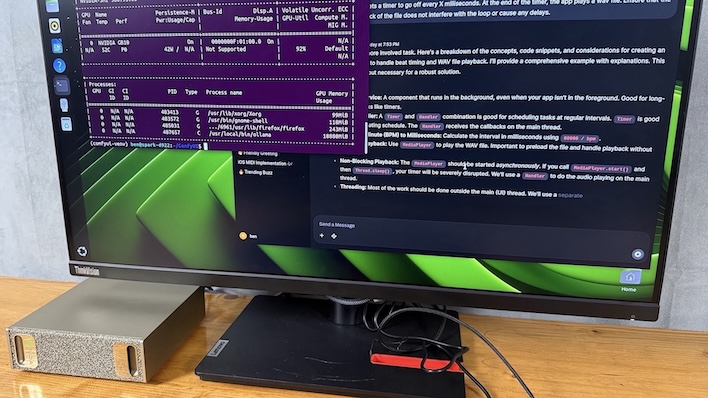
In their default form from Ollama, all of those models are too large for a 16GB consumer GPU like a GeForce RTX 5080 or Radeon RX 9070 XT. While GPT-OSS 20B will technically fit, there's not much room for a context window without quantizing it down to FP8 or even smaller data types.
We needed to bring in something as a point of comparison, and the Mac Studio 2025 seemed like a logical choice. There's a difference in testing methodology, running LM Studio on the Mac and sticking to NVIDIA's Playbook with Open WebUI and Ollama on the DGX Spark, so t isn't a perfect comparison. LM Studio is a well-known quantity, though, and it's just not available for Linux on Arm64 just yet, so it's not an option for the DGX Spark.

Performance does not scale in a linear fashion. And that's because these are different models, not the same model with a different number of parameters. What's a little tough here is the raw performance that we witnessed. In the workloads that would fit into a discrete GPU, the DGX Spark trails behind. The Mac demonstrates that having much more memory bandwidth offers much more performance with these particular workloads, until we ran out of space. Our Mac Studio only has 36 GB of memory, so we can only test gpt-oss:20b and gemma3:27b before LM Studio starts to throw a fit.
It's also worth noting that a Mac Studio with 128GB of LPDDR5 memory and 4 TB of storage is $4700. You'd lose access to NVIDIA's software too, and if the point is local development for deployment in DGX Cloud the Mac is much less useful.
AI Development With NVIDIA's DGX Spark
Having fun with models is great and all, but the real purpose of the DGX Spark is development. Quantizing an unoptimized model to run on edge devices with limited memory is a good representative task that developers can accomplish on DGX Spark workstations. NVIDIA's playbook for this part of the process uses the TensorRT Model Optimizer application which can be downloaded from the company's GitHub repository.
Look, ma! I've quantized my own model.
In this example, we download DeepSeek R1 Distill Llama 8B directly from DeepSeek AI's own repositories and quantize it to NVFP4, exported in HuggingFace's standard format. The original 8B model is right around 16GB in size, due to its native 2 bytes per parameter, and therefore doesn't fit into most consumer GPUs' memory footprint.
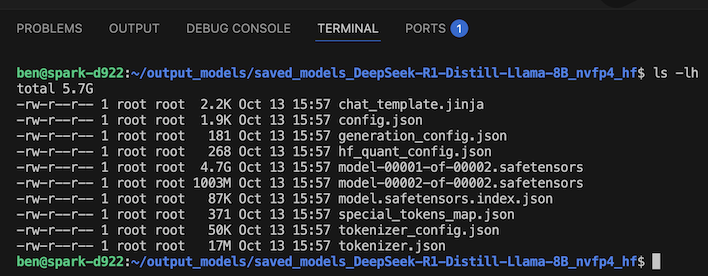
Development screenshots always look so boring, but you can see the results of quantization here
This process keeps the GPU fairly busy, at approximately 50% utilization according to the nvidia-smi utility, and the driver reports about 16-20 Watts depending on exactly what's going on when we ran the command. Power consumption for the whole system as measured by our Kill-A-Watt is just 75-80 Watts in total, which includes a bit of CPU activity to feed the GPU and keeping the system on, plus whatever is lost in the conversion from our wall socket to the system via the AC adapter.
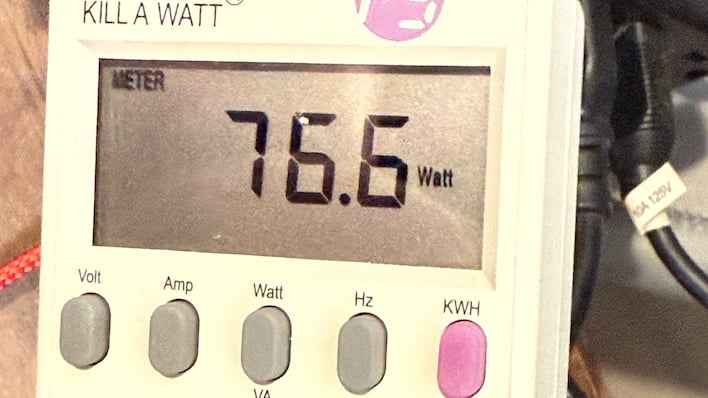
Approximately 15 minutes and 36 seconds later we had a HuggingFace-formatted model that can be loaded on even small 8GB GPUs without breaking a sweat. The output winds up being a total of 5.7 GB, down from that 16 GB starting point. This is a solid example of how quantization is necessary for inexpensive edge devices to run relatively big LLMs.
DGX Spark Thermals And Noise
While running the DGX Spark through different workloads, we kept an eye on surface temperatures and power consumption. To say this box is an efficient little machine is a bit of an understatement. While the RT Core and Tensor Core count is almost certainly different, the 6144 CUDA Core count is the same as a GeForce RTX 5070 desktop GPU. That card requires a 300-Watt connection to a power supply, whether it's a pair of 8-pin PCIe connectors or a 12VHPWR plug.The DGX Spark runs not just its GPU but also its CPU cores, all that LPDDR5x memory, and its storage and other subsystems in half that power most of the time. When we were really taxing it with a DeepSeek R1 70B model, our Kill-A-Watt reported that the system was pulling between 145-160 Watts. It would fluctuate some while it churned through the workload, but that represents 80% GPU utilization according to the nvidia-smi utility at the linux console.
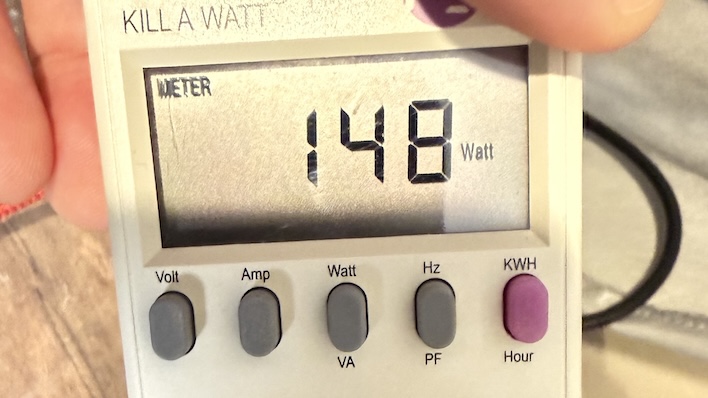
A professional GPU like the NVIDIA RTX Pro 6000 might do the job faster with its 96 GB of GDDR7 and 24,000 CUDA cores, but that card by itself is $10,000 and also requires 300 Watts of power. By the time you add a high-power workstation around it, you're talking about three times the price of the DGX Spark and likely more than three times the power consumption under load, as well. That's pretty wild.

The cooling system in the DGX Spark is pretty effective, based on the air coming out of the back.
The other part of it is just how quiet and cool the DGX Spark runs while it's very busy. Switching to an automated test method in which we had the system generate a couple dozen 1024x1024 images with Stable Diffusion 3.5, we were able to get the heat and fan up as much as possible. Surface temperatures hovered around 44-45 degrees Celsius, and the fans had to be measured at 2 inches from the vent to even register on our sound meter at close to 40 dB. You'll be straining to hear the DGX Spark in even a quiet office.
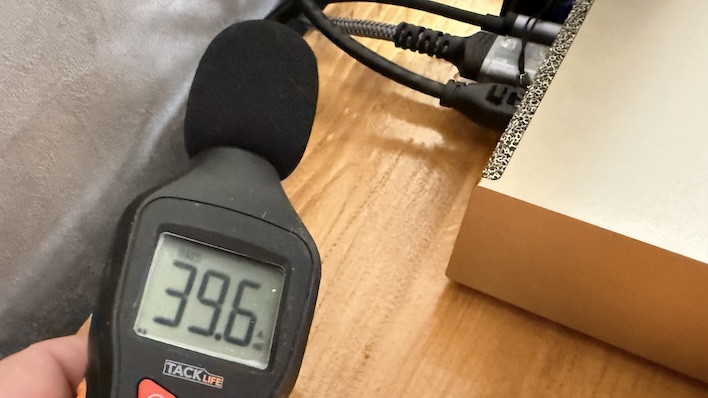
Meanwhile, power consumption didn't really budge. We stuck to that ~150-Watt range for the duration of that test. DGX Spark is very unobtrusive and gets the work done.

NVIDIA DGX Spark: Our Conclusions
We've put the DGX Spark through its paces over the last several days, but have only scratched the surface. To start with, let's talk about the hardware. Small developer devices with big, fast SoCs is something NVIDIA has been adept at creating. Starting with the Jetson line, up through the Jetson AGX Thor Developer Kit, and now today with the DGX Spark, the company knows how to cram a lot of power into a small space.The DGX Spark is also quiet and efficient. Power consumption was about half of a comparable desktop or consumer GPU. The GB10's 20 CPU cores are potent enough to keep the Blackwell GPU well-fed, and there's plenty of memory to support these very large loads. There's also 128 GB of fast LPDDR5X memory on store and a whopping 4 TB of storage.
The software is what really sells the device, though. The developer documentation and playbooks on NVIDIA's Build portal for the Spark are thorough and easy to follow. Even novices who aren't experienced developers in the AI space will have no trouble getting up and running with a host of different tasks. Everything is publicly available, and NVIDIA has improvements in the works. If those are as high quality as the current playbooks we got to test in our pre-release review period, it will only enhance the DGX Spark's value.

The current pricing on NVIDIA's little AI box is $3,999 including everything we reviewed today. That means the GB10 chip, 128 GB of memory, 4 TB of flash storage, 10Gb ethernet and fast USB 3.2 20Gbps available for expansion. At 4 grand, the DGX Spark is not an enthusiast's toy, but rather a real AI machine for serious business.
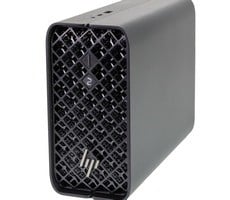
This is just the start. There are loads of partners who have already signed on to produce their own Grace Blackwell based developer boxes, including HP, Dell, and ASUS. We'll have to see how NVIDIA's partners price their units, but we don't expect a huge deviation from this model.
All told, the NVIDIA DGX Spark is an interesting next step in the world of AI development. As businesses jump on the AI train, purpose-built hardware like the DGX Spark will become the norm. If you want to get in on the ground level this is the place to start, and for that reason, the NVIDIA DGX Spark is HotHardware Recommended.