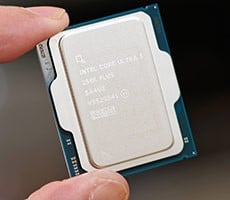
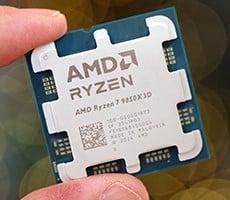
Core Ultra 7 270K Plus & Ultra 5 250K Plus Review: Intel Boosts Cores, Clocks And Gaming


With the Windows installation complete, we installed all of the drivers necessary for our components, disabled auto-updating and OneDrive, and installed all of our benchmarking software. When that process was done, we performed a disk clean-up, cleared any temp and prefetch data, processed idle tasks, and optimized all of the SSDs using Windows' built-in tools. Finally, we enabled Windows Focus Assist to minimize any potential interruptions and let the systems reach an idle state before invoking any tests.
We should also note that we've completely revamped our test beds for this latest round of processor launches and all of this data is freshly generated. All systems were as up-to-date as possible with the latest BIOS/UEFI firmware, drivers, software and updates as of the time of publication.
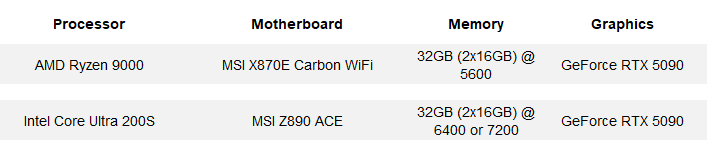
HotHardware's Test Systems:
AIDA64 Memory Bandwidth, Memory Latency & Cache Latency
AIDA64's CPU Cache and Memory benchmarks measure memory bandwidth during read, write and copy operations, in addition to memory latency, and cache bandwidth and latency.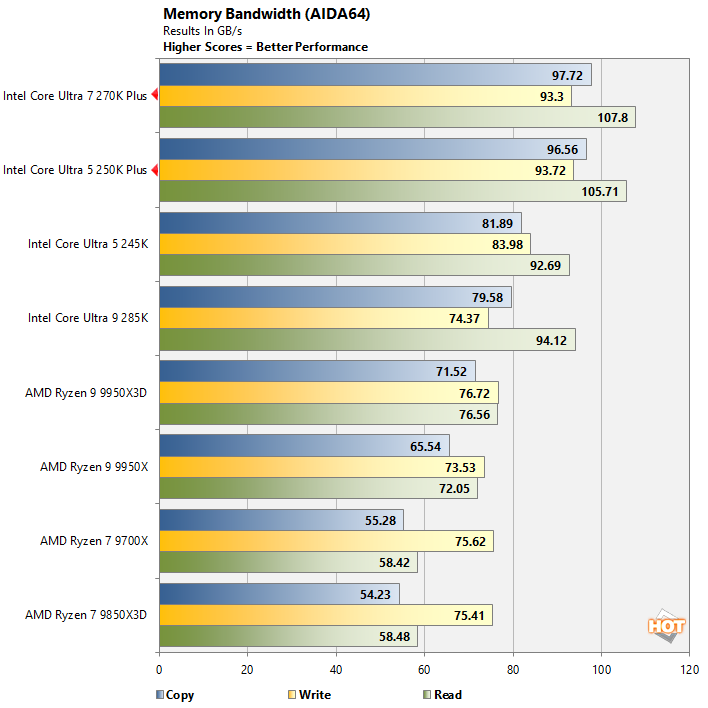
Thanks to their official support for higher memory speeds (7200MT/s vs 6400MT/s vs 5600MT/s) and other internal optimizations, the Core Ultra 200S Plus series processors offer significantly more memory bandwidth than their predecessors and the Ryzen 9000 series processors.
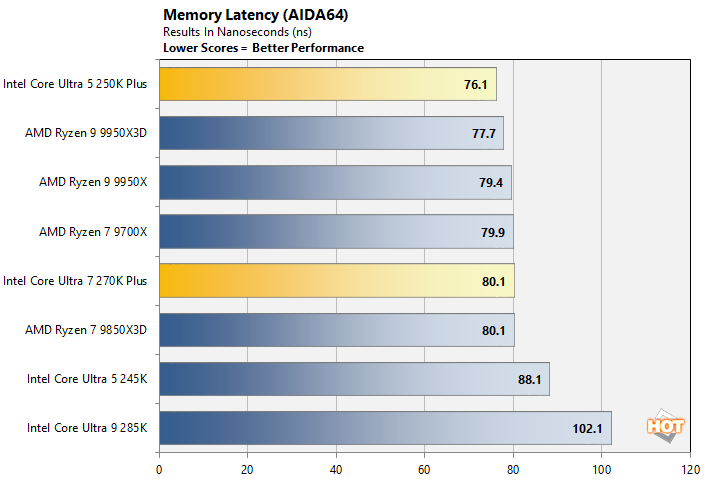
The Core Ultra 200S Plus series' higher clocked interconnects and memory also help improve memory latency. The Core Ultra 7 270K Plus lands at the to of the chart with the Core Ultra 5 250K right in the mix with the Ryzen 9000 series processors.
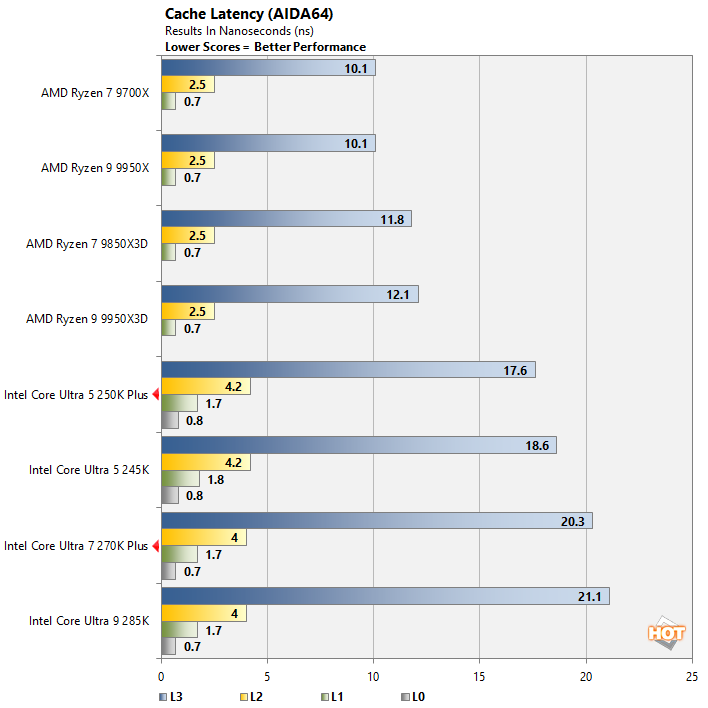
Cache latency is a different story altogether, though. The Core Ultra 200S Plus series processors sport an additional level of cache, but across the board cache latency is higher than AMD's Ryzen 9000 series processors.
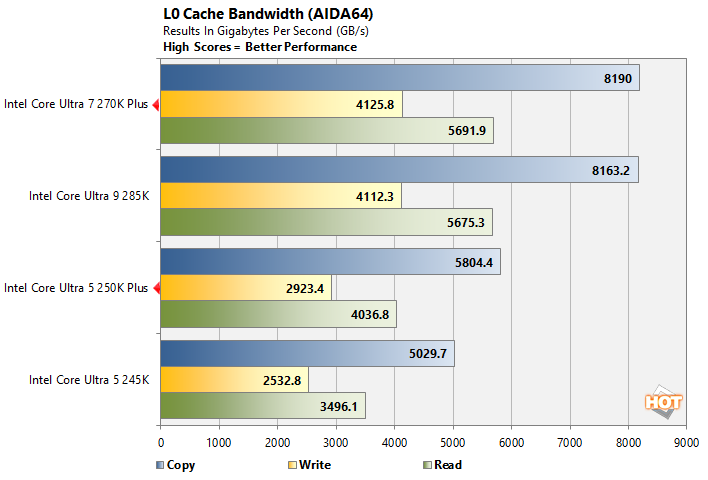
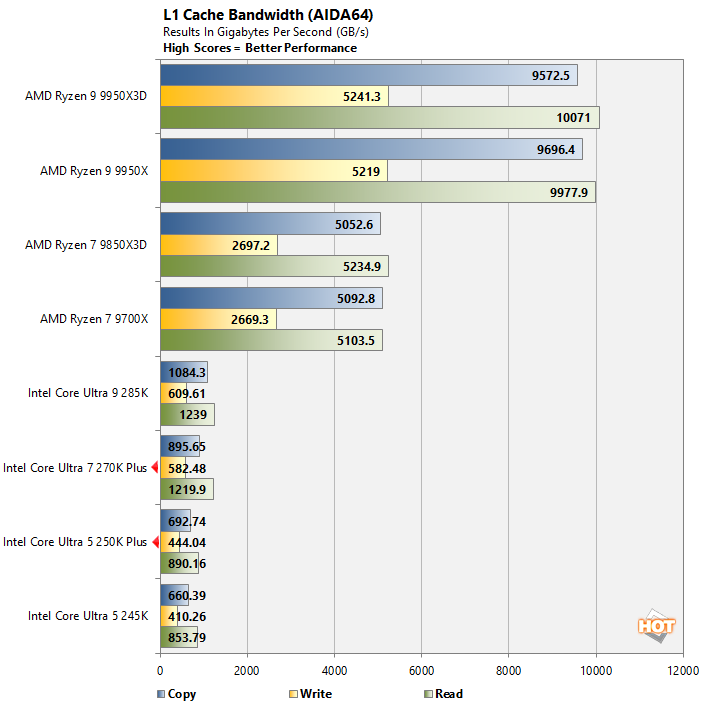
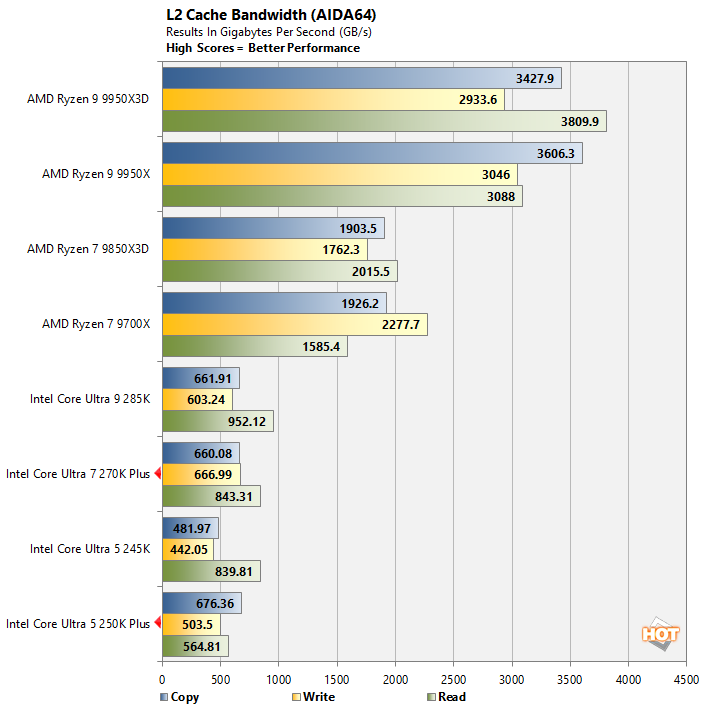
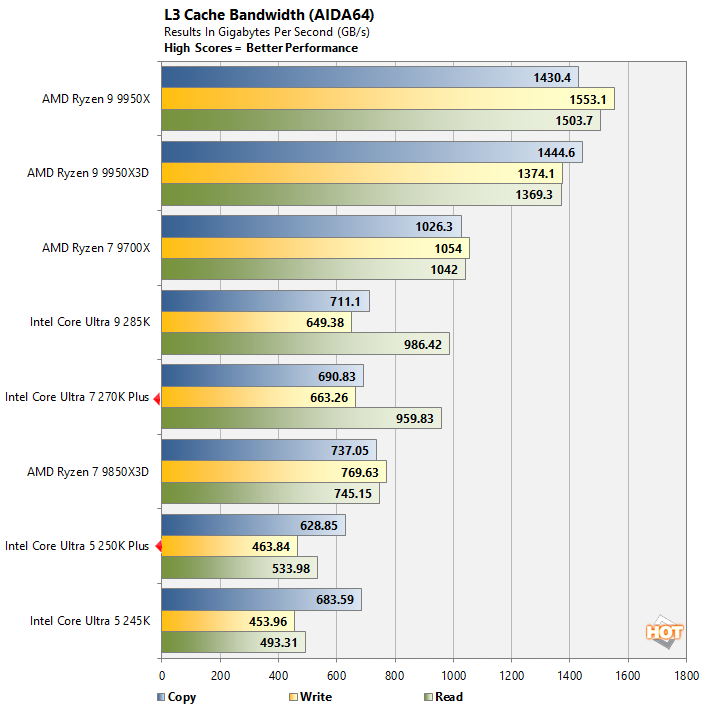
Intel's last few processor generations feature what the company calls an L0 cache, which is a low-latency additional layer that sits below the L1. AMD's cache hierarchy is different and doesn't have an L0, hence only Intel processors in the first chart here. As you can see, the Core Ultra 200S Plus series processors offer similar cache bandwidth to their predecessors, but AMD's processors offer much higher bandwidth at every level.
Geekbench v6.5 CPU Benchmark
The GeekBench CPU tests stress only the processor cores in a system (not the graphics card/GPU), with both single and multi-threaded workloads. The tests are comprised of encryption processing, image compression, HTML5 parsing, physics calculations and other general purpose compute processing workloads.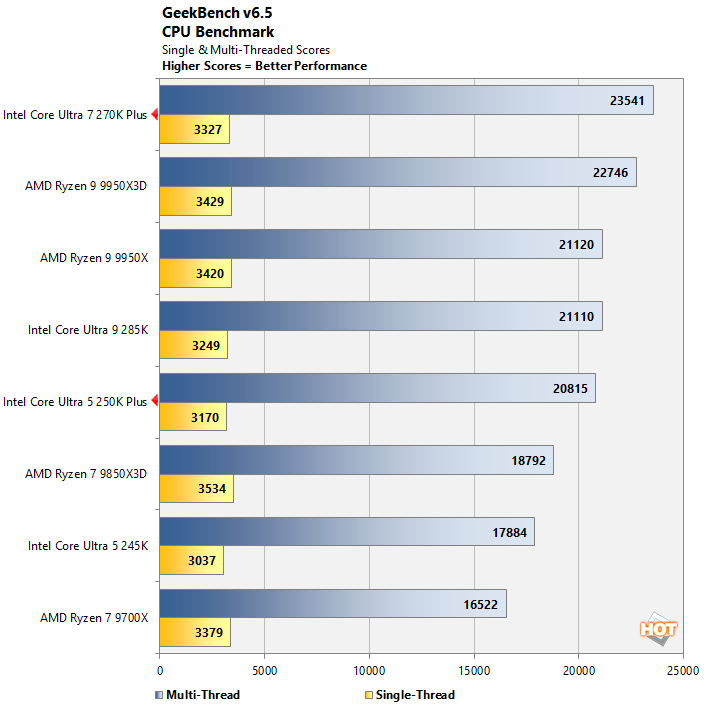
The Core Ultra 200S Plus series processors performed very well in the latest version of Geekbench. The Core Ultra 7 270K Plus took the pole position in the multi-thread test, with a strong single-thread score as well. The Core Ultra 5 250K Plus crushed the 245K and actually hangs with the much pricier Ryzen 9 9950X.
UL PCMark 10 Applications Benchmarks
Next, up we have some full-system testing with PCMark. We're reporting all test results from the PCMark 10 Applications benchmark suite, which uses actual Microsoft Office applications, in addition to the Microsoft Edge browser. The workloads are specific to each Office application (Word, Excel, and PowerPoint), and the Edge tests simulates real-world web browsing.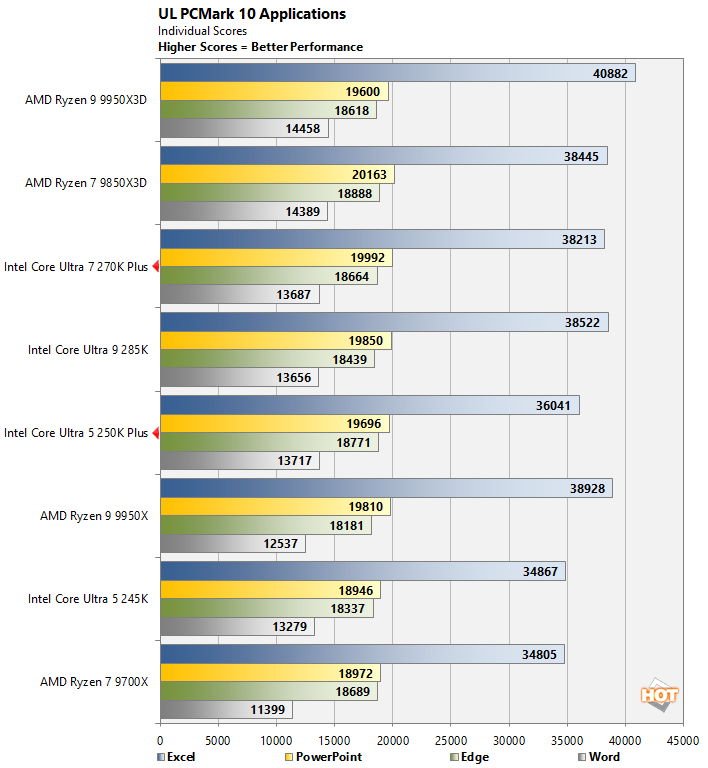
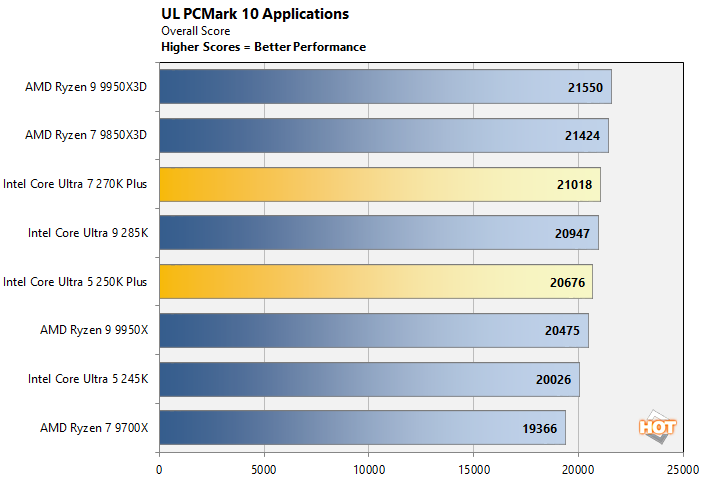
All of the processors we tested are more than fast enough for standard office productivity. The new Core Ultra 200S Plus series processors are right in the mix with both Intel's and AMD's current flagships, with only a few percentage points separating all of the processors here.
Bapco Crossmark Benchmark
Crossmark is a cross-platform benchmark from Bapco that's available for Windows, Android, iOS and MacOS. Like PCMark, Crossmark measures overall system performance and using real-world applications. It provides an overall score based on the results of its Creativity and Productivity benchmarks and system responsiveness tests.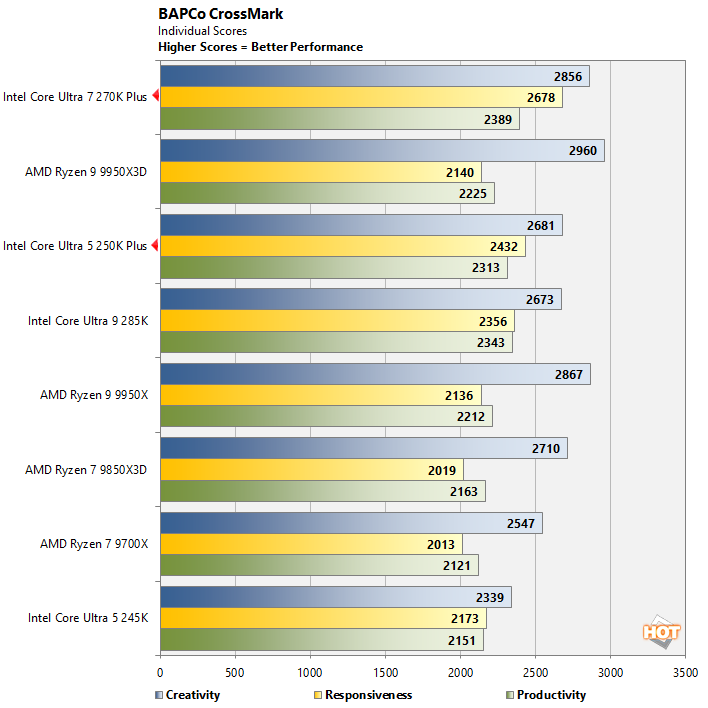
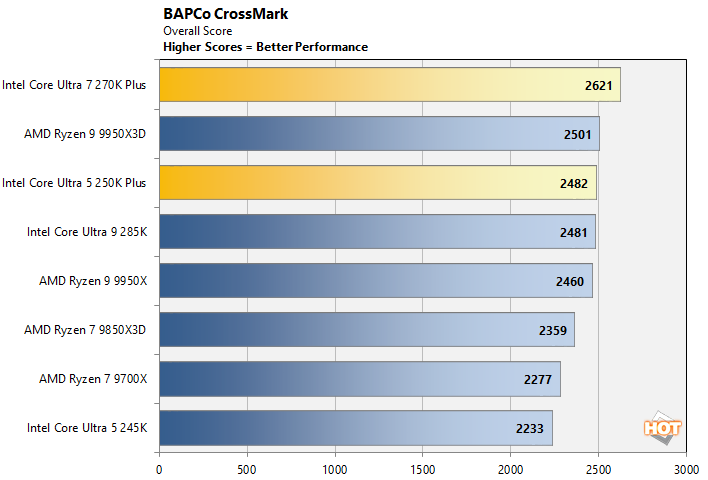
The new Core Ultra 200S Plus series processors performed exceptionally well in Bapco's Crossmark benchmark. Once again, the Core Ultra 7 270k Plus takes the top spot, with the Core Ultra 5 250K Plus not too far behind. In fact, only the 270K Plus and Ryzen 9 9950X3D put up better scores than the 250K plus, which outpaced the 285K as well.
Browser & Web App Benchmarks: Jetstream 2.2 And Speedometer 3.1
Next up, we have some numbers from the Speedometer 2.0 and Jetstream 2 tests available at browserbench.org. The Speedometer Benchmark Suite uses a wide array of latency and throughput benchmarks to evaluate web application performance, while Jetstream evaluates Javascript and WebAssembly performance; both tests take all of their individual results and tabulate them into a final score.These benchmarks measure performance of an array of browser-based technologies used on modern, rich web applications. Scores in these benchmark are an indicator of the performance users would see when browsing the web and running advanced web apps. All of the systems were tested using the latest version of Google Chrome, with default browser settings, on a clean, fully-updated install of Windows 11.
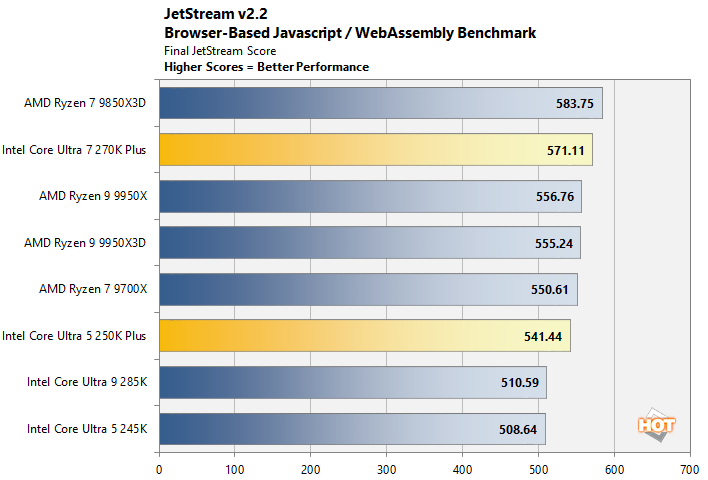
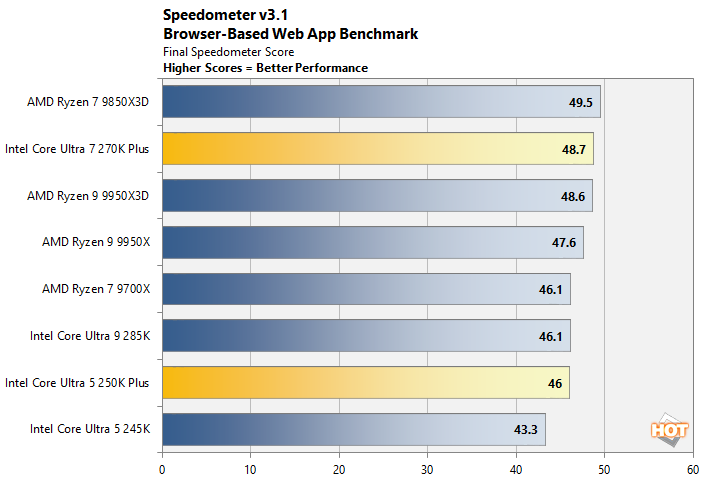
Obviously all of these processor are plenty fast for web browsing and running web applications through a browser. Jetstream and Speedometer both show the Core Ultra 200S Plus series processors hanging with the best of 'em with only a few percentage points separating the fastest and not-as-fastest processors here.
7-Zip Data Compression & Decompression Tests
The 7-Zip benchmark measures compression and decompression performance using the LZMA method, which leverages the Lempel–Ziv–Markov chain algorithm to perform lossless data compression. The benchmark produces a final rating in GIPS (giga instructions per second).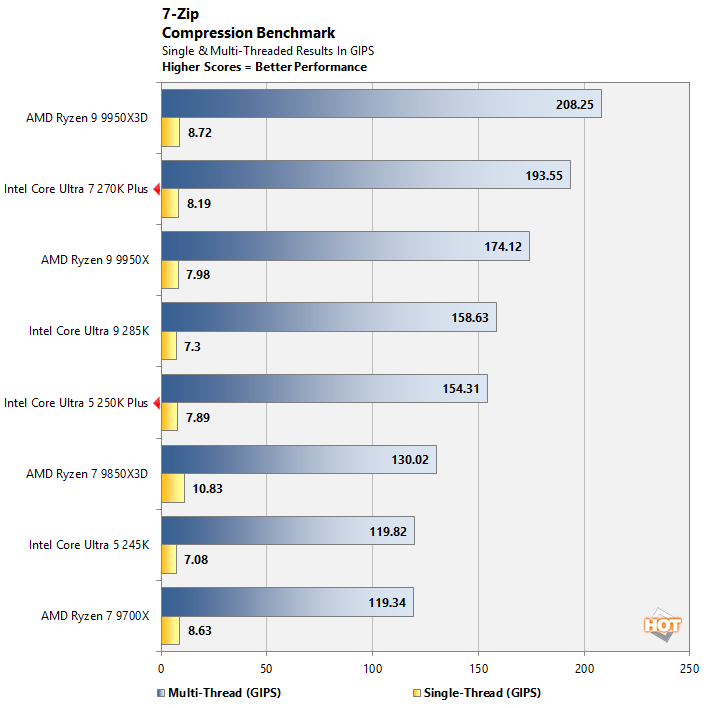
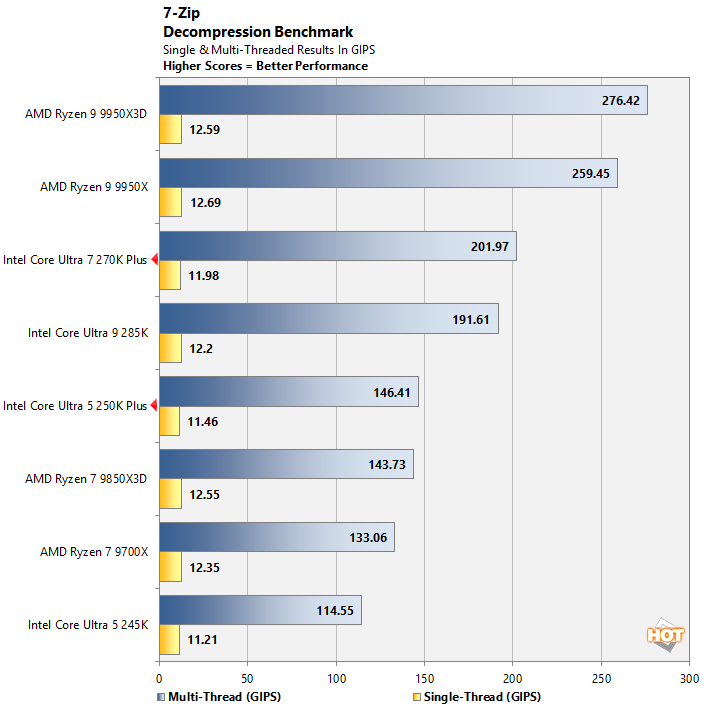
Their additional memory bandwidth, higher clocks, and faster interconnects help push the Core Ultra 200S Plus series processors up the charts in 7-Zips compression and decompression tests. The Core Ultra 7 270K Plus is the fastest Intel processor overall and the Core Ultra 5 250K lands just behind the 285K, but well out in front of the Ryzen 7 processors.