Epomaker Galaxy100 Lite Review: A Quality Budget Keyboard With Thocky Sound

Epomaker Galaxy100 Lite Mechanical Keyboard Is Solidly Built And Deeply Customizable

| Epomaker Galaxy100 Lite Mechanical Keyboard: $109.99 (MSRP), $98.99 On-Sale The Epomaker Galaxy100 Lite is a highly customizable and solidly built wireless keyboard that won't break the bank.
|
|||

|

|
||
The Galaxy100 Lite is the latest addition to Epomaker's extensive lineup of mechanical keyboards, and if that statement has you scratching your head wondering, 'Who the heck is Epomaker?', keep reading because this is the kind of peripheral that can make a positive first impression and potentially expand its modest fanbase.
As a brand, Epomaker may not carry the same level of cachet among more casual consumers as peripheral heavyweights like Corsair, Logitech, and Razer, but is more familiar among keyboard enthusiasts, especially those who favor mechanical planks. It also enjoys a respectable social media presence with 39K followers on Facebook and 12.9K followers on X, both of which the brand actively engages with the community on.
Many of Epomaker's keyboards are relatively affordable (you won't find the company offering a $500 special edition keyboard like Razer), especially when you factor in features that can drive up pricing, and there are several budget options as well. The Galaxy100 Lite, meanwhile, is one of its more expensive mechanical decks at $109.99 (MSRP).
While still reasonably priced for a keyboard, the MSRP thrusts Epomaker's latest plank into a tier above the crowded field of sub-$100 keyboards, and it leans on premium features such as a wireless design and pre-lubed hot-swappable key switches to justify its position. At the same time, its pricing is well below some of the more expensive keyboards on the market. Still, it's a competitive landscape that has drawn its share of non-traditional players, such as OnePlus and its Keyboard 81 Pro that debuted for $219.99.
All of this raises the question, is the Galaxy100 Lite worth the asking price? Let's get into it.
Epomaker Galaxy100 Lite Design And Features

The first thing that struck me about the Galaxy100 Lite is its heft. I had not looked at the full specs before unboxing the keyboard and was both caught off guard and pleasantly surprised at how substantial it feels. For the record, it weighs 1.6 kilograms, or just over 3.5 pounds.
That may not sound like much, but it's noticeable on a 96% form factor (read: not a full-size) keyboard, especially if you're accustomed to punching keys on a plastic plank or any number of typical gaming keyboards on the market. To put it into perspective, Corsair's Vanguard 96, which is also a wireless offering in the 96% form factor, weighs 0.994 kg, or right at 2.19 pounds.
While not light in and of itself, the Galaxy100 Lite earns its 'Lite' designation by being 0.9 pounds lighter than the Galaxy100, which weighs 2 kg, or a hair over 4.4 pounds. Otherwise, the dimensions are the same with both the Galaxy100 Lite and non-Lite models measuring 40.5 x 13.78 x 3.23 cm, or 15.94 x 5.43 x 1.27 inches.

It's also thick compared to some keyboards, which is a testament to its more premium build quality. The infographic above details all of the internal bits, though the biggest takeaways are the aluminum base, the husky CNC aluminum alloy shell, and hot swappable PCB.
Beyond those parts, Epomaker packed some sound dampening materials inside the Galaxy100 Lite, including multiple foam layers, in an effort to muffle noise while highlighting the switch's "pure thocky thud." Epomaker also claims that its construction reduces hand fatigue.

Epomaker offers a choice of two key switches: Feker Marble White or Wisteria Linear V2. They are both linear, which trades tactile feedback bumps and audio clicks at the point of actuation for butter-smooth keystrokes. I actually prefer a tactile switch over linear and would like to see Epomaker offer an option for others who feel the same way, but there are certainly plenty of typists who lean in the other direction.
You can also choose between two keyboard colorways, including the Black model that I received and a Creamy White color option, both with RGB lighting.
I asked Epomaker to send me whichever key switch it felt was louder, as my own personal preference is towards switches like Cherry MX Blue that, if you pound on them hard and fast enough, you can annoy your neighbor three houses down. Based on that request, they sent me a Galaxy100 Lite equipped with Feker Marble White switches.

While Epomaker limits your choices to two linear variants, you're not totally bound to the stock options. The keycaps remove with ease using the included 2-in-1 puller tool, and so do the factory-lubed switches that you can yank out and replace without having to master a solder iron. It's basically a plug-and-play setup, and I did not have any trouble removing the keycaps or switches.

The Galaxy100 Lite also features customizable south-facing RGB LEDs. They shine bright through the cracks between the keys, though the keycaps themselves do not have shine-through lettering or symbols. Of course, you could swap them for ones that do. A Cherry MX RGB Switch Kit with 36 Blue switches runs $19.99 on Amazon (and of course you'd need multiple kits to fill out the entire keyboard).
You can also pick up a Cherry MX Experience Box with 10 different switch types for $19.99 on Amazon, to get a literal feel for your preference. It comes with MX Black (linear), MX Black Clear Top (linear), MX Blue (tactile and acoustic), MX Brown (tactile, no click), MX Ergo Clear (tactile, no click), MX Green (tactic and acoustic), MX Gray (tactile, no click), MX Red (linear, no click), MX Silent Red (linear, no click, quiet), and MX Speed Silver (linear, no click).
There are other characteristics of each type and that's not an all-inclusive list. Additionally, key switch options extend well beyond Cherry. For example, a 20-pack sampler of Kailh and Gateron switches runs $14.99 on Amazon.

This is a wireless keyboard that comes with a 2.4GHz USB receiver that can be stored to a housing that's attached to the included USB-C to USB-A cable. Alternatively, you can use the keyboard in Bluetooth mode, though the advantage of 2.4GHz wireless connections is less latency.
The only real quirk here is that you have to manually flip the toggle switch to whichever mode you're using. Where this becomes a minor inconvenience is when needing to recharge the battery while simultaneously continuing to use the keyboard. When plugged in, you need to flip the toggle to the middle position or the keyboard won't be recognized.
Epomaker Galaxy100 Lite Software And Typing Experience
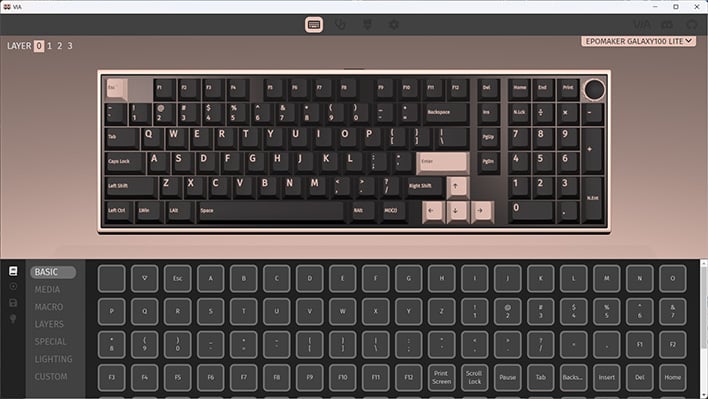
Instead of offering its own custom software utility, Epomaker opted to make its keyboard QMK/VIA compatible, which is essentially an open-source web-based configuration tool. The upshot of going that route is that the level of customization is typically higher than what is available through most custom-packaged utilities.
For example, VIA supports multiple different layers, each of which can be assigned a different key or function. Layers enable you to create multiple key layouts that you can switch to on-the-fly. In theory, you could create a layer that is customized for gaming, another one for productivity, and so forth.

In practice, using VIA is not necessarily as slick or user friendly as some custom utilities. Those who like to tinker and wade in the waters of open-source software will appreciate the level of customization VIA affords, while users who prefer a bit more hand-holding will have to endure a learning curve.
I don't know if this is considered a hot take or me simply saying the quiet part out loud, but I prefer a more streamlined utility over VIA. When setting things up, you have to load a JSON file into VIA. I consistently had trouble getting VIA to recognize the Galaxy100 Lite on the first attempt (two tries seems to be the magic number, at least in my case).
Another quirk I ran into was seeing partially broken graphics on the key fonts in the VIA software. It was still usable, but certainly odd and a little bit distracting. The solution? Hit the gear icon and change the Render Mode from 2D to 3D. If you've never played around with VIA before, I highly recommend reading through Epomaker's beginner's guide.
What about monitoring battery life? The VIA software doesn't have a spot for tracking battery life, but if you press Fn + Space Bar, LED lighting underneath the 1 through 0 keys will light up, serving as a battery life meter. That is, unless you change the behavior in software, as I accidentally did when tinkering around. The numbers correspond to the battery percentage, so if the LEDs stop at the number 8, the keyboard is at 80% battery life.
Software aside, typing on the Galaxy100 Lite is smooth and responsive. There is a faint hint of keycap wobble, and that's only apparently if you intentionally force the issue. During normal typing or when resting your fingers on the keycaps, they stay put without shifting around.

The Feker Marble White switches on the model I received strike a nice balance between overall noise and the 'thud' action that Epomaker is shooting for. I could classify the audible profile of the Galaxy100 Lite with these switches as a polite loudness. It's not a quiet keyboard, but the thocky nature of the sound profile is less jarring to others in the vicinity.
It really comes down to your preference. Again, I prefer an obnoxiously loud key stroke with tactile responses, but can also appreciate the thocky delivery of these switches. On top of that, the Galaxy100 Lite never rattled or vibrated in my testing. Like the WhiteFox Eclipse we reviewed, I suspect most users will not find a need to re-lube the switches or swap them out (provided they are fans of the Feker Marble White's acoustics).
One thing to note, however, is that typing on 96% form factor keyboard is slightly different than slamming keys on a full-size deck. You do still get a dedicated number pad on the Galaxy100 Lite, but some key positions are slightly shifted or reposition, which can take some getting used to. For example, the Page Up key sits where the Delete key is normally found on a full-size keyboard, and the arrow keys sit much closer to the main area, right next to the right-Shift key and below the Enter key.
This means retraining your muscle memory if you're not accustomed to a 96% keyboard. The upshot is that it takes up a little bit less space on your desk without having to give up the number pad as is required on tenkeyless (TKL) keyboard.
Epomaker Galaxy100 Lite Conclusion:

The Epomaker Galaxy100 Lite is a sturdy and highly customizable keyboard in every respect, from the PCB and key switches on the hardware side, to fine tuning the experience through software. There is a learning curve associated with the open-source VIA software that is used to change settings on the keyboard and that may turn off more casual typists. However, if you like to tinker, there is not much you can't do through VIA.
Though the Galaxy100 Lite is designed to offer a dynamic typing experience that can grow and change alongside your only typing preferences, the out of the box performance is quite good, presuming you like a linear switch that is thocky. I can only speak to the Feker Marble White switches that shipped with the review unit, which are smooth and land with a polite thud. The faster you type, the more melodic it is to listen to mechanical key switches that make noise, it just comes down to what kind of noise you prefer. There are a ton of options out there, and the Galaxy100 Lite can accommodate many of them.

Viewed from that perspective, the Galaxy100 Lite is a solid base. Compared to regular Galaxy100, the Galaxy100 Lite is 20% lighter while maintaining a good amount of heft. You're not going to accidentally push this thing around your desk, even if you're a spirited typist.
Somewhat surprisingly, for being such a customizable keyboard Epomaker opted to retain the Galaxy100's fixed angle that positions its slightly upward. I didn't find this to be detrimental to my own typing preference, but is something to consider if you're specifically looking for a keyboard that lays completely flat. You also won't find dedicated macro/gaming keys like some keyboards have, though the support of layers in software is a serviceable alternative.
Overall, the Galaxy100 Lite is an excellent keyboard that is built like tank, is tuner-friendly like a Civic, and produces a satisfying thocky exhaust note. For $109.99 (MSRP but currently on sale for 10% off at just $98.99), Epomaker's Galaxy100 Lite deserves your serious consideration if you're in the market for a quality mechanical keyboard.