Dell Pro 14 Premium Laptop Review: A Case Study In Top-Shelf Minimalism


On paper, the Dell Pro 14 Premium brings together Intel’s latest Core Ultra CPUs, fast LPDDR5x memory, and a decently speedy PCIe 4.0 SSD in a featherweight package. But specs only tell part of the story. To get a clearer sense of how this machine stacks up, both against its thin-and-light peers and in the context of real-world workloads, we turned to our usual suite of performance benchmarks. From CPU crunching and graphics throughput to storage responsiveness and battery efficiency, the goal here is to see how Dell’s engineering decisions translate into everyday capability.

The 1TB Kioxia PCIe Gen 4 SSD in the Dell Pro 14 Premium delivers exactly the kind of snappy performance you’d expect from a modern Gen 4 drive, though we have seen faster in this class of machine. In ATTO, sequential read speeds top out at around 5.0 GB/s, while write performance settles around 4.8 GB/s. That puts this Dell laptop comfortably in the premium tier for ultraportable-class machines.
In Speedometer 3.0, the Dell Pro 14 Premium tallied a score of 35.1, which puts it ahead of many prior-gen Intel Core Ultra systems and way ahead of Snapdragon X Elite-powered rivals. In practical terms, the Pro 14 feels snappy for browser-heavy workloads—tab juggling, collaboration apps, and modern web apps never bog it down.
With a single-thread score of 123 and multi-thread score of 631, the Dell Pro 14 Premium shows decent gains from Intel’s Ultra 7 268V CPU over other Lunar Lake siblings here. It’s not a mobile workstation by any stretch, but for burst rendering, light 3D modeling, or content creation in apps like Blender or Premiere, it’s more than capable. Single-thread scores in particular keep it competitive in snappy, latency-sensitive workloads.
The Pro 14 Premium turned in a PCMark 10 Applications score of 14,586, a relatively strong showing that translates to quick spins through office-centric tasks. Individual app metrics underline this: Word at 9,028, Excel at 22,773, PowerPoint at 13,955, and Edge browser workloads at 15,779. For the target audience—professionals living in Microsoft 365, conferencing, and browsers—this machine checks all the boxes with headroom to spare.
On Procyon’s AI computer vision workload, the Pro 14 Premium posted a score of 34,662. That’s in line with expectations for Intel’s NPU on board Lunar Lake, and with the added benefit of Intel's continued work on its NPU driver adding a touch more performance. It won’t outpace discrete -class GPUs in raw throughput, but it shows that Dell’s ultraportable can still accelerate AI-assisted tasks like imaging tricks for collaboration apps and on-device inferencing in Windows Copilot+ workflows.
3DMark tells us where the Arc 140V slots into the graphics hierarchy. In Night Raid, the system posted a score of 34,662, while in Wild Life Extreme it pushed just north of 46 FPS for a total score of 5,200. These numbers underscore that light gaming is viable, but expectations should be tempered—think eSports titles and mainstream games at reduced settings, not maxed-out modern blockbusters.
On the track, the Dell Pro 14 Premium acquits itself better than you might expect from integrated graphics. In F1 22, it averaged 73 FPS with 60 FPS mins, while in the newer F1 24 benchmark it managed 50 FPS on average (minimum 45). That’s perfectly playable, especially at 1080p with modest settings. It shows that Intel’s latest Arc iGPU isn’t just for spreadsheets—it can hold its own in casual gaming sessions.
ATTO Disk Benchmark
We'll start off with ATTO, a quick and dirty test that measures read/write bandwidth and IOPS across a range of different data transfer sizes. While we don't typically compare these results across multiple machines, it's useful to gauge whether a particular notebook's storage subsystem is up to snuff.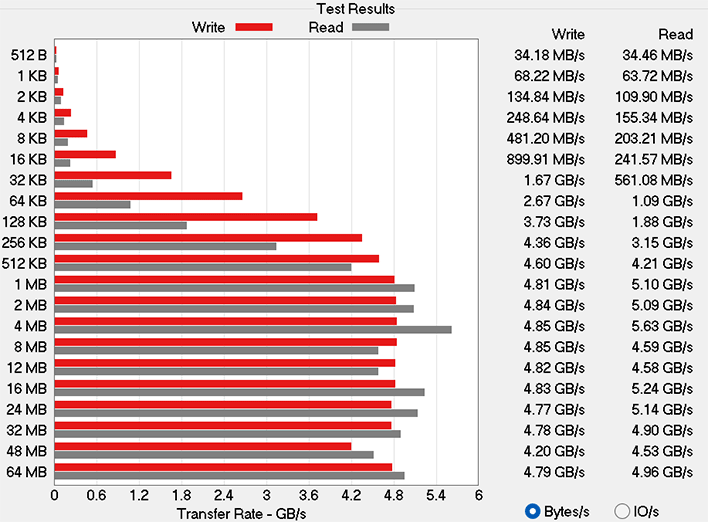
The 1TB Kioxia PCIe Gen 4 SSD in the Dell Pro 14 Premium delivers exactly the kind of snappy performance you’d expect from a modern Gen 4 drive, though we have seen faster in this class of machine. In ATTO, sequential read speeds top out at around 5.0 GB/s, while write performance settles around 4.8 GB/s. That puts this Dell laptop comfortably in the premium tier for ultraportable-class machines.
Speedometer 3.0 Browser Benchmark
We use BrowserBench.org's Speedometer test to take a holistic look at web application performance. This test automatically loads and runs a variety of sample web apps using the most popular web development frameworks around, including React, Angular, Ember.js, and even simple JavaScript. This test is an example of how systems cope with real-world, modern web apps. All tests were performed using the latest version of Chrome.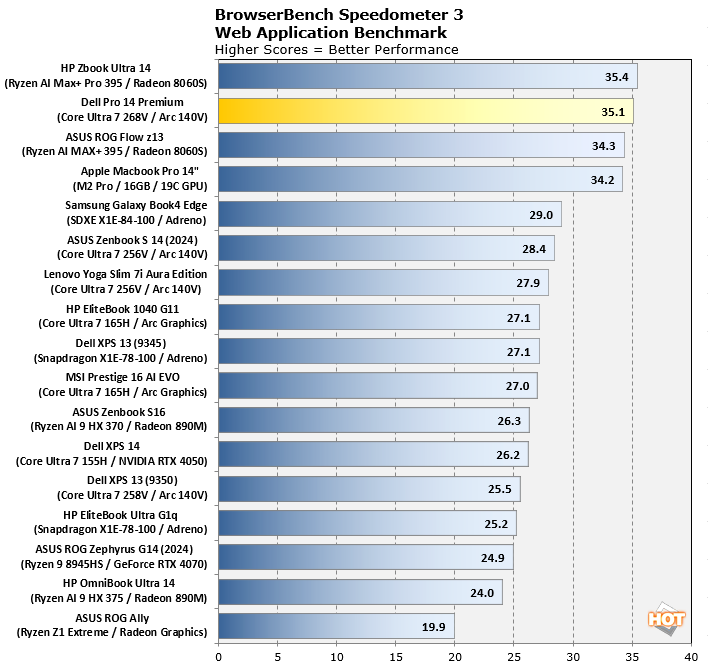
In Speedometer 3.0, the Dell Pro 14 Premium tallied a score of 35.1, which puts it ahead of many prior-gen Intel Core Ultra systems and way ahead of Snapdragon X Elite-powered rivals. In practical terms, the Pro 14 feels snappy for browser-heavy workloads—tab juggling, collaboration apps, and modern web apps never bog it down.
MAXON Cinebench 2024 3D Rendering Benchmark
Next up is the latest-generation 3D rendering benchmark from Maxon, based on the Cinema 4D rendering engine. It's a purely CPU-based test that doesn't make use of the graphics processor or NPU, and it scales very well with additional CPU cores. We ran both single- and multi-threaded tests on all of the machines in the charts.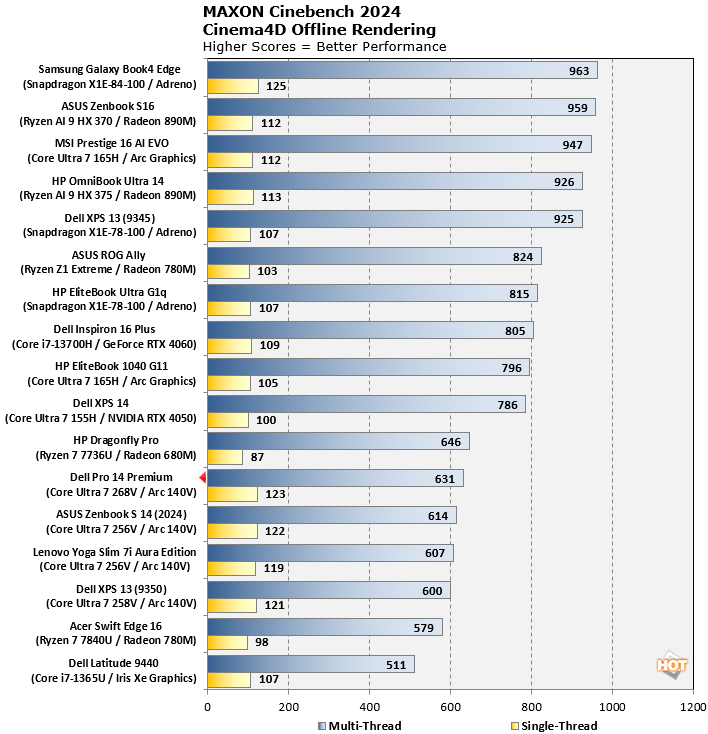
With a single-thread score of 123 and multi-thread score of 631, the Dell Pro 14 Premium shows decent gains from Intel’s Ultra 7 268V CPU over other Lunar Lake siblings here. It’s not a mobile workstation by any stretch, but for burst rendering, light 3D modeling, or content creation in apps like Blender or Premiere, it’s more than capable. Single-thread scores in particular keep it competitive in snappy, latency-sensitive workloads.
UL PCMark 10 Applications Benchmark
The PCMark 10 Applications benchmark measures performance in the Microsoft Office suite, as well as in the Edge browser, offering native instruction set-compatible versions of the apps for optimal performance across a wide variety of workloads in tools office workers, students and home users utilize every day. The following results should show a view of performance with a best foot forward from all systems tested.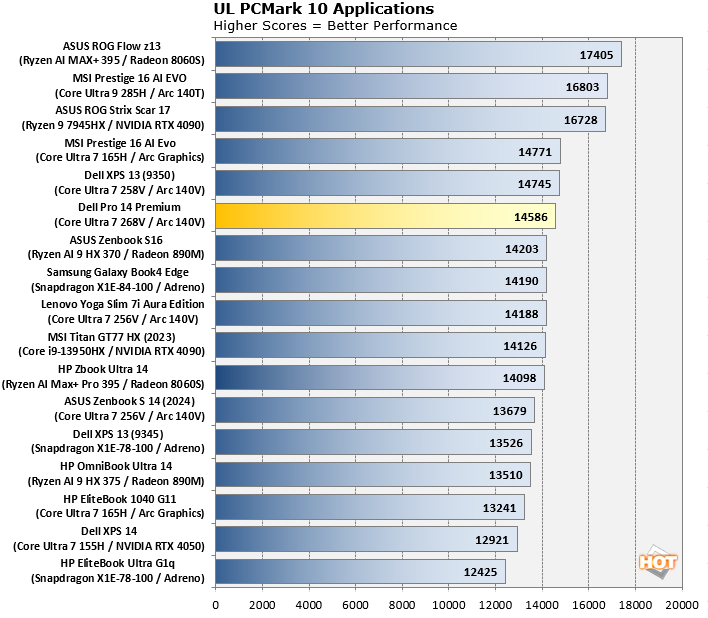
The Pro 14 Premium turned in a PCMark 10 Applications score of 14,586, a relatively strong showing that translates to quick spins through office-centric tasks. Individual app metrics underline this: Word at 9,028, Excel at 22,773, PowerPoint at 13,955, and Edge browser workloads at 15,779. For the target audience—professionals living in Microsoft 365, conferencing, and browsers—this machine checks all the boxes with headroom to spare.
UL Procyon AI Computer Vision Benchmark
The idea of "edge AI", or running AI workloads natively on your local devices, instead of in the cloud, is only just emerging on mainstream PCs. As such, benchmarks for these workloads aren't exactly prolific. Fortunately, UL has already built a few into its Procyon benchmark suite. The following is a look at how a few machines do in this benchmark suite's AI Computer Vision benchmark, which exercises the test subject's ability to handle machine vision workloads, which you'll find in everyday tasks like webcam background blur, subject tracking, eye gaze correction and other effects, for example.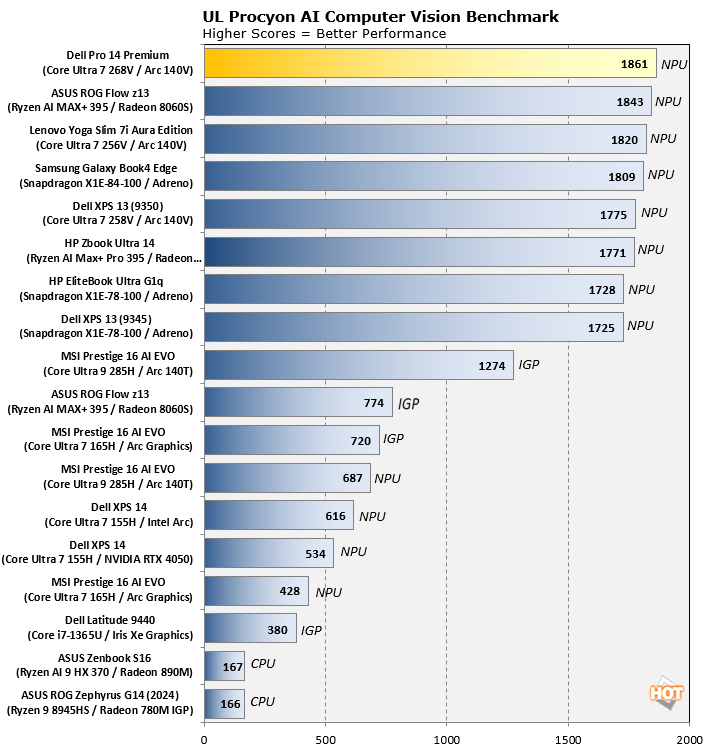
On Procyon’s AI computer vision workload, the Pro 14 Premium posted a score of 34,662. That’s in line with expectations for Intel’s NPU on board Lunar Lake, and with the added benefit of Intel's continued work on its NPU driver adding a touch more performance. It won’t outpace discrete -class GPUs in raw throughput, but it shows that Dell’s ultraportable can still accelerate AI-assisted tasks like imaging tricks for collaboration apps and on-device inferencing in Windows Copilot+ workflows.
UL 3DMark Gaming Benchmarks
3DMark has a wide variety of graphics and gaming related tests available. In this next test, we chose to run 3DMark Night Raid, a modern DirectX 12 test specifically for mobile platforms with integrated graphics, as well as the more-demanding, cross-platform Wild Life Extreme benchmark which utilizes more modern rendering APIs.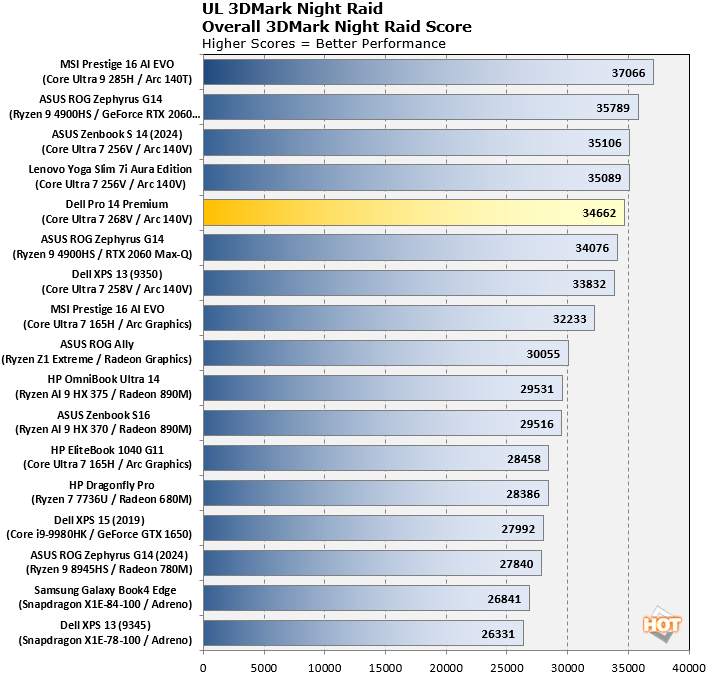
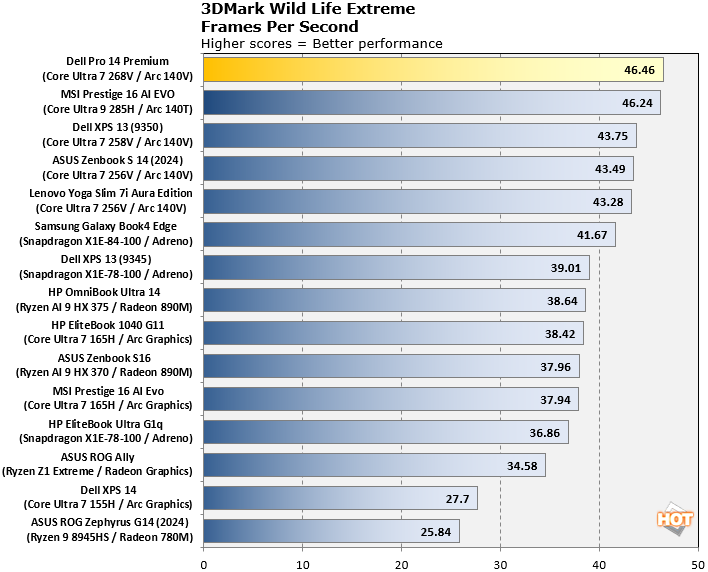
3DMark tells us where the Arc 140V slots into the graphics hierarchy. In Night Raid, the system posted a score of 34,662, while in Wild Life Extreme it pushed just north of 46 FPS for a total score of 5,200. These numbers underscore that light gaming is viable, but expectations should be tempered—think eSports titles and mainstream games at reduced settings, not maxed-out modern blockbusters.
F1 22 And 24 Formula 1 Racing Game Benchmark
Racing simulator F1 2024 is a DirectX 12 game title that is surprisingly sensitive to certain system configurations, so we enjoy using it as a test because it can really tease out some performance characteristics. We tested the game in its High graphics preset, with upscaling disabled, and at 1080p resolution.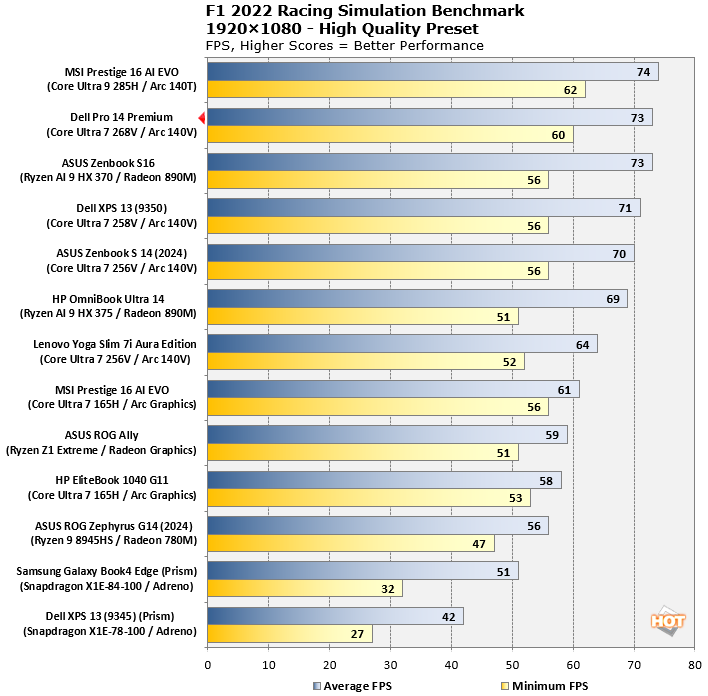
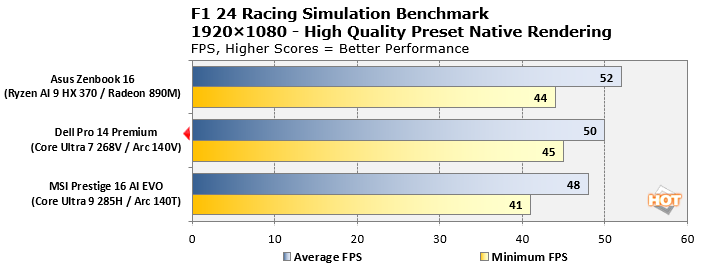
On the track, the Dell Pro 14 Premium acquits itself better than you might expect from integrated graphics. In F1 22, it averaged 73 FPS with 60 FPS mins, while in the newer F1 24 benchmark it managed 50 FPS on average (minimum 45). That’s perfectly playable, especially at 1080p with modest settings. It shows that Intel’s latest Arc iGPU isn’t just for spreadsheets—it can hold its own in casual gaming sessions.