



NVIDIA DLSS 5 Neural Rendering Tested: Incredible Photorealism, Performance Explored


This report doesn't spend much time talking about what DLSS 5 Neural Rendering (NR) is or how it works. If you want that information, head over to our DLSS 5 launch coverage where we go over exactly that. However, as a quick setup, DLSS 5 NR uses a specialized AI model to apply generative post-processing to video games in real time. The specific model that NVIDIA has trained and deployed comes in three variants at this time, but all are designed to produce better photorealism in games. Users don't pick which model to use in-game, rather the developer selects its preferred version along with many other configurable controls for the technology.
Again, we went over all that previously. Today, let's talk about DLSS Neural Rendering, what it is and what it isn't, how it performs, how it looks, and what to make of all of this.
What DLSS 5 Neural Rendering Actually Does And Why You’re Probably Misunderstanding It
DLSS 5 Neural Rendering can be integrated into a game engine by developers using specialized masks to tell the model that it should treat various objects in the scene differently, or ignore them altogether. This is a fact.
Don't let this "game engine integration" confuse you, though. DLSS NR is fundamentally and functionally, a post-processing filter. It takes whatever data from the game engine that the developer configures it to have, feeds it through an AI model, and what you see is the output from that AI model. The model in question is a pixel-space per-frame diffuser, which is a fancy way of saying it's an image generator, somewhat like Stable Diffusion or FLUX. The main difference is that the primary "prompt", instead of being text, is the game engine output.
In this sense, it is somewhat like the universal post-processing mod ReShade. If you remember SweetFX, ReShade is the successor project to that classic tool. ReShade allows you to insert shader programs into game renderers. It supports "game engine integration" in a way that it can read depth buffers from the game and also perform shader dumping and real-time replacement. Another popular function that ReShade can offer is the ability to alter tonemapping and color grading.

There are several aspects to how DLSS 5 Neural Rendering affects the scene, and two of the most prominent are the way it affects the color tone and grading of the scene and the extra shadow detail that it provides. As it happens, both of these are common ReShade effects, and you can get about 70% of the way to DLSS 5 Neural Rendering (in terms of subjective graphical fidelity) by using existing ReShade shaders. Doing so also has less of a performance impact.
However, that last 30% is the kicker. You see, DLSS 5, with its AI-powered image processing, is capable of doing things that no extant ReShade shader could possibly ever do. It alters the image to give the appearance of drastically more detailed light simulation, including advanced subsurface scattering, realistic-looking light transmission through foliage and hair, and very impressive contact shadowing and shadow falloff. These effects are very hard if not impossible to convincingly fake with conventional post-processing shaders.

You'll note there that I said "to give the appearance of." Remember, this is a post-processing effect. It is not actually adding these things to the scene. There is no additional simulation going on; this isn't a rendering technique like path tracing. As such, NVIDIA's "Neural Rendering" term is somewhat of a misnomer in my opinion, because this isn't really 'rendering' in the 3D graphics sense--the AI model is essentially painting in details on each frame based on what it thinks reality looks like. With that in mind, there is technically a risk of it converging every game that uses it to a similar sort of photorealism, but we can't actually say that this is a problem as there's only one game officially released using it so far and game developers are likely to tune the technology differently in their respective titles. Developers retain control of which model is used and how intensely effects are applied.
DLSS 5 Neural Rendering Looks Better And More Stable Than You Might Expect
Detractors of DLSS 5 and AI haters in general have been spreading a lot of FUD about this tech. Having used it unguided and unsupervised for several hours now, I'm prepared to dispel some pretty pernicious myths regarding DLSS 5 Neural Rendering.
For starters, there are none of the telltale signs of AI generation here, and I mean none that are related to DLSS 5. There is no wobbling or warping of faces or objects. There is no corruption of text or design elements like the UI and HUD. There are no strange artifacts, like 'holes' in the rendering, or unexplainable lights, at least in this game. I've admittedly only had a few hours to mess with the technology, but so far it has been essentially flawless in terms of its quality.

That extends to character consistency. When you look at Cade Cunningham, he looks like Cade Cunningham, every single time. I won't tell you that every single pixel on his face remains exactly the same, but the model is notably consistent from frame to frame, or across camera angles or scenes. In fact, it's impressively stable even under rapid camera motion. NVIDIA claims that the model is actually deterministic, which doesn't really jibe with my understanding of neural networks, but that is the claim, and it does seem to hold up in the real world with this game well.

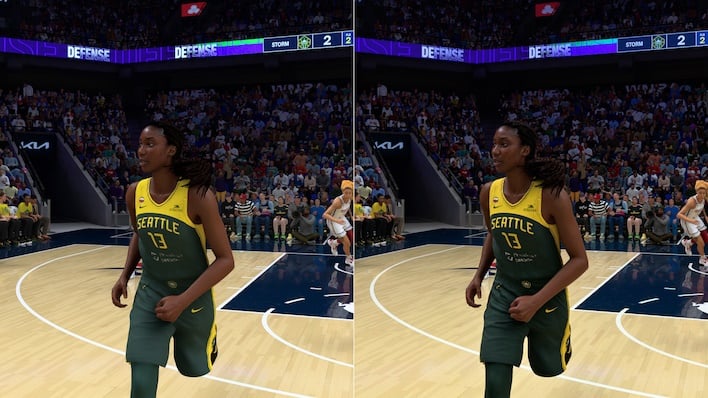
In stills, close-ups, and zoom shots, DLSS 5 can look incredible. Some of the moment to moment scenes in NBA 2K27, when the virtual camera is zooming close on players or coaches between quarters, for example, really do get shockingly close to photographic. This implementation of DLSS 5 appears to be relatively modest, too, compared both to NVIDIA's earlier demos with Resident Evil 9 as well as many examples of people hacking the leaked version into other games over this past week or so.
However, in normal gameplay in NBA 2K27, it can become pretty subtle. Because your camera in NBA 2K27 is generally quite zoomed out during gameplay, the subtle details that DLSS 5 NR adds to characters aren't always clearly visible, and so the only notable changes are to the tonemapping and some differences in shadows, particularly contact shadows. During testing, I was able to use a hotkey to toggle the effect in real time, and sometimes it was tough to tell if it actually toggled on or off. In fact, it was often easier to tell by observing the frame rate and motion smoothness than the image quality.
Neural Rendering's Performance Hit Is Steep, But Not Prohibitive
Toggling DLSS 5 on and off has an immediately visible effect on the game's performance, even when you're using Dynamic Multi-Frame Generation to smooth things out. Rendered frames and generated frames look pretty similar, but they are not the same to the game engine, and any gamer will probably be able to see the difference if they scrutinize the imagery. That's because the actual performance effect of toggling DLSS 5 is stark. Let's check out some benchmarks:Almost all performance data to this point for DLSS 5 has been recorded using the GeForce RTX 5090, which has enourmous tensor throughput. I didn't have a GeForce RTX 5090 on hand, so I used two different systems for testing. One was a test bench with a Ryzen 9 9900X processor and a GeForce RTX 5070 Ti graphics card, and the other was the Alienware 18 Area-51 with a GeForce RTX 5090 Laptop GPU inside.
Below you'll find two results from the laptop and four results from the desktop. These frame rate results were generated by carefully verifying the game settings, restarting the game, and then capturing an entire quarter of an NBA game with CapFrameX using the listed settings.
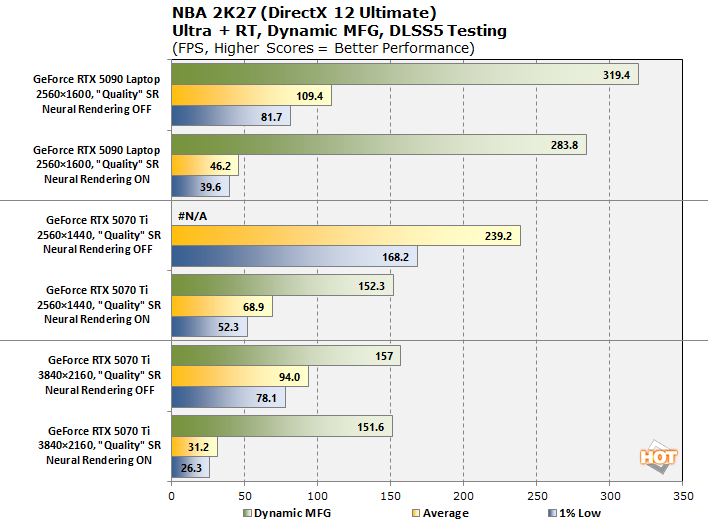
As you see, the chart includes both game frame rates and output frame rates as multiplied by DLSS Dynamic Frame Generation. On the GeForce RTX 5070 Ti system, it has a 4K display that refreshes at 160 Hz and had G-SYNC enabled, so the Dynamic MFG algorithm was attempting to get as close as possible to the display refresh rate without exceeding it to preserve the benefits of G-SYNC (thus the relatively low dynamic MFG frame rates). Meanwhile, the laptop did not have G-SYNC enabled (due to its Optimus architecture) and so with vertical sync off as NVIDIA recommended, MFG was free to crank the frame rate as high as it would go.
There are a lot of takeaways from this performance data. First and foremost is that the Alienware laptop with the mobile version of the GeForce RTX 5090 can't really use DLSS 5 Neural Rendering at its native QHD+ resolution. You might suggest to lower DLSS to "Performance" to help out, but that does almost nothing for the frame rate. The 175W mobile GPU is bottlenecked by its power limit and the performance limiter is the DLSS 5 Neural Rendering processing itself.

Even setting DLSS to 'Ultra Performance' didn't help more than a few FPS in my testing. You're going to have to drop the output resolution, because, just like any post-processing effect, the final output resolution is what affects DLSS 5 Neural Rendering performance. It looks plenty smooth with Dynamic MFG cranking the frame rate to 284 FPS, but it does not always feel great in actual gameplay because it was often running below 60 FPS. Remember, the game engine has no knowledge of the MFG frame rate.
That 'performance is based on the output resolution' quality is exactly why the more powerful GeForce RTX 5070 Ti desktop card, with its 300W power limit, struggles in 4K UHD with DLSS 5 Neural Rendering enabled. With a 1% low frame rate under 30 FPS, the Dynamic MFG is having to crank up all the way to 6x at times, and this does produce brief but noticeable artifacts, particularly whenever UI elements are sliding around the screen. With DLSS 5 NR off, the game runs beautifully in 4K "Quality" on the GeForce RTX 5070 Ti.

NVIDIA recommends a maximum resolution of 2560×1440 for this GPU, and it's easy to see why. The RTX 5070 Ti "only" has 70 shader modules (versus 82 of the RTX 5090 Laptop) and it doesn't quite have the tensor throughput to handle doing Neural Rendering at 4K. At 2560×1440 with DLSS set to 'Quality', we see a much more reasonable performance level, with an average game framerate of 68.9 FPS and a 1% low frame rate of 52.3 FPS. Dynamic MFG takes this up to 152.3 FPS; this is the measured average of MFG frames, which is why it doesn't exactly line up with one of the scalars.
This is a perfectly acceptable way to play the game, but look at what happens when we turn Neural Rendering off. Dynamic MFG disables itself because the 1% Low FPS of the game skyrockets all the way to 168.2 FPS. The average is nearly 240 FPS, which seemed to be some kind of cap for the actual game framerate built into the game, as it did indeed stick at 240 FPS most of the time when running this way.
DLSS 5 NR has a significant performance cost, and you can reach high frame rates through frame generation, but even NVIDIA recommends getting to at least 50-60 FPS before using MFG. You're likely going to have to lower your resolution from what you're accustomed to if you want to make use of this tech in the latest, most demanding games, which brings me to the next section...
A Calculated Trade: Image Quality Is More Than One Axis
What does "image quality" mean? In 3D rendering, it can refer to the clarity of the rendered image, most often expressed in terms of spatial resolution. Alternatively, it can refer to the quality of the rendered image, in terms of visual fidelity. This is enhanced by things like improved lighting detail, higher-quality textures, increased polygon counts, and more advanced rendering features like path tracing.Make no mistake, DLSS 5 NR can absolutely ramp up the image quality of a scene and make the output looks more photoreal. However, it may also detract from the image quality of a scene by forcing you to lower the resolution. Playing in 2560×1440 with DLSS upscaling on a 4K monitor resulted in some imprecise, fuzzy geometry edges as well as visible geometry aliasing along certain surfaces. You can see it in this image:

Maybe I'm more sensitive to these details than others. Maybe you don't mind playing games at 1080p (which is the initial render resolution of "Quality" DLSS with a QHD output resolution.) Maybe you don't mind less detail in distant objects, and less-readable player names on jerseys. For many though, it's a pretty valid complaint, particularly when a GPU like a GeForce RTX 5070 Ti is more than capable of running the game in 4K resolution, even with the details turned up. Here's that for a comparison:

Notice how you can read the player names of Towns, Shamet, and Hart even as they are standing halfway downcourt. Notice too the relative lack of aliasing on the lines on the court (although there's still some, thanks to the "Quality" DLSS that I'm using here. Remember, even DLSS "Quality" is a 45% render scale!) Of course, to attain this higher render resolution, you have to give up the lush details of DLSS 5 Neural Rendering.

The irony of this necessary decrease to render resolution is that a major part of DLSS 5 NR is the incredible level of detail that it adds to surfaces, including skin, fabrics, natural materials like stone and wood, and even metals and glass. However, without sufficient render resolution, you can't always make out these details unless they're very close to the camera. Often, in most video games, the camera is pretty far from the relevant objects in the scene. Few objects in a video game take up more than a small percentage of the screen space during gameplay and as such, in a game like NBA 2K27, you just don't get to appreciate those details all of the time, which diminishes the DLSS 5 NR value proposition.
There are other trade offs to consider, too. DLSS 5 NR is computationally intense. It puts a heavy workload on the GPU by maxing out the chip's tensor cores, which are normally nearly idle in games even if you're using other DLSS features. With DLSS 5 NR running on a ray-traced game, you are completely slamming every single part of the GPU die (Raster, CUDA, RT, Tensors) aside from the video block, and this generates a power load similar to running FurMark. While testing NBA 2K27 with DLSS 5 NR enabled, my GeForce RTX 5070 Ti was at its 300W power limit for the entire duration of the testing.
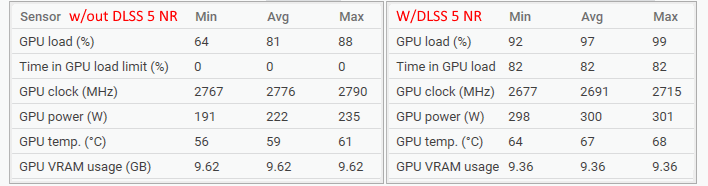
Things were more limited on the Alienware laptop. While temperatures remained relatively frosty in the low 70°C range, the GPU was slammed at its 175W power limit for most of the test and in fact managed brief excursions all the way up to 240W when it could "borrow" TDP from the CPU. The GeForce RTX 5090 Laptop is actually a bigger GPU than the RTX 5070 Ti desktop chip, and so the laptop power limit here is more stringent, limiting performance.
That means when using DLSS 5 Neural Rendering, you are working your GPU harder, drawing more power, creating more heat, and generating more fan noise. "Of course," you might say, "it's doing more work." That's true, but it's not a consideration with previous DLSS technologies that mostly decreased the workload on the GPU rather than increased it, so we want to make users aware.
NVIDIA DLSS 5 Is Impressive, But It's Still A Work In Progress
That's really the fundamental aspect of DLSS 5 Neural Rendering that seems to be giving so many people pause: it's not really like other previous NVIDIA DLSS technologies. Other DLSS tech generally works to make the game image better than the renderer could afford to produce. It attempts to be a smarter way to render the same scene, but it's still working toward the ground truth of the game's own output. DLSS 5 NR is different.You can argue that it's also a "smarter way to render," as doing the complex simulations for some of the visual effects that it imitates would likely be even heavier. But even NVIDIA's Edward Lee acknowledged that DLSS 5 NR isn't working from any ground truth. Instead, the model is applying its own knowledge from its training to the game's output.
With previous DLSS technologies, the game remains authoritative, but with DLSS 5, the model becomes authoritative to an extent, depending on what the developer configures, because it's sitting between the game and your eyeballs trying to determine what a scene should look like. That's a fundamental difference in concept and function, which is what many people are instinctively reacting to.
That might sound like I'm dismissive of DLSS 5 NR, but that's not correct. In fact, I think DLSS 5 NR is quite clever and also very impressive. Further, I think the original marketing message didn't land properly and that there's a lot of misinformation out there regarding what it is and what its capabilities are. Even still, the fact remains that it is a technology that, at least for now, requires trade-offs, and not everyone is going to appreciate that. Some people will simply continue to dismiss Neural Rendering out of hand, while others will look down at games that don't implement it as being woefully outdated.
I discussed in the beginning how DLSS 5 NR is a bit like a fancy ReShade preset, and indeed, ReShade was one tool that the enterprising modders used to wedge DLSS 5 NR into games it was never meant to be in. My personal experience with ReShade dates back to its creation and I feel that I speak for a lot of ReShade users when I say that I have rarely found the visual uplift with heavy ReShade presets to be worth the performance hit during gameplay. They're awesome for cool screenshots and photo modes, but I typically toggle the effects off when I'm actually playing to enjoy the higher framerate (and sometimes, cleaner visuals.)

That sums up how I think about DLSS 5 NR at this point in time, too. For my personal preferences, the way I prefer to play games and the way I prefer games to look, I think the performance penalty is a tough sell currently. I want to make it clear that this is my opinion, though, and I doubt most will share it. I think a lot of people are going to load up DLSS 5 NR games in the coming months and be absolutely blown away by the awesome photorealistic details it adds to game graphics.
If you try it out for yourself and find that you prefer the nearly photographic visuals that DLSS 5 NR can enable over the higher frame rates and resolutions you could achieve without it, I absolutely get it and won't fault you in the least. DLSS 5 Neural Rendering is extremely cool technology and it's obviously just the first step in what may well be a new rendering paradigm as NVIDIA positions it to be. In fact, I'd put a solid bet on the idea that DLSS 5 may be a sneak peek at the capabilities of NVIDIA's next-generation graphics hardware, which is likely to ramp up tensor performance in a big way while traditional rendering gets sidelined.
It's also likely that NVIDIA will continue to optimize DLSS 5 for current chips and even some of the company's previous gen hardware. NVIDIA informed us that the feature is coming to Ada Lovelace GPUs "once RTX 50 Series performance is more fully tuned." That will be quite a thing to see, and if the performance trade-off becomes less severe, we could be in for a visually stunning next generation of games. In its current form, though, mine is a conditional recommendation, and whether or not you should use DLSS 5 is honestly going to come down to what hardware you have, how sensitive you are to rendering resolution, and your personal enjoyment of near-photorealistic graphics.





