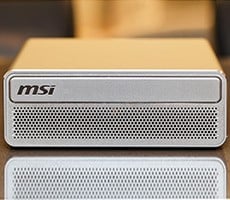


MSI EdgeMesa N AI+ Review: NVIDIA RTX Spark Power In A Pint-Sized PC


There are four feet on the bottom of the MSI EdgeMesa N AI+, along with some additional ventilation and a myriad of decals, branding, and certification info. Tucked away in the center of the four feet are screws that hold the chassis’ shell in place. Remove those four screws and the shell slides right off.

The MSI EdgeMesa N AI+’s internal M.2 2242 SSD is mounted on the bottom, with a thick thermal pad attached. The thermal pad is covered with a clear plastic protector, however, so it doesn’t get snagged and crumpled up when sliding the shell on or off. As such, it doesn’t make direct contact with any metal or external surface, so its effectiveness is questionable. The thermal pad certainly adds some mass to the drive, which will slow any potential throttling somewhat, but it’s not used to actually radiate heat outside of the system.

From the top, the MSI EdgeMesa N AI+’s dual blower fans and vapor chamber / heatsink assembly are visible. At the far left, installed vertically, is the system’s CMOS battery, and the RTX Spark chip is obviously underneath the vapor chamber, closest to the IO ports (top of the picture). With this setup, the fans rest underneath the solid portion of the chassis’ shell, at the front of the system. They pull in air from the bottom and front, and expel it out of the back. This configuration helps muffle any fan noise and it’s so effective, that the MSI EdgeMesa N AI+ doesn’t even register on our sound meter. If you put your ear to the MSI EdgeMesa N AI+, a dull whir from the fans is audible, but even under load for hours, the system remains super quiet. For reference, I use an actively-cooled Sabrent USB M.2 SSD enclosure for an external SSD that holds a Steam library and benchmark installers, and that enclosure, while quiet, is more audible than the MSI EdgeMesa N AI+. If you’re worried adding a dense, compact system like this to you setup is going to add significant noise, don’t be.
MSI EdgeMesa N AI+ Frequencies And Thermals


To document actual SoC temperatures, we have a bunch of hardware health data captured during some graphics and AI benchmarks.
During the 3DMark Steel Nomad Lite and Speed Way tests, GPU temperatures peaked at just under 80°C, with sustained 100% loads and a GPU clock right around 2.5GHz.


With Procyon AI’s machine vision 2.0 and text generation LLM tests, we saw temperatures in the 50°C–70°C range, though they did briefly break into the low 80s.
It is safe to operate the RTX Spark at temperatures much higher than this; the MSI EdgeMesa N AI+’s cooling hardware is doing a good job keeping temperatures in check. Operating this system 24/7 should be a non-issue, assuming there’s adequate ventilation around the machine to keep fresh air circulating.
Total System Power Consumption Tests
Throughout all of our benchmarking and testing, we also monitored how much power the MSI EdgeMesa N AI+ was consuming with a power meter connected at the electrical outlet. Our goal was to give you an idea as to how much power was used while idling at the Windows desktop and while the system was under some taxing CPU and GPU workloads that lit up multiple parts of the chip.Keep in mind, this is total system power consumption being measured at the wall and not the individual power being drawn by the CPUs alone.
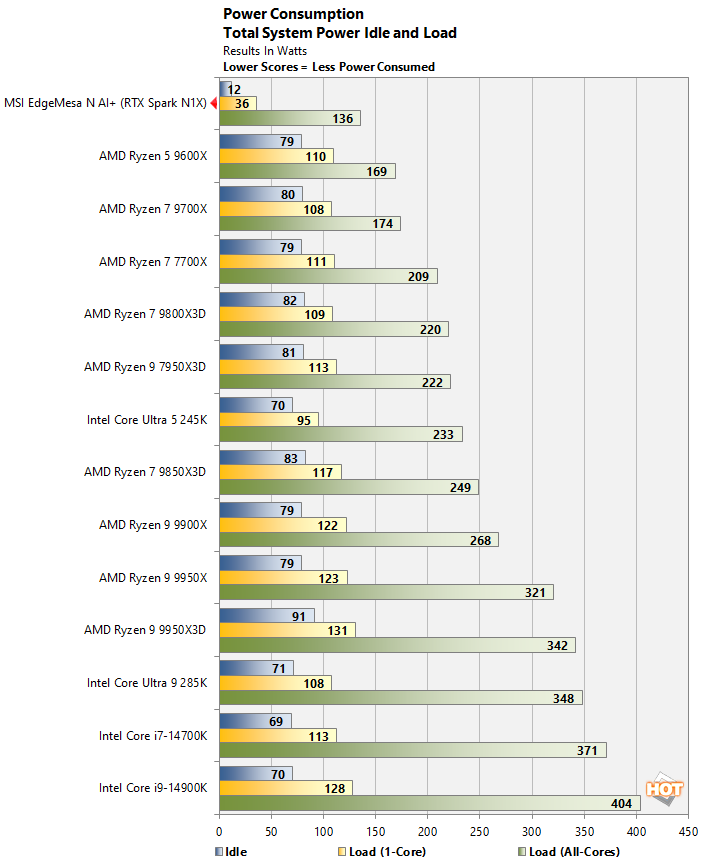
This isn’t exactly an apples-to-apples power comparison. These desktop systems are much larger, with many more fans and higher TDPs, and they were paired with a discrete GeForce RTX 5090, but we figured you’d find it interesting, nonetheless. As you can see, the MSI EdgeMesa N AI+ consumes the least amount of power by far, especially when idling or under a light load (this data was captured when running Cinebench 26 to isolate the CPU cores).
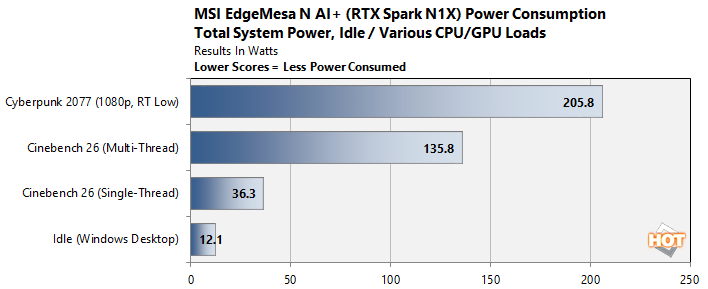
If we add a gaming workload into the mix, which hits both the CPU and GPU, and is more demanding on system memory and the SSD, power consumption on the MSI EdgeMesa N AI+ peaks in the 205+ watt range. The TDP of the RTX Spark itself is 140 watts; chalk up the rest to the memory, storage, external peripherals, and other components on the motherboard and in the system.
MSI EdgeMesa N AI+ With NVIDIA RTX Spark: Conclusions
To quickly summarize, in the conclusion of our initial coverage of the first RTX Spark laptops to hit the lab, we said the RTX Spark N1X is a powerful SoC that offers competitive multi-threaded CPU performance versus today’s top mobile platforms, with class-leading iGPU performance and currently unmatched AI capabilities, not only because of the powerful hardware on tap and unified memory architecture, but because NVIDIA’s AI software stack is so pervasive and mature. That assessment rings true again here, with the MSI EdgeMesa N AI+. This machine is powered by the same platform but doesn’t have to contend with the constraints associated with optimizing battery power. As such, performance is a few percentage points higher and the chip can run cooler under longer, sustained loads.In comparison to a similar small form factor system packing AMD’s Strix Halo SoC, the MSI EdgeMesa N AI+ and its RTX Spark are clear winners. Save for a single graphics benchmark, the MSI EdgeMesa N AI+ finished well ahead, and in the AI benchmarks, it was no contest—the MSI EdgeMesa N AI+ came out on top across the board. It would require a higher-power CPU and discrete GPU to overtake the RTX Spark’s performance as configured in the MSI EdgeMesa N AI+, but that would mean sacrificing the ability to run large models. The RTX Spark’s unified memory architecture allows it to keep larger models loaded than even an RTX 5090, provided the system has 64GB or more of memory.

MSI’s take on the RTX Spark deserves some praise as well. With the exception of low 4K random transfers with the included SSD, the MSI EdgeMesa N AI+ is a premium product through and through. The system runs cool and quiet, it’s built from premium materials, it's power efficient, and it looks good too. The premium nature of the system is reflected in its pricing, though. The MSI EdgeMesa N AI+ starts at $4,399 for a 64GB configuration and the 128GB version has an MSRP of $7,499. That’s nearly double the price of a 128GB AMD Ryzen AI Halo (with a 2TB SSD), but it’s only a few hundred more than a Mac Studio with M5 Max, 128GB of RAM, and a 4TB SSD. Whether or not that price is justifiable will depend on your use case, but considering how fast all of these systems are being gobbled up, we suspect the MSI EdgeMesa N AI+ is going to be a hit. Have you seen how long the wait is for top-end Mac Studios at the moment?
In the end, the MSI EdgeMesa N AI+ was somewhat of a known quantity coming into this article, having evaluated multiple GB10 systems and RTX Spark-based notebooks at this point. Still, we can’t help but be impressed. NVIDIA’s first SoC for Windows desktops and laptops is competitive in general computing workloads and leads in the AI workloads it was designed to run. MSI also did a great job with the EdgeMesa N AI+ build quality and design language. The only real drawback to the hardware is its lack of external I/O, but that can be resolved with a cheap hub. If you are considering an RTX Spark for your environment, the MSI EdgeMesa N AI+ is a must-see and worthy of consideration.