HP ZGX Nano G1n Review: GB10 Mini PC Runs Local Qwen Coding Agent


|
HP ZGX Nano G1n AI Workstation - $5749 (As of 10/1)
The HP ZGX Nano G1n is an impressive GB10 Blackwell SFF AI workstation with excellent cooling, and some high-profile AI models were purpose-built to use it to full effect. |
|||

|

|
||
We have been exploring hands-on performance of NVIDIA's Grace Blackwell GB10 Superchip for about a year now, ever since the launch of the DGX Spark. But here's the thing about local AI in 2026: the hardware just keeps getting better because AI models for platforms like the GB10 have seen a steady stream of optimization and improvement. Today, we're looking at another GB10 system, HP's distinctive ZGX Nano G1n AI Station. There are some unique twists with this hardware, even if the software or performance are similar to competitive GB10-based systems.
On top of that, this gives us an opportunity to examine the state of local AI in the fall of 2026.
HP ZGX Nano G1n AI Station Features And Specs
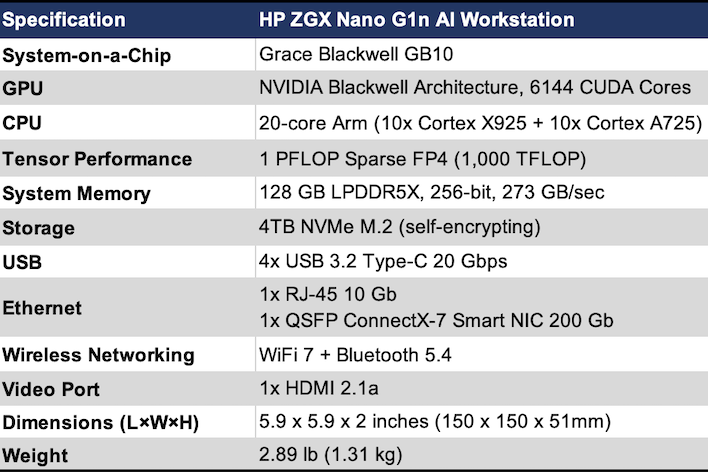
This system's specifications will look familiar to many of you reading. The ZGX Nano G1n is built around an NVIDIA Grace Blackwell chip with its 20 Arm cores, 6,144 CUDA cores for AI processing, and 128 GB of LPDDR5x offering an effective 273 GB per second of peak bandwidth. That's really no different from other GB10-based small form factor AI workstations. The same can be said for the 200 Gbps aggregate bandwidth across two QSFP ports driven by the integrated ConnectX7 NIC.

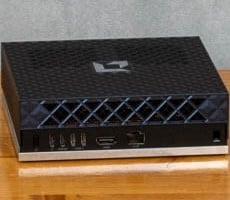
Around the back, we'll see a familiar port layout too. On the far left is the power button, then four USB-C ports. The left-most is reserved for the included AC adapter, while the others all supply USB 3.2 20 Gbps connecitions. You'll use one for a USB-C dock, no doubt, as there are no Type A ports for your keyboard or mouse. After that we have 10 Gbps Ethernet in an RJ-45 port, HDMI 2.1 for high-refresh 4K displays, and then the two QSFP ports used to connect multiple nodes together. The integrated ConnectX 7 NIC supports 200 Gbps in total, either over one connection or split over two. The best way to configure more than two of these systems is over a managed switch, but a pair of GB10 systems gets the best performance out of a single cable.
The software isn't that different, either. HP has customized it with branded wallpaper and a link to HP's own support site. But otherwise, you'd be hard-pressed to tell it apart from NVIDIA's vanilla DGX OS, which is based on Ubuntu 24.04. That's not a bad thing, though. DGX OS is a solid base from which to build CUDA-based AI applications and run large models in the huge (relative to discrete GPUs) 128 GB pool of memory. Using the same OS ensured that all of NVIDIA's playbooks for things like NCCL multi-node tests work just fine with other GB10 systems like the DGX Spark.
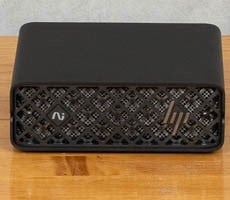
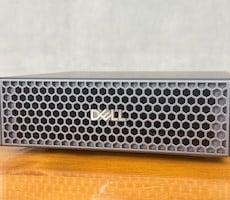
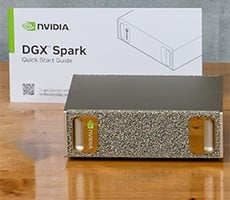
What makes the HP ZGX Nano interesting is the design. When we looked at the Dell Pro Max with GB10, we noted that the footprint was exactly the same as NVIDIA's own DGX Spark. HP's form factor isn't that much different. We get the feeling that these are made to slot into a mini rack almost interchangeably. However, the ZGX Nano G1n's front is much more open than the others, to the point where we can actually feel cool air being pulled into the system, and according to our laser thermometer, the exhaust under load is measurably cooler than the other systems.

I guess we might be doing this review out of order, but it's important to highlight what makes this system different from the others. ooking back at the Dell Pro Max with GB10 review, we saw that the metal enclosures were quite warm to the touch under load, hitting 115 degrees Fahrenheit, and outputting around 46 dBA. The DGX Spark was pretty similar, too. However, the HP ZGX Nano G1a is substantially cooler to the touch at just 98 degrees. However the fans are a little louder, but not annoyingly so.
HP ZGX Nano G1n AI Station Performance
Next up we're going to jump right into performance. At this point, the NVIDIA GB10 Superchip is a pretty known quantity, but we need some fresh comparisons. Over the last couple of months, a new crop of models has shipped. In the "new models from big names" category, we have Muse Glimmer from Meta, Nemotron 3.5 Lightning from NVIDIA, and Qwen3.8 from Alibaba. We're going to compare performance on this and a few other models to our most recent competitive entry, AMD's Ryzen AI Halo. The simplest setup for comparing performance is with Local AI Bench from yours truly. In this case, we're using the llama-bench and llama-batched-bench results for six models spanning from 26 to 120 billion parameters. We'll test some embedding and image generation tests, as well.
For the llama.cpp-based tests, we're using the latest 0.4.0 stable release from GGML's GitHub releases page with CUDA for the ZGX Nano G1n and ROCm for the Ryzen AI Halo. Remember our Ryzen AI Halo came with Windows 11, which we stuck with. That turned out to be to the Ryzen AI Halo's benefit since AMD has not yet updated its "Rex" Linux development platform with ROCm 10 just yet. The Windows version was easy to set up, and Windows is a day-one supported OS along with several other standard Linux distributions.
We would have liked to test vLLM. However, there's no vLLM for Windows. We could run it in WSL 2, but on other hardware that has always come with a slight but consistent performance penalty. Experimenting with other Linux distros on AMD's hardware is kind of out of scope for an NVIDIA GB10 system review. So that's why we're testing with llama.cpp right now. We will get back to vLLM later in this article, though.
At any rate, let's get to the benchmarks.
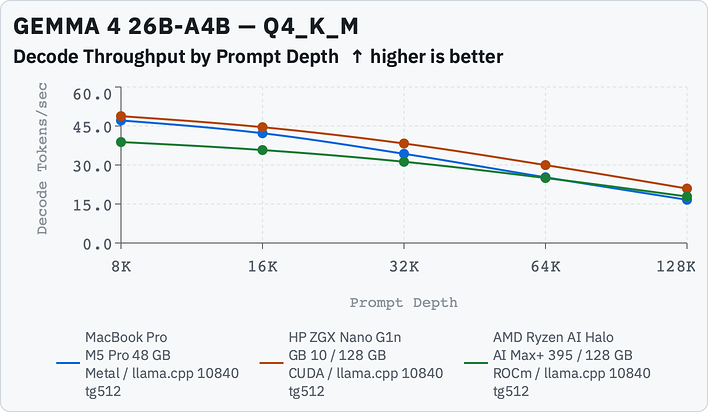
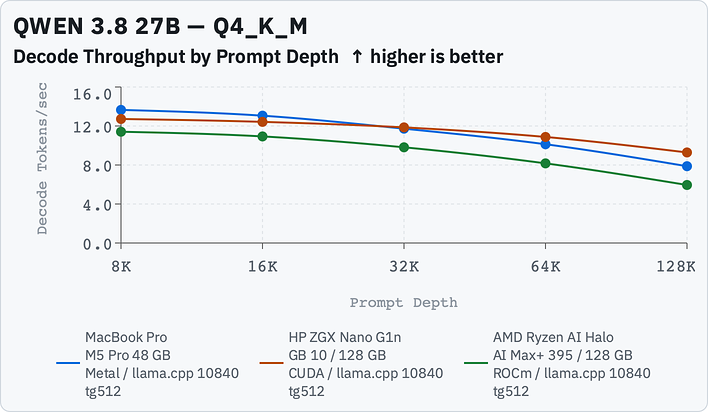
First we're looking at our medium-sized models in their Unsloth UD-Q4_K_M quantization form. On a non-unified memory architecture, both of these models really want 24 to 32 GB of VRAM, something that was easy to achieve on all three our test systems. Two things really stand out in these benchmarks: token generation isn't really all that different among AMD, Apple, and NVIDIA here, but prompt processing tells a very different story.
Token generation is light on math and relies more on iterating over all the parameters (or all of the active parameters on a Mixture-of-Experts model like Gemma 4) and NVIDIA wins by a few percentage points for the most part. That's because there's a 6% bandwidth advantage, where the ZGX Nano G1n has 273 GB/sec bandwidth vs. the Ryzen AI Halo's 256 GB/sec. The M5 Pro MacBook Pro should actually do better than it is with 300+ GB/sec, but the ZGX Nano G1n still beats it out. AMD is competitive here, and we expect the token generation advantage to dry up when the Ryzen AI Halo's Gorgon Halo version ships with faster memory with bandwidth that should match the GB10 system.
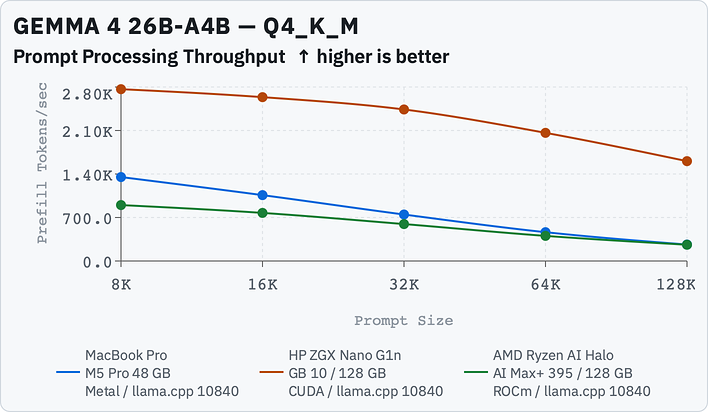
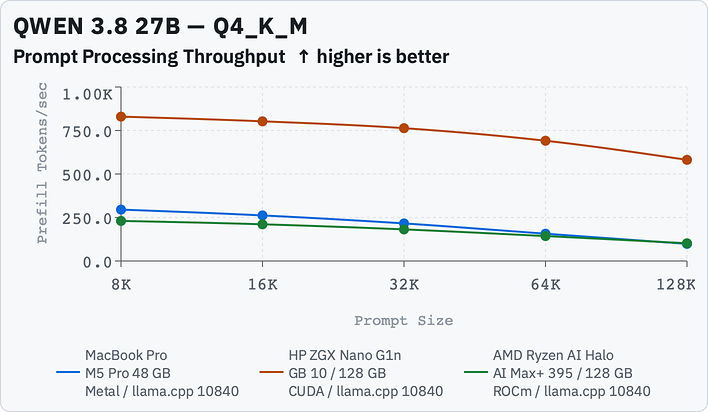
On the other hand, prompt processing relies heavily on the actual processing capabilities of the GPU. Tokenization has to turn words into tokens, which are just common sequences of letters, and then matrix multiplication runs layer by layer. This is where NVIDIA's more mature software stack and extremely capable AI-focused Blackwell architecture pulls ahead. Prompt processing drives time-to-first-token (TTFT). The larger the prompt, the longer it takes, but also, the fewer tokens that can be processed in a second drops. So that's why these charts aren't linear.
Also, these are uncached prompts being processed. Once a prompt has been through the processing stage, it's cached in memory in a key-value cache (KV cache) that's matched to the model's context length. In a chat scenario, the entire conversation history is passed back to the model along with the new prompt, but most of that is a cache hit and only what's new has to be computed, which is probably pretty short. So the values toward the left of the chart are generally what's in play. You don't really notice the difference between 200ms and 400ms in this scenario, so the NVIDIA system doesn't necessarily feel faster in responding.
However, in a coding agent scenario where the model has to hit multiple files and read in big blocks of code, which might be thousands or tens of thousands of tokens (no joke; just the Python scripts of Local AI Bench are 30,000+ lines) of uncached input. So that's why a 64k or 128k uncached input isn't unrealistic, and this is where the ZGX Nano G1n wins big-time.
Alright, that was long-winded but I feel like it's necessary to put everything into context. Let's move on to the large models.
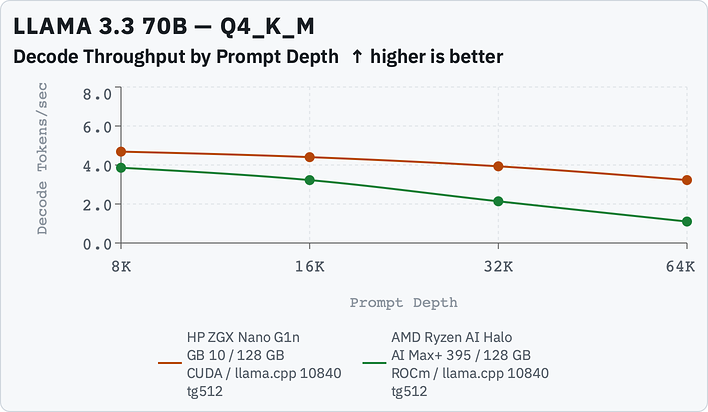
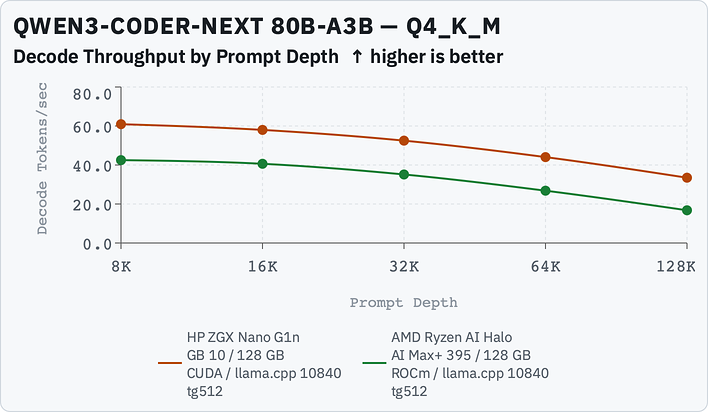
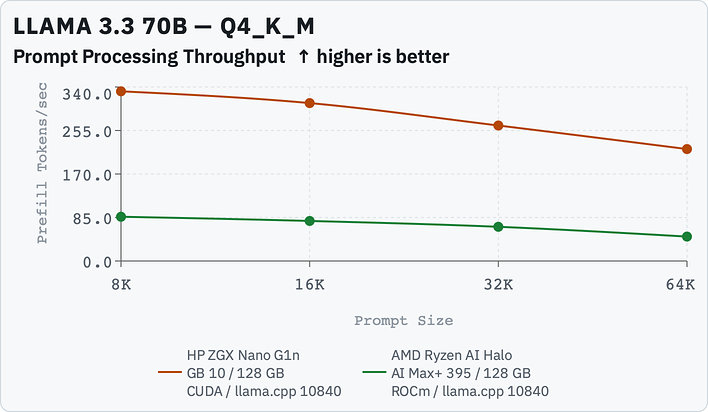
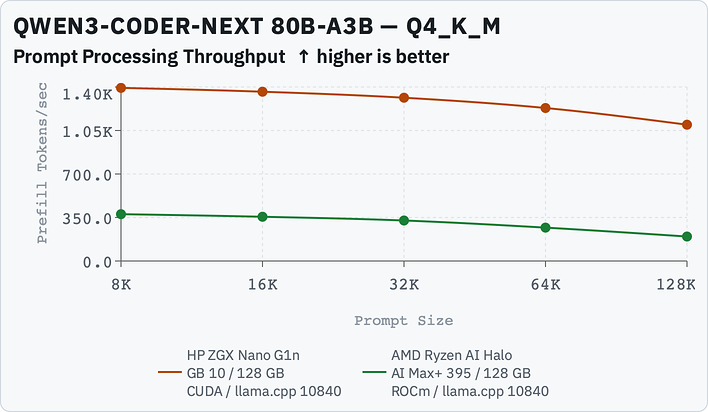
Here with the big models it's kind of more of the same. The ZGX Nano G1n again stomps the AMD competition in prompt processing, and has a small but measurable lead in token generation. The MacBook Pro M5 Pro dropped off the chart since our system "only" has 48 GB and the model needs a fair amount more than that.
What about documents? This is the domain of very small models that usually have around 1B parameters, and take less than 1GB in size. They take images, text, and audio as input and convert them to vectors that capture the underlying meaning. The vision component of many LLMs is an example of embedding at work, as is retrieval-augmented generation (RAG) web scraping pipelines. In this test, we're reading a 131kB text document (which is quite long, around 27,000 words) and ingesting chunks of approximately 70 words of data at a time. Each chunk is one paragraph of a document with over 700 paragraphs.
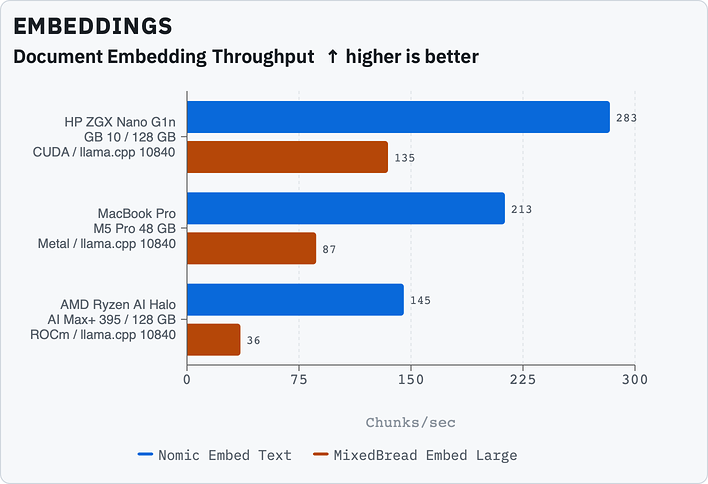
For document embedding, the ZGX Nano G1n again reigns supreme. While a single 131k document is huge, the "chunks" concept directly applies to reading code out of a project. Between prompt processing and embedding, the ZGX Nano G1n would make a far faster coding agent than the Ryzen AI Halo, even though generation isn't really that much faster. All of the reading and processing goes so much faster here.