



SCSKiller Tool Aims To Eliminate GPU Shader Stutters For Free


How does it do that? Well, easy: by pre-compiling them. Most games actually attempt to do this on launch these days; if you've played a recent PC game in the last few years, you've probably observed a lengthy pause on the first load that, if it doesn't outright say "Compiling shaders" likely says something like "preparing graphics" or "optimizing for your system". Shader compilation isn't merely an optimization, though; the shader code can't run without be compiled for your specific GPU and driver version. If you don't do it beforehand, you have to do it "just in time", and that's where the big stutters come from.

The problem is that apparently even many games which attempt to pre-compile their shaders miss a lot, resulting in a terrible, hitching experience. This could be because of shaders that were modified or replaced in updates, or it could simply be because the initial shader burn pass was incomplete. Whatever the case, SCSKiller claims it can reduce or eliminate these stutters by reading the shaders from the game files and compiling them before you even launch the game.
There are, unsurprisingly, a number of caveats here. For one thing, it's going to use some extra disk space and some extra memory while playing, as the big compiled shader cache has to be loaded into memory. For another thing, not every game is supported. In our brief examination of the app, about half of the games we had installed on one of our test benches were not compatible with the app, including big names like Counter-Strike 2 and Cyberpunk 2077. The former doesn't really need it, but the latter does for sure. Many games with restrictive anti-cheat aren't compatible with the app, and apps that heavily integrate NVIDIA's Streamline SDK also seem to be incompatible.

There's also the reality that compiling thousands and thousands of shaders can take a long time. On our test bench's AMD Ryzen 9 9900X, compiling a massive 12.5GB shader cache for Hogwarts Legacy took about 11 and a half minutes. That's not so bad; get up and take a break, make a sandwich, and get a drink and you're basically done. This is a pretty fast machine, though; the compile job scales with core count, so the Ryzen 9 9900X is fairly beefy here.
So after all that, does it actually help? The project's website claims big gains, including a drop from 9038 stutters in Star Wars: Jedi Survivor to just 11, a drop from 583 to 0 in Tiny Tina's Wonderlands, and massive 2.4-second stalls in Hogwarts Legacy reduced to nearly nothing. I happened to have Hogwarts Legacy installed on the test bench, so I dutifully cleared both the NVIDIA shader cache and the game's own Unreal Engine shader cache, launched the title, let it go through its own ~12 minute shader compile, and then benchmarked it on a 3 minute run from inside Hogwarts all the way to Hogsmeade.

After that, I exited the game, cleared caches again, and compiled the shaders using SCSKiller. This took about 11.5 minutes, compiled 234,778 shaders, and produced a cache of around 9GB. Then, I launched the game, which actually skipped the usual Compiling Shaders screen, but then hung badly with multiple tens-of-seconds stutters on the title screen, taking more than two minutes to actually continue. However, once I got in-game, it was fine.
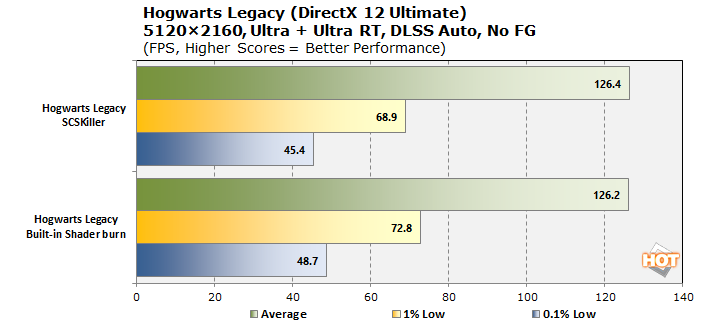
I say "fine" because the performance actually wasn't any better than without SCSKiller and in fact, the numerical values I captured with CapFrameX are actually slightly lower, but well within margin of error. The point being that nothing really changed in my brief testing.
Just as an extra point of reference, HardwareUnboxed tested the app too and found exactly identical results to my own in Hogwarts Legacy. However, the boys down under spent more time with the tool and tested a number of other games, seeing major frametime stability improvements in Tiny Tina's Wonderlands, Final Fantasy VII Rebirth, and Blood of the Dawnwalker, while other games, including Grounded and Silent Hill Townfall didn't really show any benefit. So SCSKiller absolutely can work, it just doesn't necessarily have good results in some titles, coincidentally including Hogwarts Legacy.
One problem with the concept of SCSKiller, and which the author readily acknowledges, is that not all game stutters are from shader compilation. Indeed, a huge portion of stutters actually come from data access (loading assets and saving progress), and this is particularly in the case with Hogwarts Legacy; if you don't have a baller CPU and a fast SSD, that game's going to be a bit of a stuttery mess no matter what.
Still, shader compilation does remain a problem in some games, particularly those without a pre-play shader burn, and SCSKiller can absolutely help with those. It supports NVIDIA and AMD graphics; no Intel support because the author doesn't have an Intel graphics chip available. If you're curious to see if it can help you, head over to the project's GitHub to download the latest version. It's under heavy active development for now, and unlike most recent open-source projects, it doesn't appear to make use of AI, so fret not.





