Intel Core Ultra X9 388H Review: Panther Lake Tests Strong


Measuring performance on AC power versus battery power (DC) is also an important metric, because it's obviously the way most people use their laptops, whether at home or on the road.
AC vs. DC Power: Battery Powered Benchmarks
In this next, short series of benchmarks, we compare the same systems tested previously, but with their AC power adapters unplugged. Laptop and notebook OEMs often throttle performance when on battery power to maximize battery life. Qualcomm has worked with its partners to ensure minimal performance differences when utilizing AC or DC power. Intel and AMD, however, haven't been as stringent, so performance can fluctuate quite a bit between the two modes based on how the system builder has tuned its power profile for a particular device.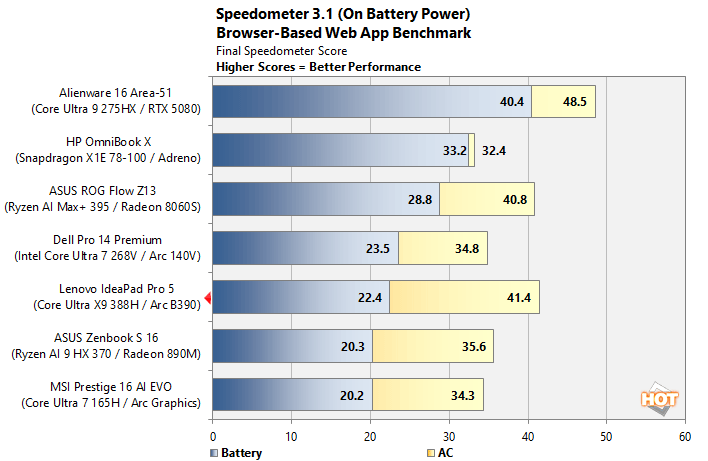
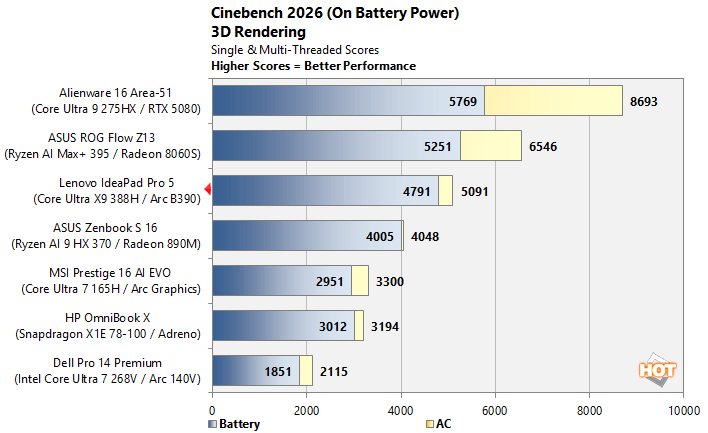
As you can see, with the light duty Speedometer browser-based benchmark, the Snapdragon powered HP system maintains virtually all of its performance, while the Intel and AMD platforms take a significant performance hit. Lenovo in particular scales performance back quite a bit on battery / DC power, to the point where the Core Ultra X9 388H drops from second to fifth place overall. With the more taxing multi-threaded Cinebench test, all of the mainstream systems have to throttle performance to manage thermals whether on AC or battery, so the deltas are much smaller -- it's only the higher powered Arrow Lake-H Alienware system that loses significant performance in that test.
Lenovo IdeaPad 5 Pro Core Ultra X9 388H-Powered Thermals And Acoustics
We're not going to pass any definitive judgement on the Lenovo IdeaPad 5 Pro's acoustics and thermals, because the system we tested isn't quite representative of a final, retail-ready product and is still being tuned before release. That said, we will give some details and perspective, based on our experience with this pre-production system.
The Underside Of The Lenovo IdeaPad 5 Pro With Panther Lake Has Plenty Of Venting
Throughout all of our testing, the Lenovo IdeaPad 5 Pro powered by the Core Ultra X9 388H remained relatively cool and quiet. After hours of benchmarking, the fans in the system did spin up to audible levels, measuring only 37-39dB on a sound level meter positioned about 1-2 feet away from the display, where a user’s ears would be when working with the system. That’s barely higher than the noise floor in the lab where we tested—we can’t imagine anyone being put off by the slight fan noise emitted from the Lenovo IdeaPad 5 Pro, assuming retail-ready system behave like our pre-production model.
Skin temps were also modest. There is significant venting on the underside of the system that allows its cooling fans to pull cool air in from the bottom and vent it out of the back of the back of the systems, through exhaust vents that run the entire length of the chassis, behind the lid hinge. The warmest part of the system is slightly left of center, on the edge closest to the display, where users are not likely to ever touch. Even then, it was barely warm after running through a 3DMark Stress Test; the keyboard, touchpad and wrist wrest area had no discernable warm spots.

CPU Temperatures And Frequencies During PCMark
As you can see from this hardware health data captured during a PCMark run, CPU temperatures can peak up around 90°C like most of today’s high-performance notebooks when under full load but average temperatures with more modest workloads remain much lower. You can also see the CPU peaking at over 5GHz, in-line with Intel's maximum 5.1GHz Performance core turbo frequency for the Core Ultra X9 388H.
Intel Core Ultra X9 388H-Powered Lenovo IdeaPad 5 Pro: Battery Life
Battery life is critically important for a business PC. Working on the go could mean long stretches away from outlets. The machine needs to last through hours of work and play, whether that means e-mails and time spent poring over spreadsheets or long runs of content consumption when binging on Netflix.Here we've calibrated all of the laptop displays to a fixed, similar brightness, in an effort to minimize that aspect of power draw, though lots of other variables come into play, like battery capacity, for example.
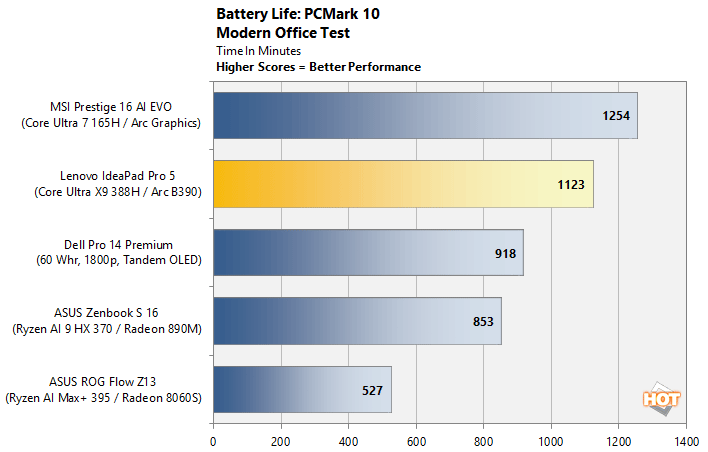
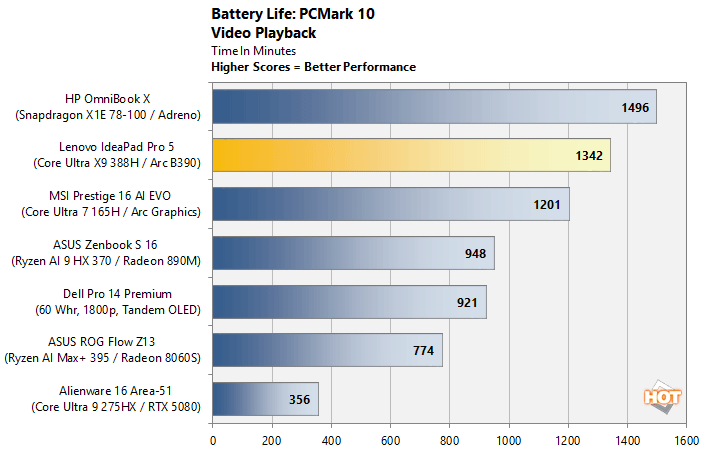
We ran two battery life tests, a video rundown benchmark and a "modern office" benchmark that rotates through web browsing, video conferencing, productivity work and idle time, to simulate a common corporate workload. Note, the Snapdragon-based system wouldn't run the modern office test properly, hence its omission from the chart. The Meteor Lake-based MSI system offered the best battery life in the modern office test, followed by the Core Ultra X9 388H-powered Lenovo system, which significantly outran the rest of the pack. In the video rundown test, the Lenovo system takes second place again offering nearly 23 hours of battery life, trailing only the Snapdragon X1-powered HP OmniBook X.
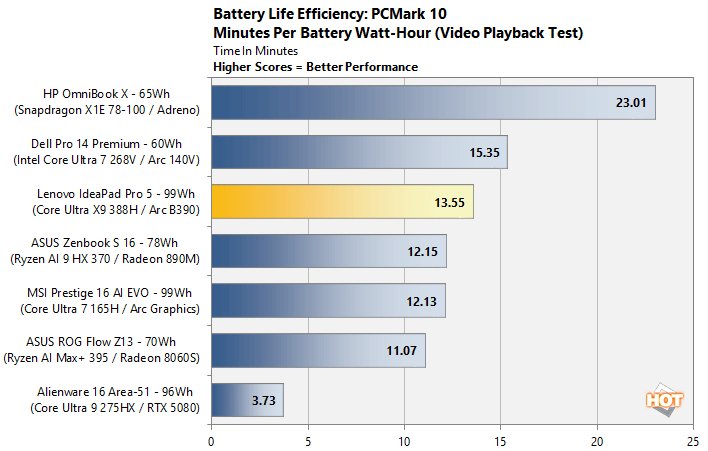
We also broken our battery life tests in terms of minutes per watt-hour of battery capacity. Please keep in mind, this isn't focused on CPU efficiency alone, but rather the either system, including the display and all integrated peripherals. Still, the results pain a picture of total platform efficiency and can help determine if increased efficiency or simply a larger battery help a system achieve longer battery life. Here, the Core Ultra X9 388H-powered Lenovo IdeaPad 5 Pro falls behind the Snapdragon system and the Lunar Lake-powered Dell 14 Pro Premium. The Lenovo system is more efficient than the AMD systems though, and the high-power Arrow Lake-H system with discrete GPU isn't even in the same ballpark.
Intel Core Ultra X9 388H-Powered Lenovo IdeaPad 5 Pro Preview: Our Conclusion
We will refrain from drawing any definitive, final conclusions on Panther Lake and the Intel Core Ultra 300 series, because all of our testing was done a pre-production system, but our initial impression are excellent. The top-end 16-core / 12-Xe Core Ultra X9 388H put up great numbers across the board, offering class-leading performance and excellent efficiency relative to other mainstream notebook platforms, especially as it related to graphics and NPU. We knew coming into this evaluation, that Intel hadn’t made significant changes to the Cougar Cove (P-Core) And Darkmont (E-Core) microarchitectures employed in Panther Lake, other than tuning them for manufacturing on Intel’s 18A process, but the 12-Xe core iGPU represented a huge leap in capability and NPU5 was purpose built for today’s local AI workloads. With all of that in mind, it appears that Intel has delivered in spades with Panther Lake and the Core Ultra 300 series for laptops and likely hand-held gaming devices as well.
iGPU and NPU performance were both very strong in our testing and CPU performance, particularly in multi-threaded workloads, was highly competitive. Battery life and efficiency were also very good. Despite our test vehicle’s relatively large, high-resolution (2.8K) 16” display, the pre-production Lenovo IdeaPad 5 Pro lasted for nearly 24 hours untethered from a power outlet, with the screen lit up the entire time.

We will have wait to test some of the lower-end Core Ultra 300 series processors with fewer CPU and GPU cores (and slower memory) to form final thoughts on Intel's new laptop platform, but we are confident that Intel hit a home run at the higher-end of line-up. The 16-core / 12-Xe Core Ultra X9 388H is a very strong all-around CPU, with leading IO and connectivity, performance, and improved efficiency. With its first consumer product built on 18A, it’s seem that Intel has delivered and we look forward to testing more retail-ready Panther Lake systems as they become available.