Intel Core Ultra X9 388H Review: Panther Lake Tests Strong


| Intel Core Ultra X9 388H - Coming Soon The 16-core Core Ultra X9 388H is a very strong all-around CPU, with leading IO and connectivity, performance, and improved efficiency. Panther Lake is officially on the prowl.
|
|||

|

|
||
By now, we suspect most of our loyal readers are well aware of what Intel’s Panther Lake is all about. We’ve been discussing it and posting various leaks and other info about Panther Lake – now officially branded the Core Ultra 300 series – for nearly two years, and today we finally get to reveal how it performs.
Back in October ’25, we attended Intel’s Tech Tour and were able to disclose details of the CPU architecture and its various model configurations. Also, under the backdrop of CES a couple of weeks ago, Intel officially launched its Core Ultra 300 series processors based on Panther Lake. We dropped a couple of sneak peeks during the show, but today we’ve got a full suite of benchmarks and other details on tap, courtesy of a pre-release Lenovo IdeaPad Pro 5 notebook, packing the 16-core / 12-Xe Core Ultra X9 388H SoC.
More on the system in just a bit – first let’s quickly recap some of Panther Lake’s particulars, and tune in to our interview with Intel's Tom "TAP" Petersen from CES a couple of weeks back...
Intel Core Ultra 300 Panther Lake Refresher
As we’ve mentioned a few times before, Panther Lake is an evolution of Lunar Lake that leverages Intel’s advanced 18A process technology for its compute tile, with more flexible memory configurations designed to scale performance and efficiency across all of the platform’s processing engines (CPU, NPU, IPU, GPU).
Like the previous-gen Lunar Lake (Core Ultra 200) and older Meteor Lake (Core Ultra 100) SoCs, Panther Lake Core Ultra 300 chips feature a disaggregated design, composed of multiple tiles, that are manufactured on different processes, linked together via a base die on a single package using Intel’s advanced Foveros-S 2.5D packaging technology.
The compute tile, which is home to the CPU cores and media engine, is built on Intel’s advanced 18A process, the GPU tile is built on Intel 3 or by TSMC depending on the particular configuration, and the platform controller tile is also manufactured at TSMC.
Although the primary market for the Core Ultra 300 series will be next-generation AI laptops, it will appear in a variety of designs and form factors, at a myriad of price points, from robots and point of sale systems, to computer vision systems and intelligent edge IoT devices.

Initially there will be three main Core Ultra 300 series chip configurations, an 8 CPU core variant (4P, 4LPE) with a 4-core GPU tile, a 16 CPU core variant (4P, 8E, 4LPE) with the same 4-core GPU tile, and a top-end 16 CPU core model (also 4P, 8E, 4LPE) with a much higher performing 12-core GPU tile – that’s the version we’ve tested here.
The platform controller tile on all three configuration is mostly similar, and offers up to 20 PCIe lanes (8x Gen 4, 12x Gen 5), 4x Thunderbolt 4 posts, 10x USB ports – split between USB 2 (8x) and USB 3.2 (2x), Wi-Fi 7, and Bluetooth Core 6.0. The only real difference between the platform controller tiles is that all 20 lanes are available on the mid-level 16-core Panther Lake configuration, while only 12 lanes are available on the entry-level 8-core and top 16-core / 12-Xe3 models.

The three main Core Ultra 300 series chip configurations also differ in terms of their memory support. The 8-core model can utilize either DDR5 or LPDDR5X memory, at speeds up to 6,400MT/s or 6,800MT’s, respectively. The mid-level 16 core model will use DDR5 or LPDDR5X memory, but at speeds up to 7,200MT/s or 8,533MT/s. And the top-end 16-core / 12-Xe3 model will use 9,600MT/s LPDDR5X memory only. Intel actually has a strict requirement in place to pair the 16-core / 12-Xe3 variant with only 9,600MT/s memory, to ensure maximum performance and consistency across laptop models, though that memory can be soldered down on the PCB or use LPCAMM modules. We should also note that the maximum memory capacity for the 8 and 16-core models is 128GB, but the 16-core / 12-Xe3 tops out at 96GB.
For a much deeper dive into the Panther Lake architecture and details about Intel’s advanced 18A manufacturing process, we suggest reading our coverage from Intel Tech Tour 2025. Suffice it to say, Intel set out to improve performance and efficiency of all of the platform’s processing engines. The CPU cores have been updated and tuned for 18A, the NPU has been re-balanced for better utilization, performance, and efficiency, and Intel's Battlemage iGPU is Intel’s most powerful and advanced yet. The top-tier 16-core CPU / 12-Xe model should offer a significant leap in performance, particularly as it relates to graphics and AI, relative to similarly power-constrained mobile platforms.
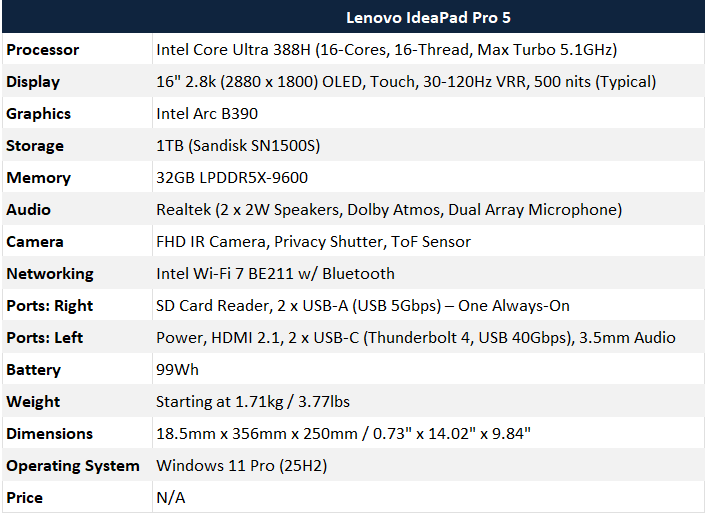
As mentioned, we got to test the 16-core CPU / 12-Xe Core Ultra X9 388H processor using a Lenovo IdeaPad Pro 5 laptop. The full specifications of the system we tested were as follows.
Lenovo IdeaPad Pro 5 With Core Ultra 3000 Specifications
A Quick Tour Of The Lenovo Ideapad Pro 5
The Core Ultra 300-series based Lenovo IdeaPad Pro 5 is a full-featured, premium 16” machine with all the trimmings. We must point out, however, that the system we tested is not a retail-ready model and should be considered pre-production. With that in mind, some specifications, features, or performance may change when the systems start shipping and hit store shelves. That said, the system arrived in retail packaging, behaved perfectly throughout testing, and appeared ready for prime time.
We’re not going to dwell too much on the system itself but wanted to show you what we tested. The Core Ultra 300-series based Lenovo IdeaPad Pro 5 is a 16” notebook, with a beautiful OLED 2.8K panel, 32GB of RAM, 1TB of fast storage, with all of the features enabled by Intel’s platform intact – Thunderbolt (with Thunderbolt Connect support), Wi-Fi 7, Bluetooth are all accounted for.
The system’s design doesn’t stray from the existing IdeaPad Pro 5 models. The machine is packing a 16” OLED display, with a good-sized keyboard (with numpad) and touchpad, decent audio, and a beefy battery. Lenovo’s website for the previous-gen IdeaPad 5 lists an 84Wh battery in the specs, but the system we tested reports the battery size at 99Wh, so we assume Lenovo’s upgrading the battery with the Panther Lake generation.
The display is a 16" 2.8k (2880 x 1800) OLED, with touch, and a 30-120Hz variable refresh rate. It offers 1100 nits of peak brightness (500 nits typical) with 100% DCI-P3 gamut coverage, VESA DisplayHDR 1000 True Black support, and it’s TÜV Low Blue Light Eyesafe and TÜV Flicker Free certified. The panel also features X-Rite Factory Display Calibration for solid color accuracy right out of the box.

Lenovo is known for its keyboards, and the IdeaPad Pro 5 doesn’t disappoint. The keyboard on the machine has a good layout, with decent spacing and comfortable keycaps. They keys are individually backlit and offer 1.5mm key travel. In our experience, the typing on the IdeaPad Pro 5 feels great, though there is a bit of flex in the centermost part of the board. Below the keyboard is a 135mm x 80mm glass touchpad, with multi-gesture support. We’ve only been using the machine for about a week, but in our limited experience thus far, we found the touchpad to be quite good and have no complaints.
IO on the system includes an SD Card Reader and 2 x USB-A (USB 5Gbps) on the right, and power, HDMI 2.1, 2 x USB-C (Thunderbolt 4, USB 40Gbps), and 3.5mm audio ports on the left. We wish there was an additional USB-C port on the left as well, so users could charge the system with the cable on either side but considering the variety of ports available on the IdeaPad Pro 5, we won’t complain. This machine has all of the ports necessary to appease creators and business-focused road warriors alike.


The IdeaPad Pro 5’s dimensions measure 18.5mm x 356mm x 250mm / 0.73" x 14.02" x 9.84" and it weighs just shy of 4lbs. The colorway you see here is dubbed “Luna Grey”. All told, if you like machines with larger displays, the 16” IdeaPad Pro 5 won’t disappoint. The metal chassis is rigid and feels solid and premium in-hand, and the overall design language and aesthetic is understated but attractive in our opinion. I hope Lenovo makes a 14” version of this system; I would rock it in a second.
And with all of that out of the way, what do you say we check out some benchmarks?