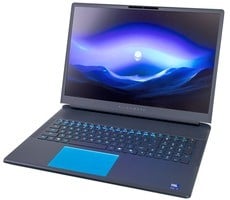
Alienware 16 & 18 Area-51 Laptops Reviewed: Benchmark-Crushing Gaming Beasts


Like many other high-end gaming notebooks, however, these Alienware Area-51 systems add an additional wrinkle. As we mentioned on the previous page, these machines give users the option to configure the discrete GPU to operate in a hybrid mode (NVIDIA Advanced Optimus), which switches between the Core Ultra 9 275HX's integrated Intel iGPU and the GeForce RTX 50x0 dGPU depending on the workload, or in an always-on mode that keeps the GeForce powered up and directly connected to the display to provide the best performance. We used Advanced Optimus mode for most of our non-gaming benchmarks, but switched over to "dGPU Only" mode for the gaming tests.
ATTO Disk Benchmark
We'll start off the barrage of benchmarks with ATTO. The ATTO disk benchmark is a fairly quick and simple test which measures read/write bandwidth and IOPS across a range of different data sizes. While we don't typically compare these results across multiple machines, it's useful to gauge whether a particular notebook's storage subsystem is up to snuff. Of course, we have two machines here, so we'll be presenting two sets of results.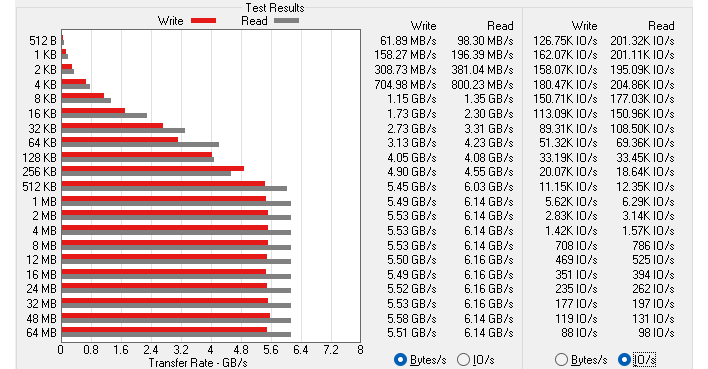
The 16" Area-51 has an SK hynix PVC10 SSD inside, which is the OEM version of the P41 Platinum SSD. That was a top-of-the-line SSD back in 2022, and it still offers excellent performance for a PCIe 4.0 x4 drive. Not the best we've ever seen, but it handles itself very well in ATTO here.
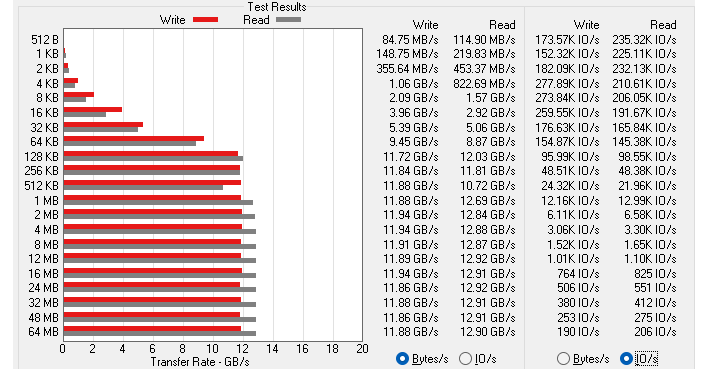
Meanwhile, our 18" Area-51 employs SK Hynix's PCB01 drive, which is the OEM version of the Platinum P51. This is an extremely high performance SSD using a PCI Express 5.0 x4 interface. Unsurprisingly, it puts up killer results in ATTO, with transfers all the way from 128K to 64MB delivering nearly 13 GB/second reads and nearly 12GB/second writes.
Speedometer 3 Browser Benchmark
We use BrowserBench.org's Speedometer test to take a holistic look at web application performance. This test automatically loads and runs a variety of sample web apps using the most popular web development frameworks around, including React, Angular, Ember.js, and even plain-Jane JavaScript. All tests were performed using the latest version of Chrome.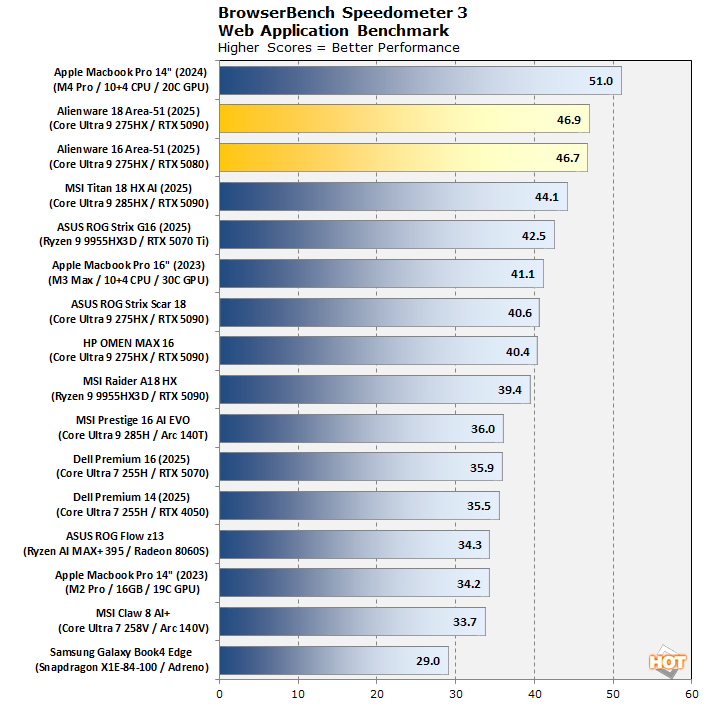
These new Alienware gaming laptops are starting off strong, with the highest Speedometer scores we've ever seen out of a Windows notebook. The top-to-bottom vertical stack that Apple enjoys still provides a commanding lead in this test, but frankly everything here loads even the most complex websites instantaneously, so it's pretty academic at this point.
MAXON Cinebench 2024 3D Rendering Benchmark
Next up is the latest-generation 3D rendering benchmark from Maxon, based on the Cinema 4D rendering engine. It's a purely CPU-based test that doesn't make use of the graphics processor at all, and it scales very well with additional CPU cores. We ran both single- and multi-threaded tests on all of the machines in the charts.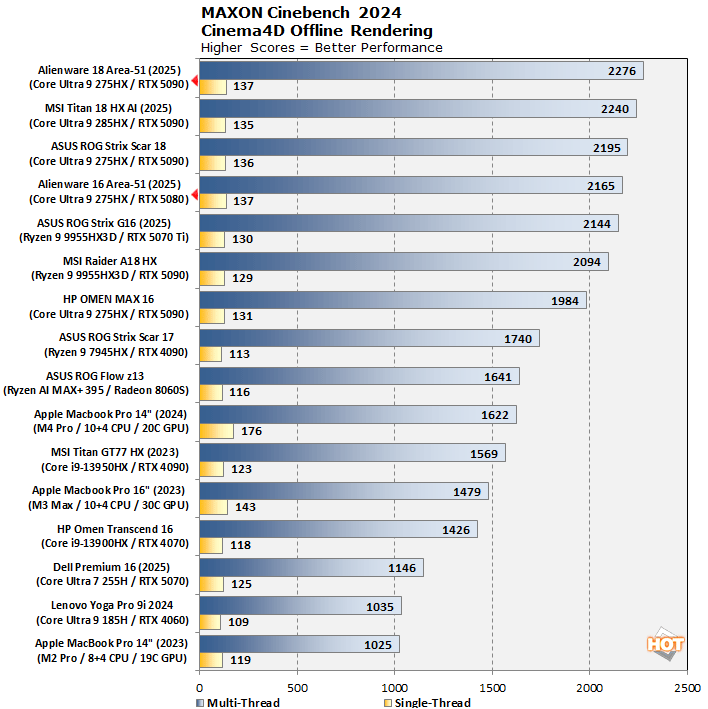
The Alienware 18 Area-51 took the top spot in the multi-threaded benchmarks, likely thanks to its powerful cooling solution. The Alienware 16 Area-51 also performs well, but drops down a few rungs versus its big brother. Both machines put up a strong single-thread results as well, but the Macbook Pro leads there by a fairly large margin.
Geekbench 6 CPU Performance Benchmark
Geekbench is a cross-platform benchmark that simulates real-world workloads in a wide variety of tasks, including encryption, image processing, physical simulation, machine learning, and many more. We tested the systems featured here with the latest Geekbench 6 version to get an idea of their overall system performance.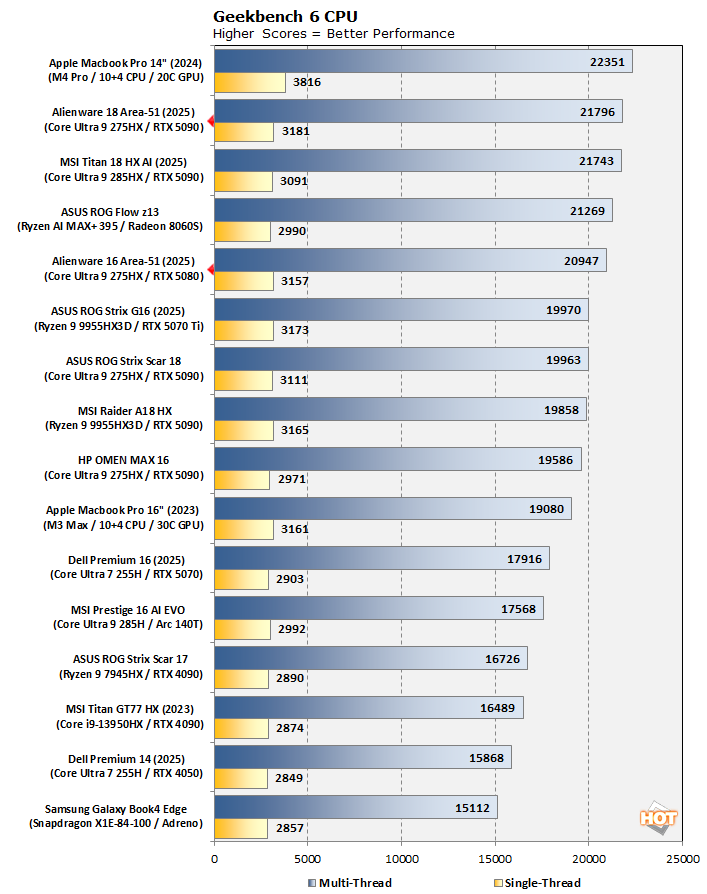
The 18" Area-51 is denied the top spot once again by Apple's Macbook Pro, but it remains the fastest Windows laptop we've ever tested in this benchmark. The single-threaded scores are particularly impressive, matching or beating everything else on the chart.
Geekbench AI Machine Learning Benchmarks
The Geekbench AI benchmark provides a straightforward look at how well a device handles a variety of AI-assisted tasks. This quick and easy test gives you a numerical snapshot of the CPU, GPU, and NPU's ability to power through real-world machine learning workloads, factoring in both speed and accuracy. The higher the score, the better the device's AI chops, whether it's image recognition, object detection, or natural language processing.Results are presented in three levels of numerical precision: single precision or FP32, half precision or FP16, and quantized or INT8. All results that the benchmark provides are geomean scores from multiple runs of each test workload.
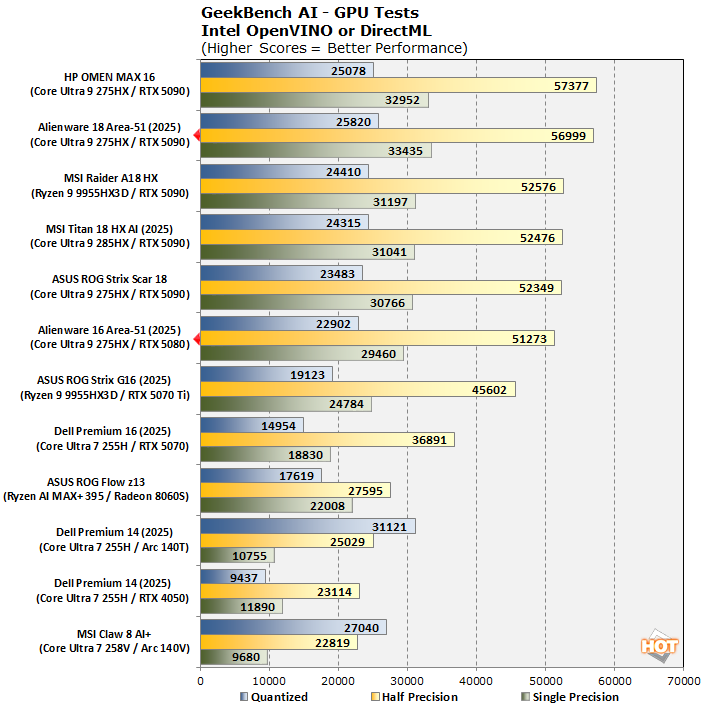
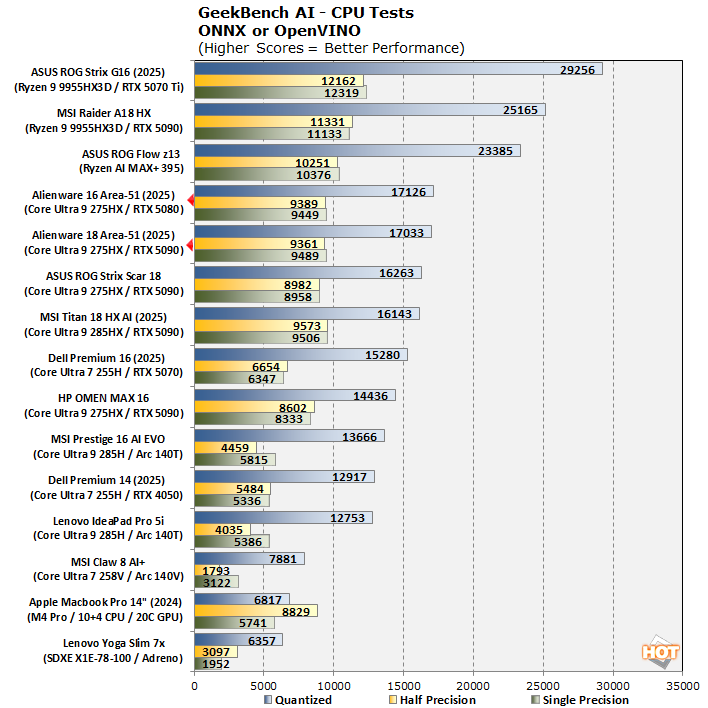

Results here are fairly unsurprising, although we're interested to observe the Alienware 16 Area-51's GeForce RTX 5080 Laptop GPU striking dangerously close to the ASUS ROG Strix Scar 18's RTX 5090. Very impressive stuff there. The Core Ultra CPUs simply can't compete with Zen 5's AVX-512 acceleration in the CPU tests, but they comport themselves relatively well without it. Meanwhile, the Intel NPU in Arrow Lake is underwhelming compared to the more modern architecture of Intel's Lunar Lake, but still offers serviceable performance for some common AI tasks.
UL PCMark Applications Office Benchmarks
We've started using the PCMark 10 Applications benchmark a bit more because it measures performance in Office and Edge using native instruction set-compatible versions of the apps for optimal performance across both x86 and Arm architectures. The following results should paint a picture of Microsoft Office productivity performance with the best foot forward from all systems tested.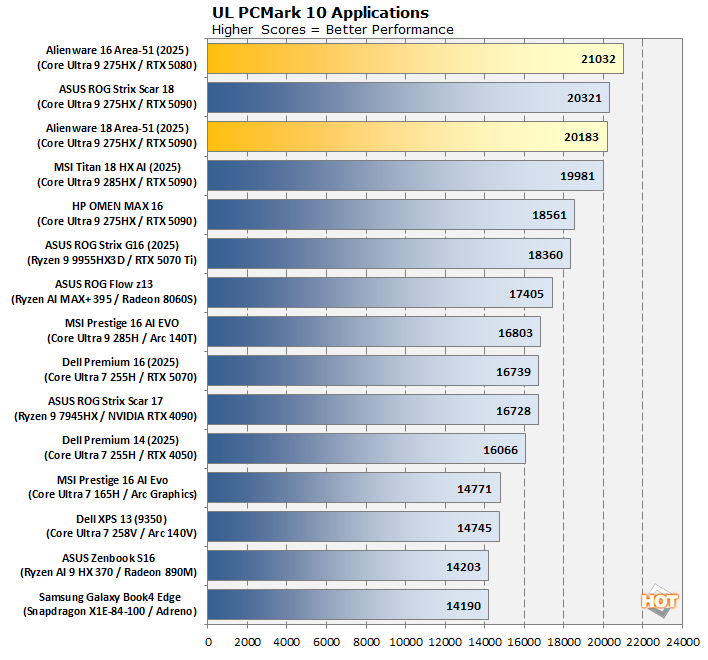
Suffice to say that Intel's Core Ultra 200 series Arrow Lake CPUs kick butt for office use, as do these two powerfully-configured Alienware laptops. The Alienware 16 Area-51 scores a top slot win here but all the top scores are within striking distance of each other regardless.
Clamchowder Memory Latency Microbenchmark
System memory latency can have an outsized effect on the performance of certain applications, particularly in the realm of gaming. Console game emulators and high-speed competitive titles can both have gigantic swings in performance depending on the memory timings of the system in question. We wanted to check out the memory latency on these Alienware systems because they are the first laptops we've tested to ship with CSODIMMs.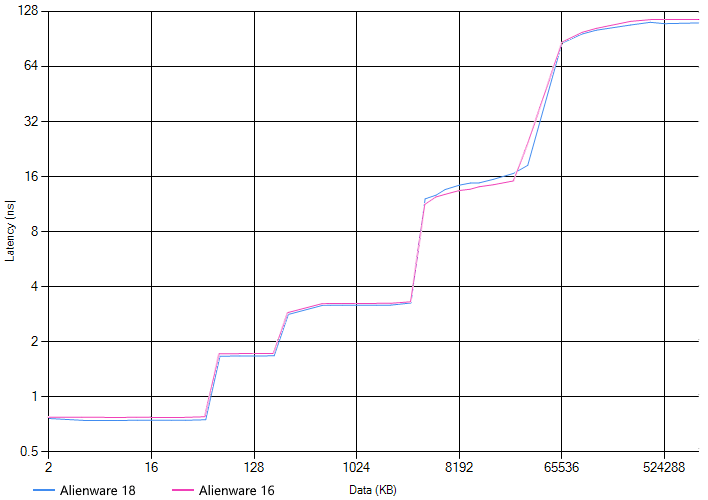
While these results aren't outstanding in the grand scheme—they're behind our results for AMD's Ryzen 9 9955HX3D—they do represent the best latency we've seen out of the Core Ultra 200 Arrow Lake platform. That probably goes some ways to explain the excellent performance we see in most of our gaming benchmarks down this page a bit.
UL 3DMark Synthetic Gaming Benchmarks
3DMark has a wide variety of graphics and gaming related tests available. To best match up with the historical benchmark data that we have hanging around, we ran the Fire Strike Extreme QHD DirectX 11 benchmark, the Time Spy QHD DirectX 12 benchmark, and the Port Royal DXR ray-tracing benchmark. First up: Fire Strike Extreme: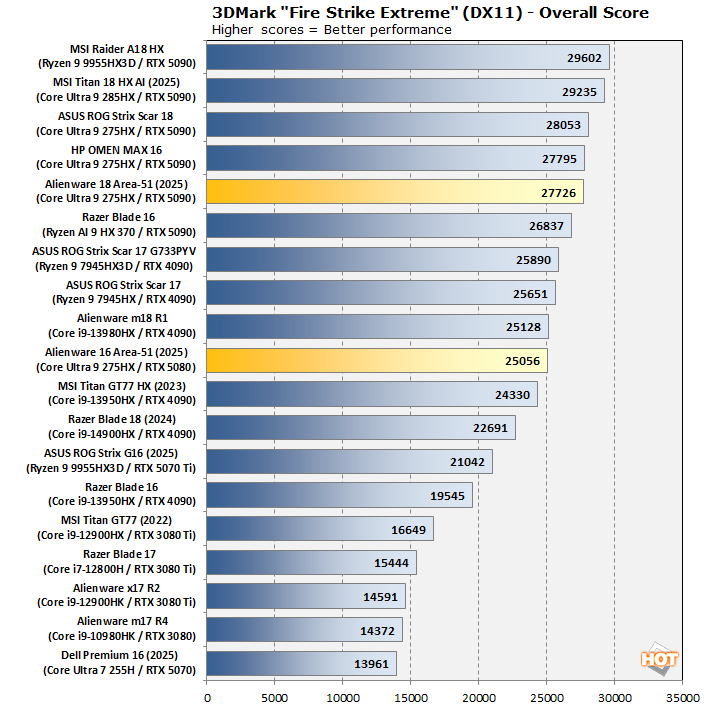
In Fire Strike Extreme, we see an unusually weak performance from the Alienware 18 Area-51, although we should note that the difference between its score and the top is a measly 6%. Meanwhile, the Alienware 16's GeForce RTX 5080 is holding its own, soundly beating an RTX 5070 Ti and coming in right alongside several GeForce RTX 4090s, which are considerably larger GPUs. Chalk it up to that shared 175W power limit.
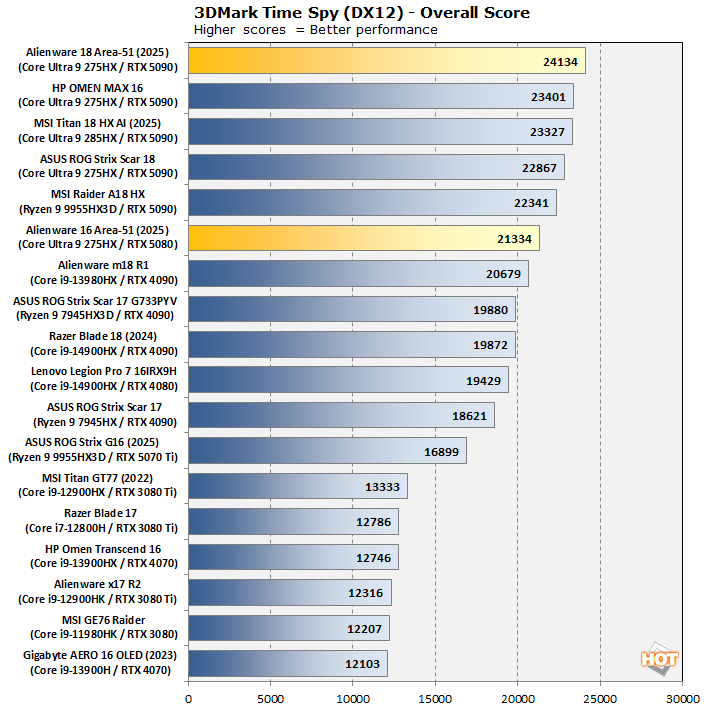
In Time Spy we see something more like the performance we would expect: the Alienware 18 crushing all comers, while the Alienware 16 is dunking on every RTX 4090 laptop and creeping up awfully close to the RTX 5090s. This is a powerful showing for both machines.
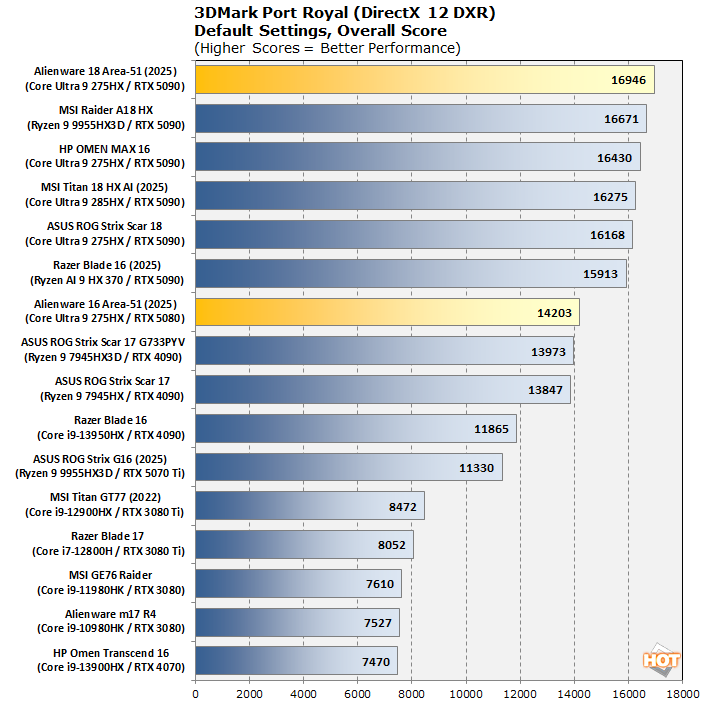
In Port Royal, we see a similar situation to Time Spy, although the RTX 5080 in the Alienware 16 lands further behind the 5090s due to simply being a significantly smaller GPU (60 SMs vs. 82 SMs in the 5090). It still manges to outpace all of the 4090 machines, largely thanks to ray-tracing upgrades in Blackwell.
Middle-earth Shadow of War Benchmarks
Middle-earth: Shadow of War is a fun and beautiful title set in J.R.R. Tolkien's Lord of the Rings universe. To test the game's performance relative to other systems, we set the visuals to the High preset and tested in both 1080p and 2560×1440. The frame rates here are the average reported by the built-in benchmark.
In 1080p we do see the Core Ultra systems falling well behind many others, especially those with previous-generation Core CPUs and Ryzen processors. The absolute performance is still fantastic with average frame rates over 250 FPS from both machines, but in this heavily CPU-limited test, the other machines, particularly systems equipped with AMD's "X3D" CPUs, do pull far ahead.
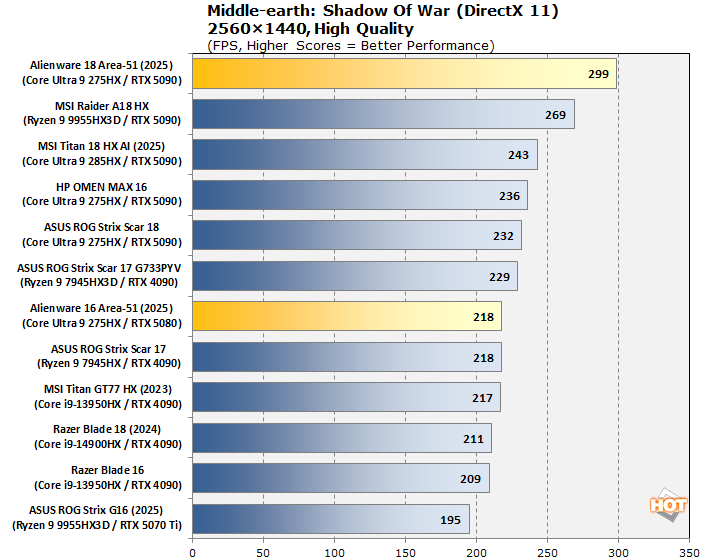
In 1440p, we get to see the Area-51 systems flex their muscles a bit; the 18" machine actually runs *better* in 1440p than in 1080p. Meanwhile, performance drops a bit for the Alienware 16, but it's still hanging tough with RTX 4090s and just barely behind the RTX 5090 systems. These machines have QHD+ screens, so there's really no reason to play in 1080p to begin with.
Shadow of the Tomb Raider Benchmarks
The finale in the rebooted Tomb Raider trilogy, Shadow of the Tomb Raider is easily the best-looking of the bunch. It's also brimming with fancy tech, including all three vendors' smart upscalers, ray-traced shadows, and even Tobii eye-tracking support. To test this game out, we turned the visuals up to their highest preset and tested at 1080p and 2560x1440.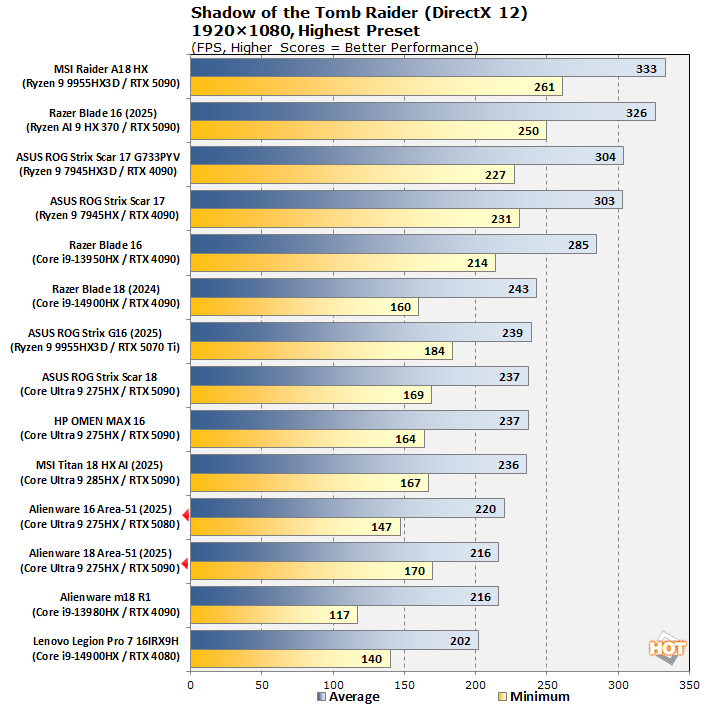
Similar to Middle-earth: Shadow of War, the 1080p results are pretty dire. Once again, the Alienware 16 actually presents a slightly higher average frame rate for reasons we couldn't guess, and the benchmark tells us that only 5% of its runtime was GPU-limited. Let's check at a resolution you might actually use on these laptops.

Marvel's Guardians Of The Galaxy
Marvel's Guardians of the Galaxy is an action-adventure game where you play as Star-Lord and lead the rest of the nominative Guardians from mission to mission. The game's minimum requirements only call for a Radeon RX 570 or GeForce GTX 1060-class GPU, but it also supports some of the latest graphics technologies, including DXR and DLSS.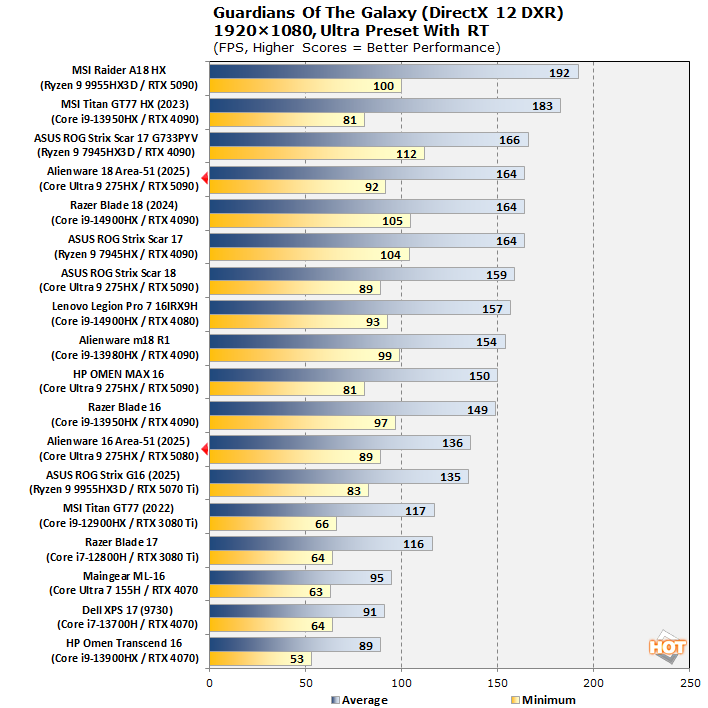
Guardians of the Galaxy, with its detailed ray-traced reflections and shadows, presents a heavier workload immediately that improves the relative placement of the Core Ultra systems. However, frame-time consistency isn't the greatest. Let's flip over to QHD and see if things actually improve.

Guardians of the Galaxy is a little bit of a strange benchmark, with some unusual behavior regarding frame-rate limiting; we're considering retiring it from our benchmark suite for that reason. However, considering that this is a test of the game at its actual maximum settings, above the "Ultra" preset, the performance here is completely acceptable, and the 18" Area-51 actually puts up our best-ever 1% lows.
F1 24 Formula One Racing Benchmarks
The previous iteration of Codemasters' annual officially-licensed F1 racing game carries forward the gorgeous custom ray-traced global illumination (RTGI) solution from F1 23 while improving texture quality and performance across the board. Many environmental objects have had their detail improved, and the tracks look a lot more like their real-world versions in this release, especially after a major graphics patch back in December 2024.We also wanted a test to demonstrate the benefits of NVIDIA's DLSS technology in terms of performance, and F1 24 presents the perfect opportunity to do so. We stuck to comparing systems with Blackwell GPUs because it was the most apples-to-apples comparison given that the Blackwell architecture performs frame generation in a different manner than the older Ada Lovelace architecture from the RTX 40 series.
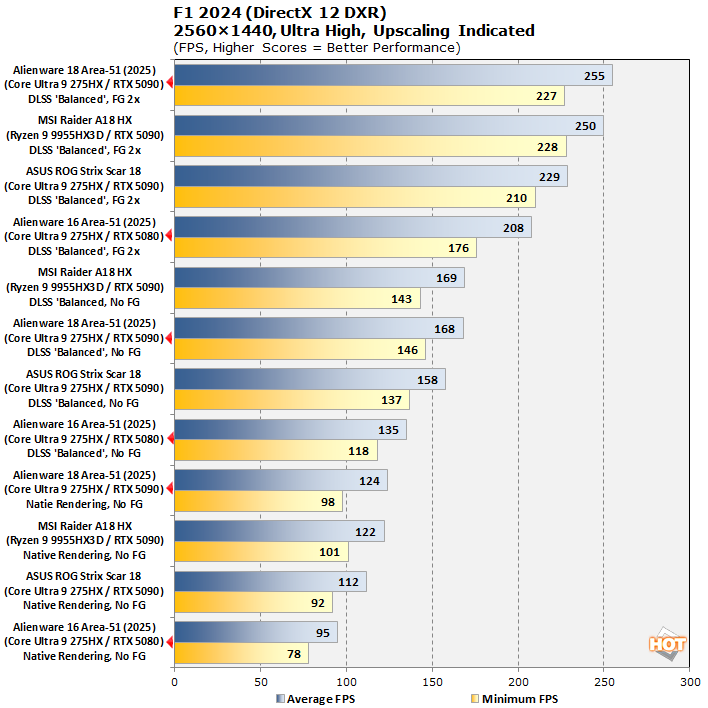
This chart is confusing, so you'll want to read it very carefully, but essentially we're comparing the two Alienware machines against the ASUS ROG Strix Scar 18 and the MSI Raider A18 HX in this benchmark. Unsurprisingly, the Alienware 16 Area-51, with its smaller GeForce RTX 5080 GPU, comes in last place, but keep your perspective: it's still pushing 95 FPS in native rendering on this taxing, ray-traced game, and its 2X frame gen score is significantly higher.
The takeaway here is that using DLSS upscaling and frame generation can take even a smaller GPU to over 200 FPS in this game despite using max settings. Meanwhile, the Alienware 18 Area-51 puts up the highest scores we've ever seen in this test, which is marvelous.
Alienware Area-51 Core Ultra Laptops Subjective Gaming Impressions
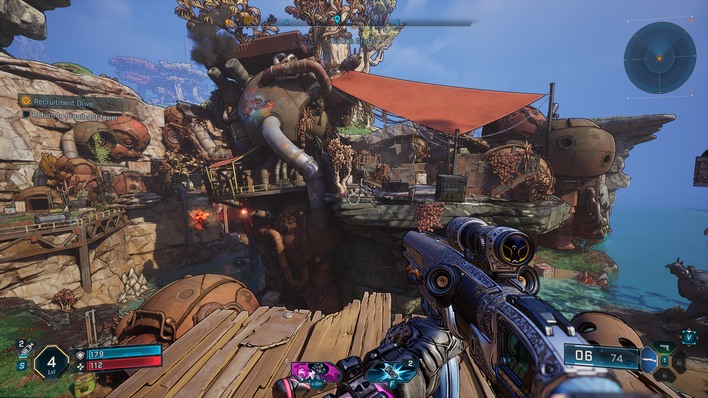
According to Steam, we spent 63 hours over 3 weeks running games (including benchmarking and regular gaming) on these two laptops. We tried to divide our time evenly, but we did end up spending a little more time with the Alienware 16 Area-51 simply because it was easier to carry around. We played games at home, we played games in public locations, we played games at a friend's house, and attended a LAN party.
The biggest consistent problem we encountered was some strangeness with performance mode setting in Alienware Command Center. These systems are strangely reluctant to stay in "High Performance" mode when set with the hotkey. However, if you simply open AWCC and select the "Overdrive" mode, that seems to stick more reliably, and appears to be fundamentally the same thing: maximum power, maximum fans—which means maximum noise. We'll talk about noise on the next page but it's really not terribly obtrusive even on max fans.
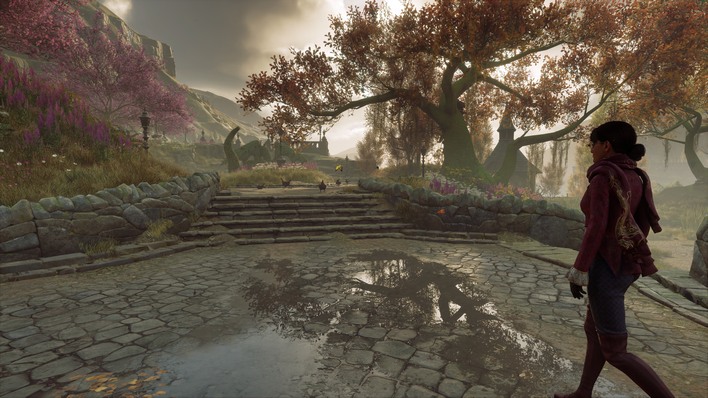
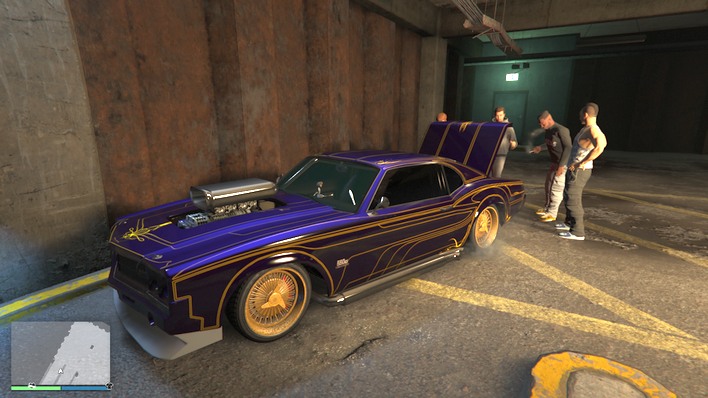
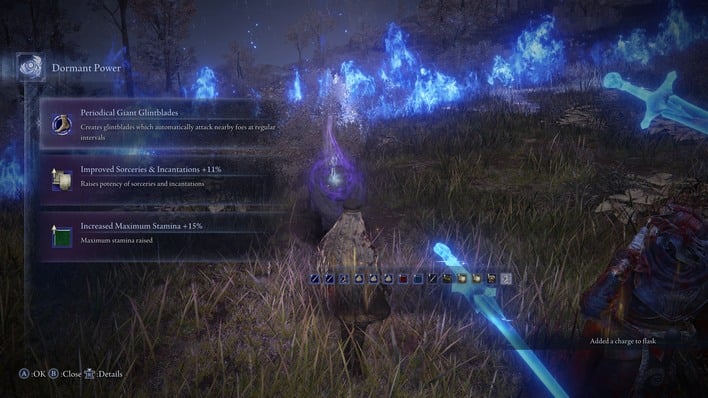
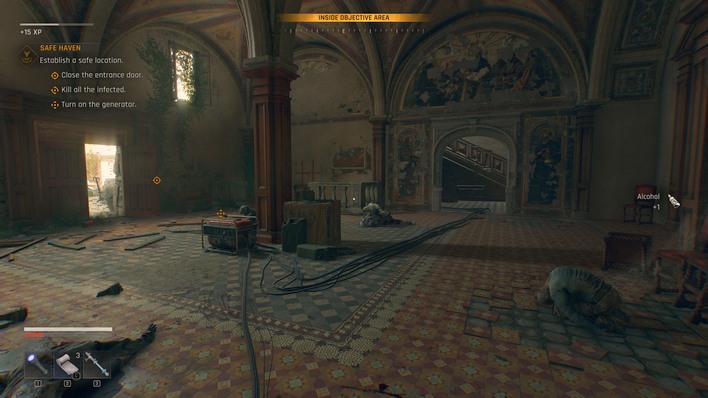
We played Borderlands 4, Dying Light: The Beast, GTA Online: Enhanced Edition, Hogwarts Legacy, Elden Ring: Nightreign, the original Elden Ring, Onirism, and Hollow Knight: Silksong on these two systems. Broadly speaking, performance is fantastic. Even on the Alienware 16, you can easily set every game's graphics settings to the absolute maximum and play without a care. We did have to use a liberal amount of DLSS upscaling for Borderlands 4, but that game's performance issues are well-documented by this point.
In everything else, you simply max out the settings, crank up the ray-tracing, and play along just fine at full native resolution, which is 2560×1600 on these machines. Games just work, even without manually enabling the discrete GPU. You can leave the system in hybrid mode for solid battery life, and then when you flip over to a game, the discrete GPU will automatically enable. NVIDIA's BatteryBoost is enabled by default, so gaming on battery does get frame-rate capped, but you can disable it if you prefer to chew through your battery in 30 minutes.
Obviously, these are desktop replacement-class laptops, even if the 16 is a bit smaller than that. As such, the hardware on board these machines is indeed power-hungry. You absolutely can employ frame rate limiters and BatteryBoost, or even play games on the integrated Intel graphics, if you want to maximize battery life. We were able to achieve over 4 hours of Hollow Knight Silksong gameplay at a smooth 60 FPS using the integrated graphics on the Alienware 16 Area-51. However, you're really going to want to carry the power adapter with you anywhere you go. Despite diminutive dimensions, these power bricks weigh over 2 pounds by themselves, so bring a proper backpack.
Speaking of battery life, let's head over to the next page to talk about that, as well as power, thermals, noise, and our conclusions.