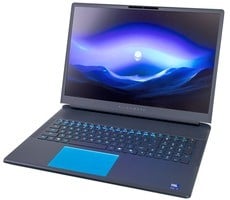
Alienware 16 & 18 Area-51 Laptops Reviewed: Benchmark-Crushing Gaming Beasts


Alienware Area-51 16 And 18-Inch Laptop Thermal Performance
Clearly, a big part of the redesign was indeed the thermal solution. Contrary to previous Dell laptops that we've tested, these machines have no major thermal constraints, and they achieve their performance levels with relatively modest noise levels. Check it out: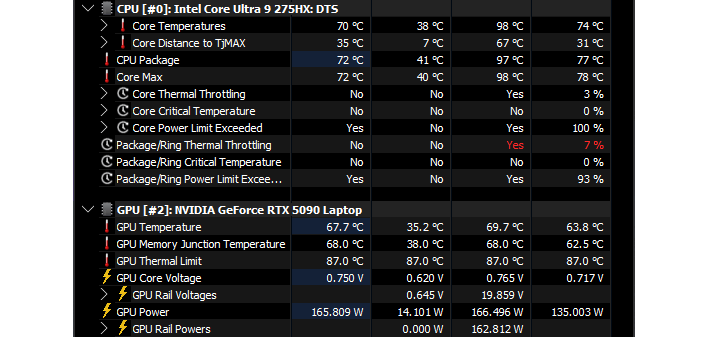
These are the results of running a five-minute stress test with "power virus" workloads similar to Prime95 and Furmark simultaneously on the Alienware 18 Area-51. GPU temperatures remain chilly, while the CPU gets warm, yet never really approaches its thermal limits. The package temperature does throttle briefly, while the CPU is in its 160W PL1 turbo limit, but core temperatures don't hit the junction max, even under this brutal test.
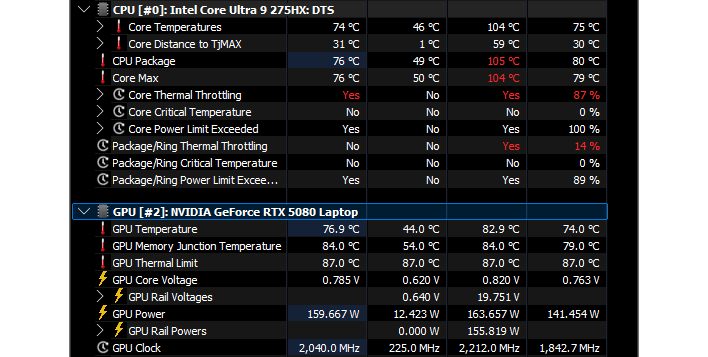
Running the same test on the smaller Alienware 16" Area-51, it does struggle to maintain acceptable temperatures a bit more due to the reduced thermal mass, but remember: this is a torture test, not a gaming workload. Moreover, the test is still running in this screenshot; as you can see from the first column (the "current" values), once the CPU exits its 160W turbo period and the cooler's fans have ramped up, both CPU and GPU temperatures stabilize at perfectly acceptable values.
In short, while gaming, these systems easily stay cool, and surprisingly quiet, too. Perhaps most impressively is that, even under this stress test, their keyboards remain relatively cool, especially on the Alienware 18. With a lot of these gaming laptops, we see pretty spicy temperatures under that WASD hand, but using our infrared thermometer, we recorded a maximum keyboard temperature of 40℃, or about 105F, on the Alienware 16. That's definitely warm, but not so much so that you couldn't keep playing.
Alienware Area-51 Core Ultra Laptops Noise Testing
Staying cool is all well and good, but a lot of folks don't like it when you unpack your beefy gaming laptop and it starts shrieking like a banshee. If the system has to make an unacceptable level of noise to stay cool, then its cooling system really isn't that great, no matter how well it cools. So what are the acoustics of these Alienware machines like under load?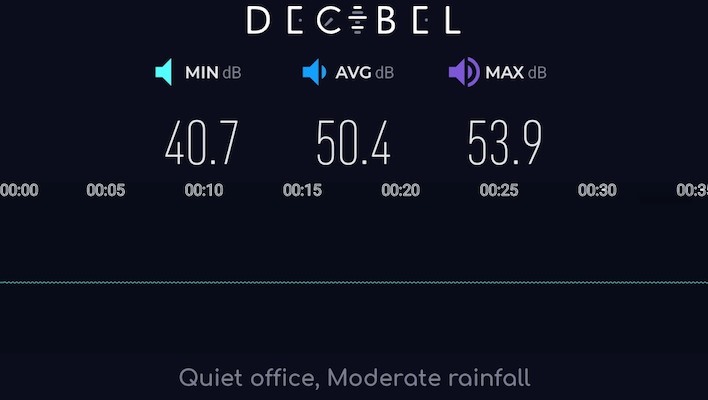
Alienware 18 Area-51 Noise Output While Gaming
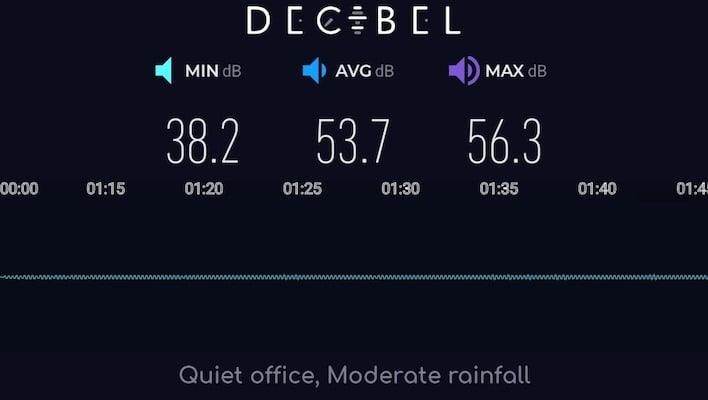
We tested noise output by playing a game using headphones and a quiet gamepad, with our measuring device placed 20 inches from the laptop—which is how far we measured between the screen and our tester's face. As you can see, the Alienware 18 is definitely audible, but it's really not bothersome, especially since the pitch of the audio emitted is soft, almost like a desk fan.
Alienware 16 Area-51 Noise Output While Gaming
The Alienware 16 definitely produces more noise, and the character of it is slightly more noticeable, but it's still not bad. It's nothing like the shrill screeching of older gaming laptops. Note that both of these results were produced with the machines in Alienware's "Performance" mode. If you want less noise at the cost of reduced gaming performance, you could use one of the quieter presets, including the "Stealth Mode" that is available with one button press on the keyboard. For lightweight games, like Hollow Knight: Silksong, this makes sense, although that game doesn't produce enough heat to cause the fans to kick up to a high level anyway.
We've heard some near silent systems and some seriously loud laptops in the past. These new Alienware machines are not among the quietest systems we've ever tested, but they're also far from the loudest, and the character of the fan noise is generally tame. We're giving Dell full marks on this point, even for the Alienware 16, because cooling 160 Watts of CPU and 175 Watts of GPU in a 16-inch form factor, without creating a shrieking hell beast, is truly impressive.
By the way, if you enable the Overclocked mode on these Alienware machines, or press the "High Performance" button on the keyboard, it slowly ramps all of the fans up to their maximum speed. With this setting enabled, the Alienware 16 produced 59.8 decibels of noise, while the Alienware 18 hits 61.3 decibels. These values, especially the Alienware 18's, are getting pretty loud. You have to speak up to talk over them, and they'd be really bothersome in a quiet environment like a library. In other words, don't use high performance mode unless you're at home and you have headphones.
Alienware Area-51 Core Ultra Laptops Battery Life Benchmarks
Gaming laptops aren't typically known for their battery life. Once upon a time, the untethered lifespan of most gaming portables was easily measured in minutes, not hours. These days things aren't quite so dire, but there's still a huge gulf between the battery life of something like these Alienware machines and a lighter-weight system with a lower-end GPU and CPU. Take a look:
Frankly, considering the class of hardware at hand here, these results are perfectly acceptable. We didn't put the machines into "Quiet" or "Battery" mode for this testing, so you could probably eke out even more time if you wanted. Nearly six hours of video playback on a 16" gaming laptop with a desktop-class CPU and high-end GPU is very impressive stuff. The Alienware 18's battery life suffers a bit due to the larger screen, but it's matching the HP Omen Max 16 with the same hardware in a 16" form factor, which is pretty cool.
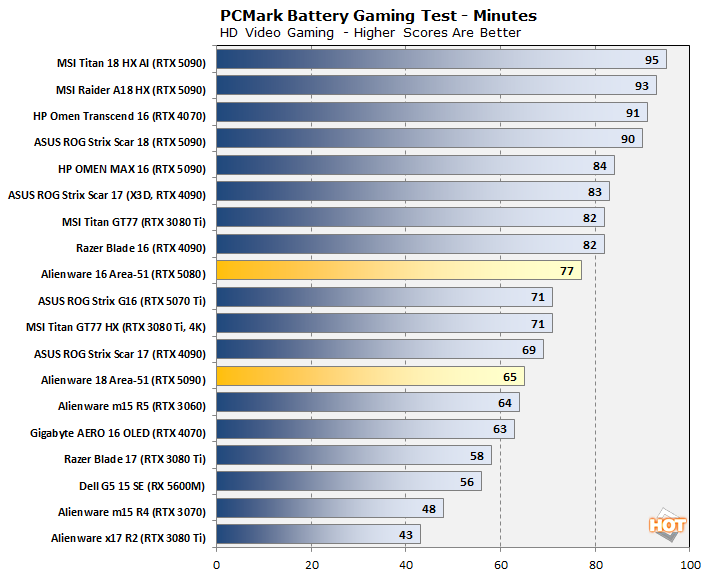
Gaming results are similar: acceptable, but not outstanding. Realistically speaking, nobody should really expect to play games at max settings for extended durations while on battery with this class of PC hardware. It would be nice, but so would flying cars. Physics is a cruel mistress, and you just don't feed silicon of this size cheaply. We could have improved these results by lowering the screen refresh rate; many of the other vendors do this automatically when on battery power, but Dell's software doesn't.
Regardless, as we remarked on the previous page, we were able to play Hollow Knight: Silksong for over four hours on the Alienware 16 by disabling the discrete GPU, setting the screen to 60 Hz, and using Bluetooth headphones. If you're willing to fiddle with the settings, you still can achieve solid gaming battery life from these machines for sure.
2025 Alienware Area-51 Core Ultra Laptops: Luggable Gaming Royalty
If you are even casually interested in PC gaming, you know about Alienware. You probably know that it's a brand that represents some of the fastest hardware out there, and yes, there's a price premium, but historically, you could rest assured that you were getting one of the fastest gaming PCs in the world. On the other hand, that aspect of the brand also was tarnished in years past, as some reviews found that some Alienware systems had certain design flaws that limited their potential.Conversely, these new gaming laptops offer a fresh design from Alienware that proves the company still has what it takes to engineer a truly awesome product. These machines achieve world-beating performance, offer gorgeous aesthetics, solid battery life, and excellent thermal and acoustic results, which speaks volumes. Beyond the lack of an OLED display option, we really don't have any major complaints with these systems, other than the software setup, which is a drawback that is often not exclusive to Dell. It's also easily resolved if you're handy with a Windows 11 install media and don't mind re-installing Alienware Command Center and Dell Update tools.
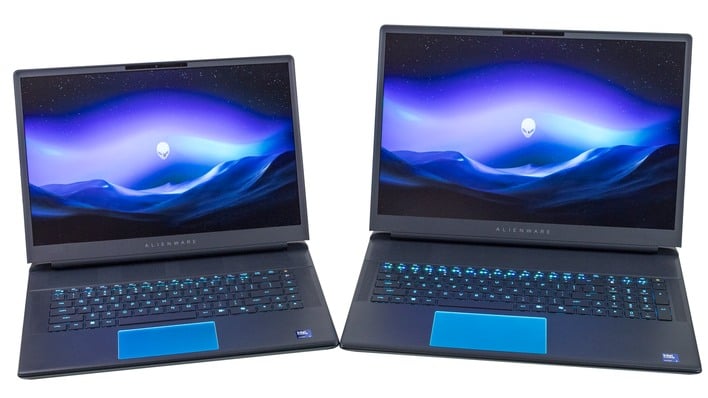
In other words, these new Alienware laptops are as close to flawless as we've seen in a gaming laptop in a long time. We do wish the 16-inch machine had an integrated Ethernet port, but that's easy enough to work around with a Thunderbolt docking station or even just a USB Ethernet adapter.
These machines start at $1749 for the Alienware16 Area-51 and $1999 for the Alienware 18 Area-51 on Dell's website. As configured for us and tested here, these gaming laptops go for $3349 and $4099, respectively. From their space-age aluminum chassis to the kind of thermal headroom that makes lesser machines gasp for breath, the new Alienware Area-51s are gaming laptop royalty. You can argue the performance and build justify the sticker shock at these pricey configs—and to a point, they do—but these mobile gaming rigs are still well into luxury-item territory.
If you're counting pennies, you'll want to dial things back on Dell's product customizer. However, if you've got the budget for indulgence, your Area-51 awaits and you can dial it up to other worldly performance.