NVIDIA Debuts DLSS 4.5 Ray Reconstruction With Second-Gen AI Denoising
by
Zak Killian
—
Tuesday, August 25, 2026, 12:00 PM EDT
DLSS Ray Reconstruction - Image: NVIDIA
When NVIDIA revealed its DLSS Ray Reconstruction, the collective response from the gaming community was essentially "huh, neat." See, while DLSS Ray Reconstruction gives marked improvements in ray-traced lighting effects across the majority of scenes in the games that it's in, it's simply not transformative in the way a technology like DLSS Super Resolution can be, so many gamers just tick it on and don't really think about it. Well, think about it at least a little bit, because today NVIDIA's launching a new iteration of DLSS Ray Reconstruction, simply titled DLSS 4.5 Ray Reconstruction.
If you're new to this technology, you should check out our previous coverage. The short version is that DLSS Ray Reconstruction uses an AI model to perform denoising of ray-tracing outputs. Real-time ray-tracing can't afford to blast out 16 or more rays per pixel, so at the low ray counts it is forced to use, the end result is extremely noisy. Denoising is necessary to make it useful, and Ray Reconstruction presents the best way to do that so far, generally (but not always) presenting results far superior to hand-tuned deterministic denoisers.
DLSS 4.5 Ray Reconstruction Slide - Image: NVIDIA
Just as I said, this new version of the technology is very much an iteration over the previous version. It brings a more powerful AI model using a second-generation transformer architecture that allows for fine-grained control over temporal accumulation as well as improved spatial awareness. The end result is further improved lighting accuracy over the original DLSS Ray Reconstruction.
DLSS 4.5 Ray Reconstruction Supported Games - Image: NVIDIA
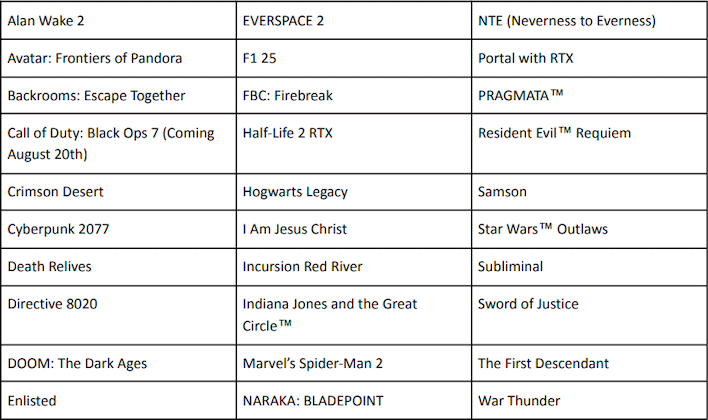
In truth, the gains are small, as you're about to see. Our CMS may not preserve the images at high enough quality to even tell the difference, so if you really want to pixel peep, you can hit this link to grab a zip file with the full-resolution images from my personal Google Drive. I tested four games from the supported games list above to see if I could spot the benefits: Crimson Desert, Cyberpunk 2077, Hogwarts Legacy, and Pragmata. We'll go through them in alphabetical order for simplicity's sake.
DLSS 4.5 Ray Reconstruction in Crimson Desert
Crimson Desert Game Screenshot - Image: Pearl Abyss
Pearl Abyss' open world single-player action RPG is an absolutely gorgeous game running on the company's own internal BlackSpace engine. It has some unusual visual characteristics compared to most of its contemporaries, giving it a distinctive look, but the lighting engine is top-notch. It looked really poor at launch without using Ray Reconstruction, and the company has clearly resolved some of those issues, but not all of them:
Using ray-tracing without ray reconstruction is not advised. - Image: Zak/HotHardware
It's hard to see in a photo but plain as day in motion; using ray-tracing in Crimson Desert causes pretty significant ghosting, so it's arguably better to just leave it off if you don't have access to Ray Reconstruction. In case it wasn't obvious, Ray Reconstruction resolves these issues. But does DLSS 4.5 Ray Reconstruction improve the look of things even more? Well... maybe.
It's subtle, but the lighting does improve very slightly. - Image: Zak/HotHardware (click for full rez)
It's incredibly hard to tell and you probably won't be able to see from the shrunk-down comparison there, but there is a tiny bit more fine detail in the lighting on both the sconce on the wall as well as in main character Kliff's hair. It's extremely subtle and I couldn't tell any difference in motion, but the difference is definitely there. Sadly DLSS 4.5 Ray Reconstruction was not able to resolve the strange appearance of the flowing water in the game.
So how much performance do you pay for this nearly imperceptible visual difference?
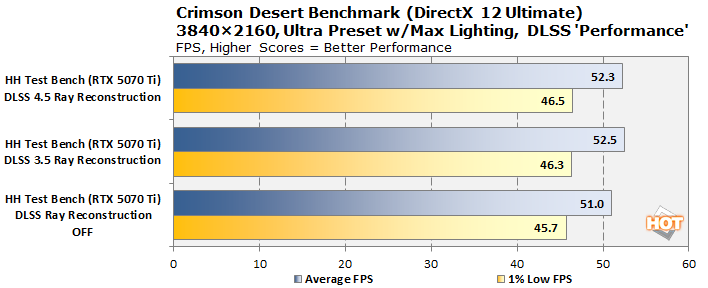
Crimson Desert Ray Reconstruction Benchmark - Image: HotHardware
None, thankfully. In fact, there's really no measurable difference in performance between the 3.5 and 4.5 version. NVIDIA said this would be the case, and also said that older-generation GPUs may suffer a small performance penalty, but we haven't had time to test that yet. Let us know in the comments if you want to see those benchmarks!
Cyberpunk 2077 will be six years old this December, but thanks to continual technological updates post-launch, it remains one of the best benchmarks around. It's particularly notable in this case because Cyberpunk 2077 was the first game to support the original DLSS 3.5 Ray Reconstruction. In fact, the game's path-traced "RT Overdrive" mode really doesn't look correct without Ray Reconstruction.
Ray Reconstruction improves Cyberpunk path tracing considerably. - Image: Zak/HotHardware
Unfortunately, despite spending hours wandering around Night City, I wasn't really able to find a good case where the difference in DLSS 3.5 Ray Reconstruction and DLSS 4.5 Ray Reconstruction is extremely noticeable aside from this one specific place where it stuck out as a visual issue rather than an upgrade:
Cyberpunk 2077 without Ray Reconstruction - Image: Zak/HotHardware
Cyberpunk 2077 with DLSS 4.5 Ray Reconstruction - Image: Zak/HotHardware
At the shooting range near V's apartment in Megabuilding H10, the wire grating covering the window between the shop area and the shooting range suffers significant visual artifacting with DLSS Ray Reconstruction enabled. It's actually worse with DLSS 4.5. The problems don't magically appear with Ray Reconstruction turned on; there's an odd sparkling effect without Ray Reconstruction. It's just that with Ray Reconstruction turned on, it becomes a very distracting shining mess. It's not a common visual artifact—it's not even close to making me reconsider using DLSS Ray Reconstruction in this game—but it just goes to show that even the latest technologies can have their drawbacks.
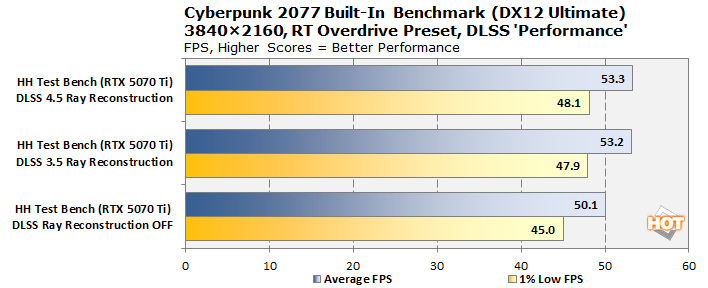
Cyberpunk 2077 Ray Reconstruction Benchmark - Image: HotHardware
Second verse is same as the first. Performance differences are within run to run variance on our Blackwell GPU. DLSS 4.5 Ray Reconstruction does seem to be a little heavier on the tensor cores, but tensor compute is almost never your bottleneck, so it has no real performance effect.
Hogwarts Legacy is our sole representative from the Unreal Engine today, but it actually features numerous ray-tracing effects (shadows, reflections, and ambient occlusion) backported to the older Unreal Engine 4 rather than relying on the Lumen ray-tracing kernel built into Unreal Engine 5. Regardless, the game is still absolutely gorgeous, and DLSS Ray Reconstruction serves to clean up some of the pop and fizzle you can rarely see in shadows with ray-tracing enabled, especially at lower resolutions and frame rates.
Hogwarts Legacy DLSS Ray Reconstruction Comparison - Image: Zak/HotHardware
Once again, despite combing the grounds of the Scottish academy for hours and hours, I wasn't really able to find a clear example of a place that demonstrated the difference in the two AI denoisers. I legitimately did have the impression that the newer DLSS 4.5 Ray Reconstruction was improving the image quality ever so slightly, with marginally better contrast and sharpness in certain scenes, but I simply couldn't capture it in screenshots. Clicking the above will take you to the gallery where you can see the larger individual shots and compare for yourself.
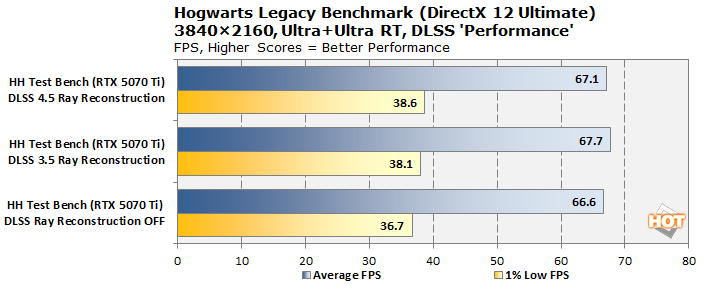
Hogwarts Legacy DLSS Ray Reconstruction Benchmark - Image: HotHardware
Just as in the other games, the performance gap between DLSS 3.5 Ray Reconstruction and its DLSS 4.5 successor is basically noise. You want to use Ray Reconstruction, because it does look better and perform better than playing without it, unequivocally. But I just can't honestly say what DLSS 4.5 Ray Reconstruction is doing over the original recipe in this title.
DLSS 4.5 Ray Reconstruction in Pragmata
Pragmata Game Screenshot - Image: CAPCOM
In sci-fi dad-'em-up Pragmata, Capcom pushes its in-house RE Engine to the limit. This one is a little strange, because you can't enable Ray Reconstruction manually. Instead, it gets enabled automatically when you turn on the game's Path Tracing feature, and as a result, Path Tracing is only available to NVIDIA GPU users despite that the earlier Dragon's Dogma 2 on the same engine had a hidden path tracing feature available to all. Of course, the denoiser on that hidden feature was quite crap, and that may be why DLSS Ray Reconstruction is required in Pragmata.
The beams in this area don't disappear correctly with DLSS 3.5 Ray Reconstruction. - Image: Zak/HotHardware
Pragmata is one of the games that NVIDIA recommended us to test in the reviewer's guide; specifically, the company called out this particular areas one that is significantly improved by the new DLSS 4.5 Ray Reconstruction. Put simply, the lower set of beams in this area move across the ground and vanish at the end of their track. With DLSS 3.5 Ray Reconstruction, the beams oddly seem to linger when they aren't really meant to. NVIDIA noted that DLSS 4.5 Ray Reconstruction cleans that right up, and I can verify that it absolutely does.
It's subtle, but the lighting is a lot better with DLSS 4.5 RR. - Image: Zak/HotHardware
But honestly I think this area over to the left is more interesting. You'll probably need a monitor with good contrast to see the difference, but the shading on the metal box to the left of Hugh and Diana is much more realistic and detailed with DLSS 4.5 Ray Reconstruction. Subjectively, I also observed that Diana's hair is much less likely to turn into a mush of pixels in motion with DLSS 4.5 Ray Reconstruction.
There's another set of images in the gallery showing an empty hallway that is also interesting; the soft reflections in the smooth metallic surface of the hallway are markedly less distorted with second-generation Ray Reconstruction, and the lighting in that scene is richer, too. It's very subtle; you may have to fullscreen both images and tab back and forth to really tell. But I've been playing a lot of Pragmata recently, and just like in Hogwarts Legacy, I definitely had the impression while playing with DLSS 4.5 Ray Reconstruction that it was subtly improving the lighting in every scene just ever so slightly.
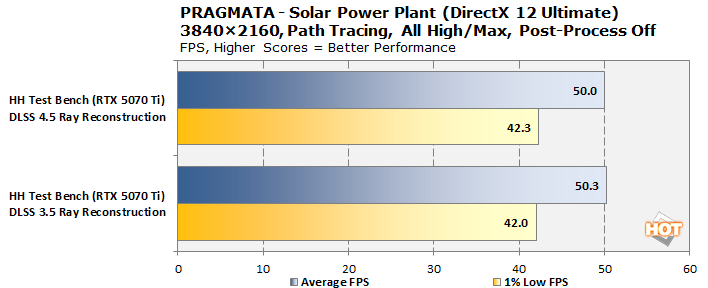
Pragmata Ray Reconstruction Benchmark - Image: HotHardware
There's no way to disable Ray Reconstruction in Pragmata without radically changing the game's rendering load, so just DLSS 3.5 versus DLSS 4.5 here. But, once again, there's no real difference. If you were playing on a much smaller GPU, in a very high resolution, or using an older-generation GPU, it's possible DLSS 4.5 Ray Reconstruction could cause you a performance hit, but at least in my testing, it doesn't seem to make any difference at all.
DLSS 4.5 Ray Reconstruction is an extremely incremental change over DLSS 3.5 Ray Reconstruction. It has no real performance impact over DLSS 3.5 on RTX 40- and RTX 50-series GPUs, and it markedly improves the visuals of just about any game where it's implemented, at least versus not using it at all. Simply put, we recommend using DLSS 4.5 Ray Reconstruction because there's really not much reason not to.
There is a broader argument to be had that Ray Reconstruction in any guise changes the lighting of a scene in ways that may not reflect the artists' intentions, but we're not making either side of that argument today. Frankly, some games (like Pragmata) are now being produced with DLSS Ray Reconstruction as the target denoiser, so using it actually is the artist's intention. In other words, just turn it on. It resolves most of the common complaints with ray-tracing—aside from the performance hit, anyway—and it's actually faster than going without it.
That's been a lot of words, a lot of testing, and a lot of time to come to that simple conclusion, but it's the God's honest truth. Kudos to NVIDIA for continuing to iterate on its technologies, and furthermore for bringing them to its customers from years back, as DLSS 4.5 Ray Reconstruction works on GeForce RTX 20 and RTX 30 series cards as well, albeit with some measure of performance impact. We didn't have time to test that today, but if you're eager to know how much DLSS 4.5 Ray Reconstruction hurts on older GPUs, let us know in the comments below.
A 30-year PC building veteran, Zak is a modern-day Renaissance man who may not be an expert on anything, but knows just a little about nearly everything.
TOP STORIES
Which New GPU Is For You?
KEEP INFORMED
Stay updated with the latest news and updates. Subscribe to our newsletter!