



MSI Unlocks Ultra Low Latency Performance For Standard DDR5 RAM


In a blog post today, MSI highlights its new High Efficiency Mode. In short, this mode lets the user select from four preset memory timing profiles (Tightest, Tighter, Balance, and Relax) that apply progressively tighter memory timings to their current modules. MSI says that on the "Tightest" setting, the values selected bring standard EXPO DDR5 close to EXPO ULL latency levels. This drastically reduces certain memory sub-timings to improve memory performance.
That's definitely a good thing... as long as your memory is capable of running with those tight timings. As far as we can tell, the feature does not appear to perform any kind of testing or verification, so it's up to the user to make sure their system is stable under the new configuration. In essence, this is just a convenient shortcut for DDR5 memory overclocking—which is welcome, to be clear. Normally, overclocking your RAM requires digging into submenus four layers deep and fiddling with arcane values that most PC gamers have no hope of understanding.

So if it can make your system unstable, why would you bother to do this? Well, what's the primary bottleneck in game performance? The right answer is that it depends on what you mean by "bottleneck." The ultimate limiter on performance in most 3D games is going to be the GPU and its memory subsystem, but that generally tells you the average and maximum performance. The CPU can be a limitation, but most modern game engines are heavily multithreaded and it's just not common that the CPU holds things up anymore. The thing that sets the baseline of your performance in most games, on most systems, is the memory. Eliminating a huge portion of these memory-related stalls is exactly how AMD's 3D V-Cache drastically improves gaming performance; because the cache is so much bigger, more requests hit the cache and don't have to go out to the slow RAM.
Thus, tuning your memory so that it spends less time refreshing and more time responding to data requests from the CPU is exactly how you improve the worst-case, 1% low frame times in your games. When the CPU has to stall and wait on RAM, everything else grinds to a halt. Given that we are talking about things that happen on the timescale of tenths or hundredths of a microsecond, it might seem like there's no way memory tuning could matter, and you've probably heard that it doesn't in the past. Well, it's true that you're not going to have much effect on your average frame rates through memory tuning, but the benchmarks don't lie: 1% lows absolutely improve, and sometimes considerably.
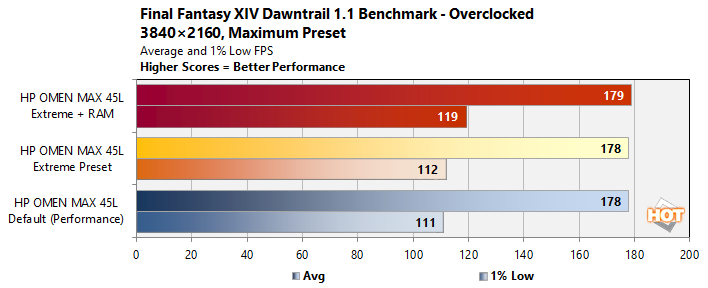
We've recently talked about memory tuning in a few places, such as our review of the HP Omen Max 45L desktop. That powerful system came with high-end memory that was only equipped with standard JEDEC memory timings. By manually overclocking the memory a bit, we saw tremendous gains in certain gaming benchmarks despite that system having a Ryzen 9 9900X3D 3D V-Cache CPU. That's because that system saw improvements in both memory transfer rate (bandwidth) as well as drastic reductions in memory latency.
Being honest, if you're interested in squeezing every last percentage of performance out of your PC, spending an afternoon messing around with memory overclocking ain't a bad way to do exactly that. Particularly for systems that have smaller caches, like Intel Core i-family chips as well as AMD G-series CPUs, a little bit of memory tuning can go a long way, especially in idiosyncratic workloads like emulation. Tools like MSI's High Efficiency Mode bring a very welcome sort of one-click simplicity to the time-honored (and time-consuming) practice of memory overclocking.





