



Microsoft Vows To Fix Windows 11's 'Cluttered And Sluggish' Right-Click Menu


In line with pledges made to improve Windows 11, Microsoft is unleashing some cool new features in the latest Insider Experimental Preview build. The headline feature of Windows 11 Experimental Preview Build 26340.9212 is its newly redesigned right-click menu within File Explorer. Not only does it look a lot better, it's arranged in a more familiar way and should benefit from the performance improvements made to File Explorer. Plus, options added by app extensions are now placed into their own customizable dropdown menu, which declutters the menu significantly.

While this Experimental Insider Preview build should already be available, that only applies if you're in the Windows Insider Program and opted into the Experimental channel. Otherwise, you'll have to wait for the features to arrive in the Beta channel and stable branch Windows users could be waiting a month or more for these features to arrive. Hopefully, Microsoft can fast-track testing for UI and performance improvements like this.
Besides the right-click menu changes, a banding issue with image previews in File Explorer was also fixed in this build. Outside of File Explorer, we've also seen various improvements and tweaks across Windows 11. This includes new Get Started screens, a modernized Magnifier tool, and even an update to Emoji 17.0 including some redesigned classic Emoji. The change to the salute Emoji is my favorite.
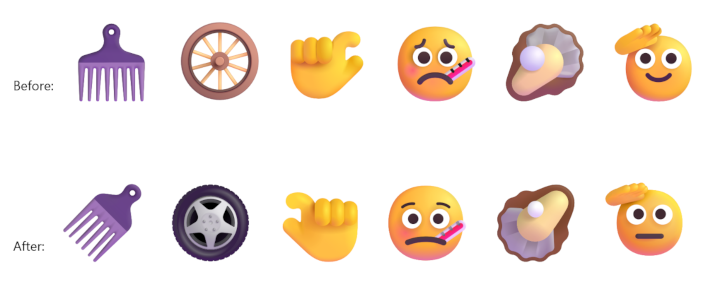
Other features being added include new entry points for the Camera Roll Backup feature, the removal of the deprecated Windows Management Instrumentation Command-line, the removal of Drag Tray for future testing and replacement, and some new Recovery and Personalization features.
But performance and UI improvements to File Explorer are certainly the highlight of Microsoft's official patch notes and blog post on this update. In the blog post, Microsoft highlights its focus on not only streamlining File Explorer's performance, but removing pain points like freezes when renaming files, delayed clicks, etc. There's a heavy focus on "everyday experiences people rely on most" from the Windows 11 team lately, and it's great to see.




