



Microsoft Kills NVMe Registry Trick For Faster SSDs In Windows 11, Here's A Workaround


Of course, you read the headline, so you already know there's a trick to work around the block. We'll tell you about that in a second, but first let's talk about why you'd want to do this and the dangers of doing so. See, Non-Volatile Memory Express (NVMe) is a protocol that sits on top of PCI Express. PCI Express is the physical layer, and NVMe is the protocol layer. Wedging that SCSI miniport in the middle can increase access latency and create unnecessary CPU overhead; it's already a bottleneck for faster SSDs.

Then why did Microsoft do it? Well, for one thing, it was likely simple to implement, and it's rock-solid as far as compatibility goes. Also, when we were talking about PCIe 2.0, NVMe 1.0 SSDs, it didn't really matter; the drives just weren't fast enough for it to be a problem. On the latest PCIe 5.0 and CXL datacenter SSDs, the StorNVMe.sys driver actually can limit performance. It also takes up precious CPU time that could better be spent elsewhere—or saved, in the case of laptops and other mobile machines.
The new native driver is exactly what it sounds like: it speaks NVMe to the drive, and it passes those messages along to the kernel without translation. In theory, this improves performance, and it also lets the drives themselves work more efficiently as native NVMe commands can be passed to the drives allowing the controllers to work their magic, potentially reducing writes and accelerating concurrent accesses.
So if that's the case, why hasn't Microsoft simply enabled the new nvmedisk.sys native driver by default? Mostly because there's not much need. "If it ain't broke, don't fix it," as they say, and replacing the older StorNVMe.sys with nvmedisk.sys breaks all kinds of stuff, like Samsung's Magician software and CrystalDiskInfo. It also simply doesn't give much benefit on typical consumer SSDs. Here's our test on the SK hynix PCB01 SSD inside the Alienware Area-51 we reviewed late last year:
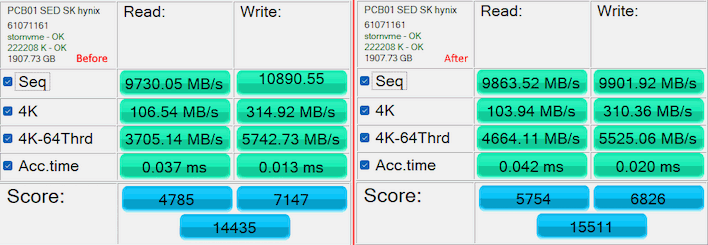
There's basically no change, and the changes that happened could be argued to be a regression. But really it's just run-to-run variance, with no real difference in throughput or latency either way. You'd have to be running incredibly heavy I/O workloads to notice the difference, and you may see performance regressions worse than ours; SSD firmwares have been tightly tuned for the StorNVMe.sys driver for a decade. If you're not running an extremely high-end storage subsystem in your desktop, there's simply no need to make the swap.
If you're still keen to try and you're on Windows 11 25H2 or newer, copy the text below into Notepad and save the file as "force-native-nvme.reg". Make sure to change the file type to "All files (*.*)" in the save dialog so Notepad doesn't stick a spurious .txt extension on the end.
Windows Registry Editor Version 5.00
[HKEY_LOCAL_MACHINE\SYSTEM\CurrentControlSet\Policies\Microsoft\FeatureManagement\Overrides]
"3244671118"=dword:00000001
"1853569164"=dword:00000001
"156965516"=dword:00000001
"1409234060"=dword:00000001
"735209102"=dword:00000001
This registry tweak contains both the old and new flags and should in theory work on both extant builds as well as current insider builds; it worked on both of the machines we tested on 25H2 and 25H2 Insider Beta channel.
Assuming it shows up in Explorer as a "Registration Entries" file, you should be able to double-click it to apply the patch. A message will pop up asking if you want to add the information to the registry; tell it "Yes" and then reboot.
If it doesn't work for you, there's another trick: grab ViveTool, throw it in a folder somewhere, open said folder in the Command Prompt or Windows Terminal, and run ".\vivetool /enable /id:60786016,48433719". As long as it doesn't throw an error, close the window and reboot. Thanks to German site Deskmodder for details on both tricks.
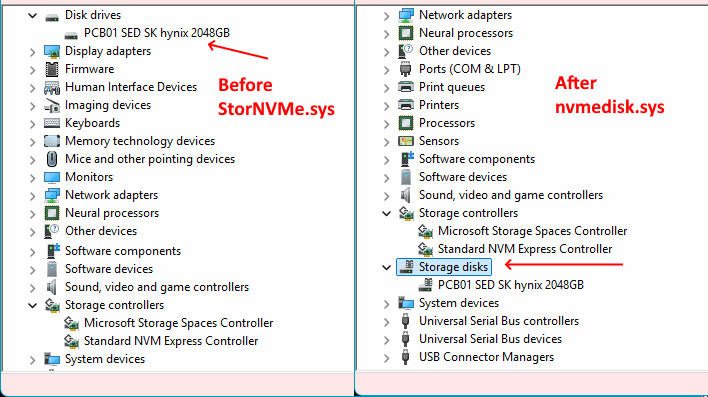
After rebooting, check Device Manager (Win+X, M) and make sure the drive has disappeared from "Disk drives" and appeared under "Storage disks" below "Storage controllers." You'll still see the "Standard NVM Express Controller" entry for StorNVMe.sys, but if you check the driver details on the "new" Storage disks device, you'll see that it is indeed using nvmedisk.sys.
Keep in mind that attempting this hack has a small chance of rendering your system unbootable; Windows really doesn't like it when it can't find its system disk. Likewise, keep in mind that you're not likely to see a major gain in disk I/O speed from this modification. It's possible that things could improve, and it's possible things could get worse. In general, we recommend most users to skip this one, but if you're hammering your SSDs and I/O limited, you might just see a speed bump from the new driver.
Let us know in the comments below if you try out this mod, whatever your results.





