



Tired Of Windows 11's AI Bloat? Use This Tool To Remove It All In Seconds


It's all pretty simple—the hardest part is right-clicking to open PowerShell as Administrator. Then, before running the tool, you'll need to verify that you're on Windows PowerShell 5.1 with the command below.
$PSVersionTable.PSVersionPaste or type this exact command into PowerShell, and note your "Major" and "Minor" build numbering, which should be "5" and "1", respectively. If it works, you can safely proceed to launching the tool with the next command.
& ([scriptblock]::Create((irm "https://raw.githubusercontent.com/zoicware/RemoveWindowsAI/main/RemoveWindowsAi.ps1")))
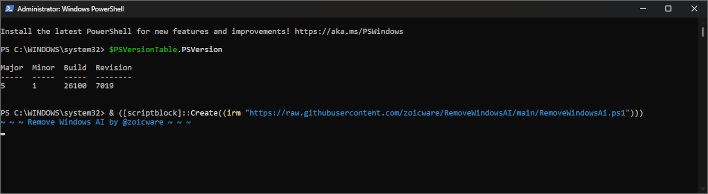
If your PowerShell output matches what you see here, the UI window screenshotted below should pop up next. You can click the question marks beside each option for a detailed explanation of what it's doing, and the tool won't run until you click "Apply", at which point the original PowerShell window becomes a live status window as the tool does its job. You can leave it in the background if you like, but the tool will automatically close when finished either way.
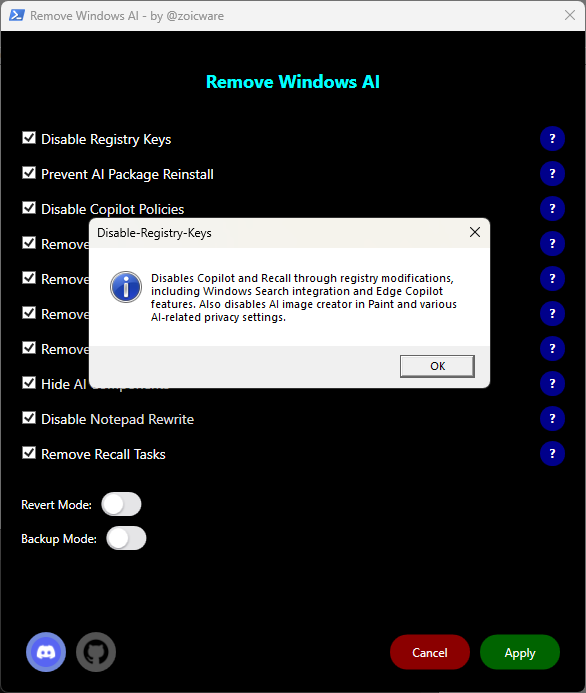
Once finished, the tool will prompt you to restart your PC to finish the cleaning process. Zoicware's Remove Windows AI script ran flawlessly for me, but fellow Hot Hardware writer Zak Killian did mention encountering "some errors that were fairly cryptic". He doesn't report any issues with features being broken or disabled, besides the AI features explicitly disabled by the utility, though. Should either of us or the countless others who have run the tool want to reverse the process, it's thankfully just as easy as it was to run, and saves users a manual process that could otherwise take hours.
One thing worth noting before we wrap up is that this tool won't quite work as well if you're using it on a Windows Insider Build, where AI features are more pervasive. Zoicware states on the original GitHub page that Insider features won't be added to the script until they come to a stable release, i.e. features present on current version 25H2.
Image Credit: Microsoft




