



TerminalFix Attacks Use Fake CAPTCHAs To Secretly Hack Windows PCs


TerminalFix is more dangerous because it increases "the likelihood that complex, multi-line scripts execute successfully."
The goal of TerminalFix is to deploy a multi-stage attack that ultimately gives the attacker persistent, network-level proxy access through the compromised host. If targeted properly at an unsecured enterprise network, TerminalFix could result in substantial data theft and malware spreading through the network from the first infected machine. From there, attackers can either subtly exfiltrate sensitive data or go as far as installing ransomware across the infected network.
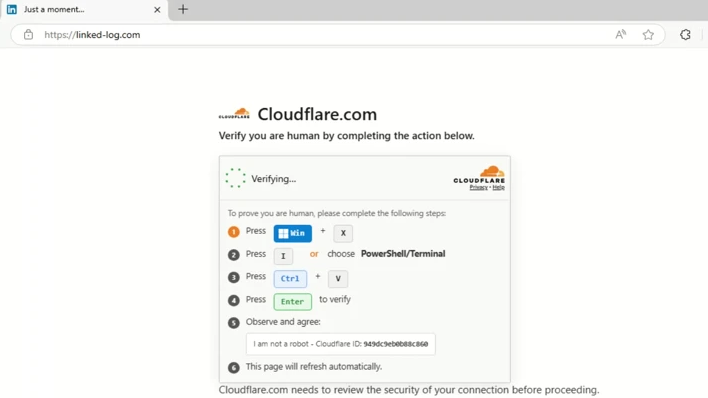
It is a scary prospect, but there's no reason to be hysteric. The best protection from TerminalFix starts with educating members of your organization about phishing attacks like these. For the majority of our readers, I imagine that a CAPTCHA instructing you to run PowerShell or launch a command prompt would instantly raise red flags. But if you don't actively follow the cybersecurity beat or are simply caught off guard by the unconventional nature of the attack, we could see users falling for this.
Beyond the traditional wisdom about educating members of your organization, Microsoft Threat Intelligence also provides an exhaustive list of mitigation strategies in its original blog post. This includes restricting PowerShell and Windows Run dialogs, monitoring for DLL sideload indicators, blocking Flash plugins, and enabling cloud-delivered protection in Microsoft Defender Antivirus. If you're a business owner or are responsible for your IT department, following Microsoft's instructions, for peace of mind if nothing else, is recommended.
For end users reading this, you have less to worry about because ClickFix and TerminalFix are typically aimed at enterprise environments rather than the average Joe or Jill. Even so, it's good to know that attacks like this exist, and to never open up a command prompt or PowerShell unless you know exactly what you're doing and why.




