



Microsoft Unveils Major Microsoft 365 Copilot Redesign To Streamline Office Workflows


The update trades the old, rigid chat box for a more dynamic, task-aware workspace built around a design philosophy the company calls progressive disclosure. It essentially shows you only what you need, when you need it. According to Microsoft, the goal is to shift Copilot from a scattered collection of AI features into a unified, context-aware layer that adapts to what you're working on in real time.
A Smarter, Cleaner Interface
The biggest visible change is an expandable prompt area inside the Copilot app. The text input can now stretch into a full workspace canvas, giving users room to drop in large chunks of code or data, preserve complex document structures, and apply basic formatting before firing off a command.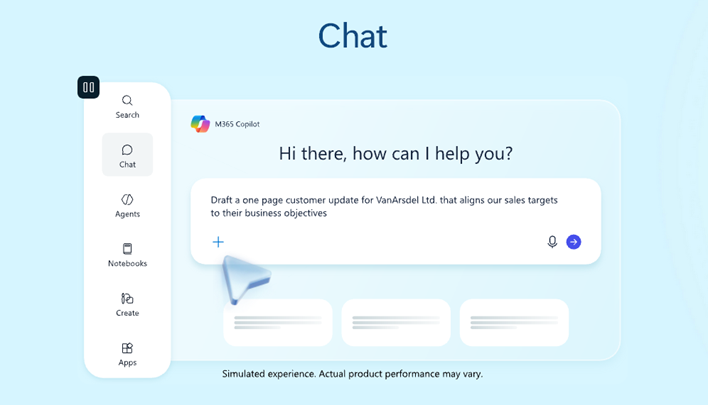
To keep things from feeling cluttered, the app starts with a clean, minimal layout. Additional tools, sidebar options, and conversation history only appear when needed, tucked behind a collapsible left navigation panel. Microsoft has also baked in a unified pinning system, making it easier to jump between different projects and pick up where you left off.
Responses have gotten a facelift too. Instead of dumping everything at once, Copilot now delivers output in layered chunks, starting with a concise summary, then progressively surfacing formatted tables, suggested follow-ups, and relevant action shortcuts as users continue to refine their requests.
Work IQ And Model Selection
Driving the smarter behavior under the hood is a new layer Microsoft calls Work IQ. It pulls together data from your emails, files, chats, and calendar to build a contextual understanding of how you and your organization actually work.For power users, Work IQ also introduces something some may find genuinely useful: the ability to manually select which AI model Copilot uses. Need a quick text summary? Pick a faster, lighter model. Tackling a complex, multi-document analysis? Switch to a heavier reasoning model. It's a level of control that productivity enthusiasts should appreciate.
Performance Improvements
A prettier UI means nothing if the app still feels sluggish, and Microsoft says it has put real work into the performance side of the equation. The company reports app load times have been cut by more than 50%, essentially slashing launch time in half. Response times for complex, multi-step queries have improved by 10%, and better internal grounding has reduced hallucinations while improving how closely outputs stick to the user's formatting requests.
Copilot Across Microsoft 365
Beyond the standalone app, Microsoft is rethinking how Copilot surfaces inside the full Microsoft 365 suite. Rather than scattering AI buttons across various menus and ribbons, the company is introducing a single entry point that sits directly above whatever document or file you have open.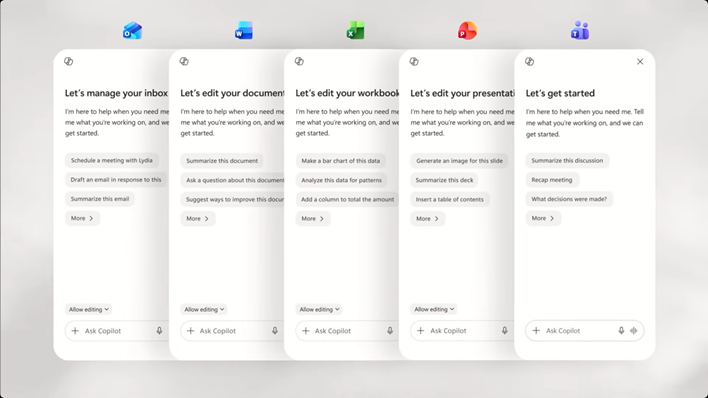
From there, Copilot works in two ways. It can make targeted inline edits, directly within a Word paragraph, an Excel cell, or a PowerPoint slide, or it can expand into a dedicated side panel. In that side panel mode, specialized agents like Designer or Researcher can pull data across multiple applications, letting users build presentations from spreadsheet data or pull in content from other documents without ever leaving their active window.
It's an ambitious rethink of how AI and Copilot fits into Microsoft’s productivity suite. Time will tell if people finally start warming up to Copilot after such a tumultuous start to the relationship.





