



Bypass Microsoft’s Queue: How to Force-Enable New Windows 11 Performance Boost


The fix arrives in a newly released cumulative update preview labeled KB5089573, which bumps systems to builds 26100.8524 and 26200.8524. Behind the scenes, this update is part of Microsoft's internal initiative codenamed "Windows K2," an ongoing performance optimization effort the company has been quietly running with a target timeline stretching through 2027.
In the official support documentation, Microsoft describes the change simply as: "[General Performance] This update accelerates app launch and core shell experiences such as Start menu, Search, and Action Center." What that description leaves out is the more interesting part, which is the update introduces a feature called the Low Latency Profile (LLP). When a user triggers a common action like opening a flyout menu or clicking the Start button, the OS briefly pushes the CPU into its highest-frequency boost state for one to three seconds. Instead of waking up gradually from a low-power state, the processor fires up at full speed to handle the rendering task right away.
Early testing of the Low Latency Profile shows UI flyouts loading up to 70% faster, with general shell responsiveness improving by as much as 40%. It is worth noting, though, that according to some reports, the performance gains tied specifically to app launches are being rolled out separately and will arrive in a future update wave.
KB5089573 also brings a handful of other useful additions. A new "Shared Audio" panel in Quick Settings lets two people stream audio to separate Bluetooth headphones at the same time from a single PC, similar to the AirPods audio sharing feature Apple users are familiar with. Task Manager is also getting some attention, with new visibility into NPU and neural engine usage, plus an "Isolation" column for tracking AppContainers.
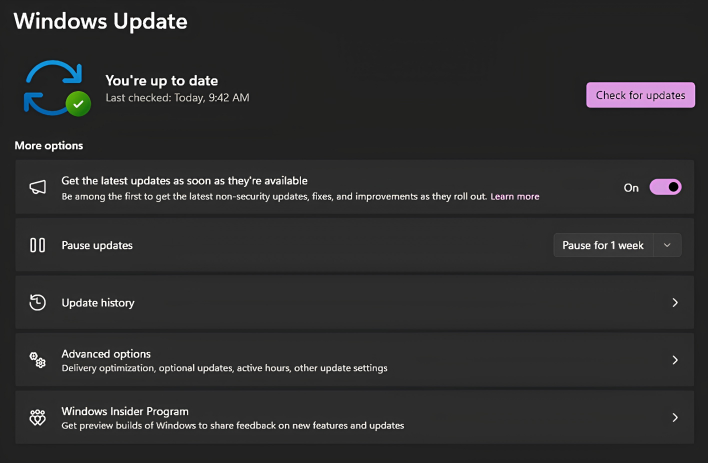
Because this is a non-security preview update, it will not install automatically unless you have the "Get the latest updates as soon as they're available" option enabled in Windows Update settings (seen in the image above). If you want to grab it before it rolls out broadly on June's Patch Tuesday, head to Settings > Windows Update > Advanced options > Optional updates.
One thing to keep in mind is Microsoft is using its Controlled Feature Rollout (CFR) system, which means the Low Latency Profile may take a few weeks to activate on your machine.





