



Microsoft Responds to Windows 11's April Update Breaking Third-Party Backups


The latest April 2026 security update for Windows 11 version 25H2 and 24H2 is proving to be a double-edged sword for some users. On one hand, the cumulative KB5083769 update that began rolling out on the second Tuesday of this month (per Microsoft's usual Patch Tuesday cadence) includes a host of improvements and security patches, including better protection against phishing attacks that use Remote Desktop (.rdp) files. However, it's also causing major issue with some third-party backup applications, such as Acronis, NinjaOne Backup, and more.
Acronis even acknowledged the issue in a support document, saying the root cause of backup failures is "related to the installation of Windows update KB5083769 on Windows 11 systems." According to Acronis, the update can introduce system-wide issues that affect Microsoft VSS (Volume Shadow Copy Service) operations, which in turn leads to backup failures.
As a temporary workaround, Acronis advises uninstalling KB5083769 and rebooting your PC, after which backup operations should resume without issue.
Microsoft also acknowledged the issue but is not advising users to uninstall the patch. To paraphrase Microsoft using Apple's famous jargon, the issue at hand is a feature, not a bug.
"After installing Windows updates released on or after April 14, 2026, certain third-party backup applications that rely on the kernel driver psmounterex.sys might experience failures when attempting to mount or manage disk images. These Windows updates include routine security hardening to help protect devices by blocking third-party drivers with known vulnerabilities," Microsoft explains.
Microsoft goes on to list a handful of negative behaviors that IT admins might run into after deploying the April patch, including backup apps failing to mount backup image files as virtual drives, errors to timeouts when attempting to browse or restore from a backup image, code integrity errors in Event Viewer, and more.
"This intentional change of behavior is designed to protect devices against known vulnerabilities in the psmounterex.sys kernel driver. Following the installation of Windows updates released on or after April 14, 2026, Windows Code Integrity enforcement will block vulnerable versions of this driver from loading when the Microsoft vulnerable driver blocklist is enabled," Microsoft says.
Microsoft goes on to say that third-party backup applications that depend on the psmounterex.sys driver will continue to run into issues until the vendor(s) issue an update. So rather than advising users to uninstall the April update for Windows 11, Microsoft says affected users should check with their backup software vendor to see if an update is available.
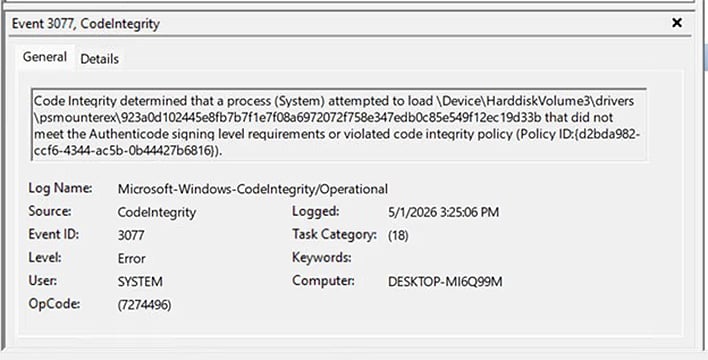
If you're unsure if your backup software's driver is being blocked by the update, there is an easy way to check. Fire up the Event Viewer by right-clicking Start and select Event Viewer, then on the left pane, go to Application and Service Logs > Microsoft > Windows > CodeIntegrity > Operational.
Once there, look for Event ID 3077 in the middle pane to see if you're affected by this.




