



Microsoft Just Gave Edge A 33% Speed Boost, Contributes Tech To Chromium Source


But what does it actually mean, and moreover how does it work? The first thing to know is that even if there is not a visible Microsoft Edge window, there is a chance that Edge is already running in the background. One of the key changes made with accelerated app launches is the ability to recognize if an existing Edge process is already running and open a new Edge window more quickly.
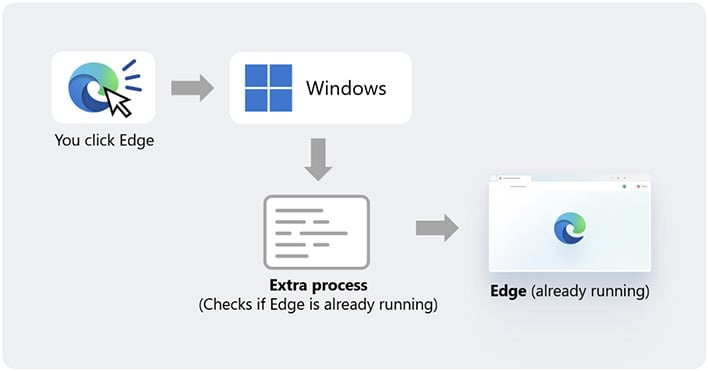
The graphic above illustrates the typical process, without accelerated app launch. With accelerated app launch, the first launch of Microsoft Edge instead sends a registration request to Windows, and then any subsequent launch attempt can have Windows notify the Edge process directly instead of running an extra process just to see if Edge is already present.
Since Edge, like Google Chrome, is based on the open-source Chromium browser project, this work should make its way to other Chromium-based browsers as well, in due time.
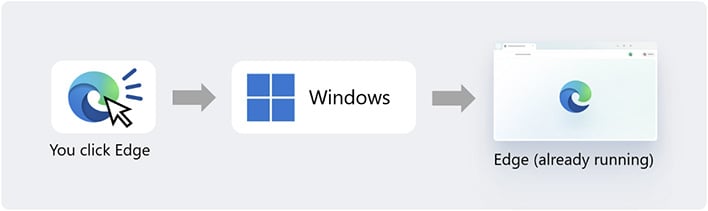
One important caveat behind Microsoft's "up to 33%" speedup is that it only applies in scenarios where Edge was already running in some way, usually in the background. Accelerated app launch doesn't seem to impact cold launch times, but those should still be near-instant on a modern system with a decent SSD* and CPU. Microsoft has been hard at work optimizing Windows 11, and has made significant progress that's evident in the most recent 26H2 update.




