


Microsoft Unleashes Up To 120 FPS Auto SR On Undocked ROG Ally X


Specifically, the new features are the ability to use AutoSR while playing in handheld mode, in games running at 1080p resolution, while using Microsoft's Auto HDR feature, and support for up to 120 FPS mode. These are all great improvements to the technology, but each one comes with some caveats, as you'd expect.

The best of these new features is obviously support for handheld mode. There's not much point in a gaming handheld if you aren't using it as a handheld; just buy a mini-PC. With this update, you can use AutoSR on the internal screen of handhelds, which seems like it should have been obvious, but it wasn't available until now. To make use of AutoSR on the internal screen, you'll have to cut resolution down to 720p—otherwise, there's no upscaling to do since AutoSR doesn't work like FSR; it happens after the game is done rendering the frame, which is both why it can work on nearly any game and also why it can cause weird artifacts on HUD and UI elements.

However, if you are using an external display, you can now use AutoSR on games running at 1080p. Obviously, your external display will need to have a higher-than-1080p resolution for this to make sense, and Microsoft advises that "performance may not be as optimal", but that the configuration still makes sense "especially in older games." What Microsoft is tacitly saying here is that the latest AAA 3D games don't work well on handhelds at 1080p resolution, although AutoSR has its own performance limiter in terms of the NPU performance, so that could become a new bottleneck.
Another huge fix, particularly for the ASUS ROG XBOX Ally X20 that we just reviewed, is that you can now use AutoSR with AutoHDR. The biggest upgrade of the XBOX Ally X20 over the original XBOX Ally X is that the newer machine's built-in screen is a brilliant HDR OLED. Most of the kinds of games that you would want to play on a handheld don't actually support HDR, though. Microsoft's AutoHDR feature does a surprisingly great job at converting SDR games to HDR tonemapping, and it is, practically speaking, a requirement for the XBOX Ally X20. That pretty much precluded you from using AutoSR, so this fix is essentially a critical update.
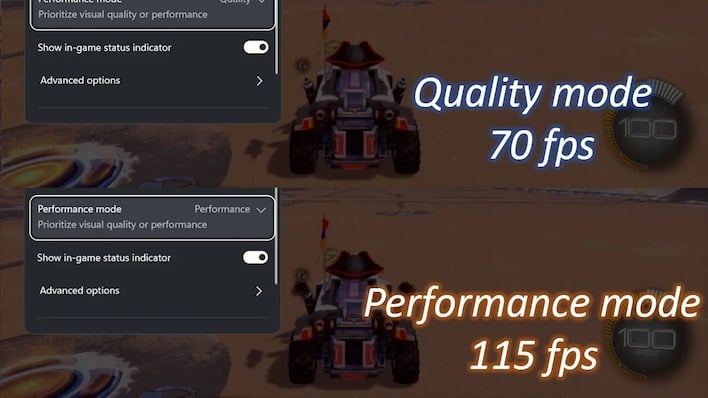
Finally, there's a new "Performance" mode for Auto SR that allows it to increase performance up to 120 FPS. It's not exactly clear what is changing here since, unlike DLSS and FSR, AutoSR isn't changing the fundamental render resolution of the game. It seems like there may be a lightweight model for AutoSR, similar to the newer "FSR4 Lite" for handhelds as well as the various versions of DLSS on both PC and Nintendo Switch.
Unfortunately, despite that Microsoft says the update is rolling out, due to the staggered nature of Windows Update, I haven't been able to grab the update on either of my supported devices yet, so I don't have any numbers to show you yet. Looking around at our colleagues, it doesn't seem like anyone else has tested it yet, either. When I tried out AutoSR two years ago on the Samsung Galaxy Book4 Edge, I wasn't impressed by its low quality upscaling and serious text artifacting.
Presumably things have improved in the interim, but I can't say for sure. In any case, in most games, you'll want to use a built-in upscaler where possible, as those are usually inserted before the HUD is drawn, letting you have upscaled 3D graphics with razor-sharp 2D—especially now that FSR4 is fully supported on these handhelds. Let me know in the comments if you'd like to see in-depth AutoSR testing and I'll see if I can't force the update issue.