



Firefox Gets A Built-In VPN As Mozilla Pushes Free Privacy Upgrade With 50GB Cap


Once upon a time, Mozilla's Firefox browser was super popular, accounting for a nearly a third of the global browser market at its peak. That has not been the case in a very long while (well over a decade), though Mozilla is hoping its latest free perk, a built-in VPN for enhanced privacy, will help it regain some of the market share it's lost to Chrome, Safari, Edge, and other options.
Mozilla claims "Firefox is the only major browser to include a built-in VPN like this for free — giving you more control over your privacy, right where you browser."
Firefox is not the only browser out there to ship with a baked-in VPN, though it's free, it offers a generous 50GB monthly cap, and it comes with the promise that Mozilla will not sell your data or smack you over the face with ads to pay for the free perk.
"Firefox’s built-in VPN is designed differently. It does not sell your browsing data and does not inject advertising into your traffic. Instead, we offer a limited amount of browser-level protection for free, alongside Mozilla VPN, our paid, unlimited, full-device VPN service," Mozilla explains.
While that's nice (along with a recently introduced AI kill switch), therein also lies the rub. Mozilla is upfront about the fact that this implementation does not offer full device protection. It's strictly focused on securing your traffic while browsing the web in Firefox, and making the process as simple as possible.
I couldn't test it out because I'm not one of the lucky chosen ones to receive access in the latest 149 build. However, if you use Firefox and are invited to the free VPN party, you'll be hit with a setup prompt. If you choose to participate, you'll be assigned to sin into your Mozilla account, and then have the option to turn the VPN on.
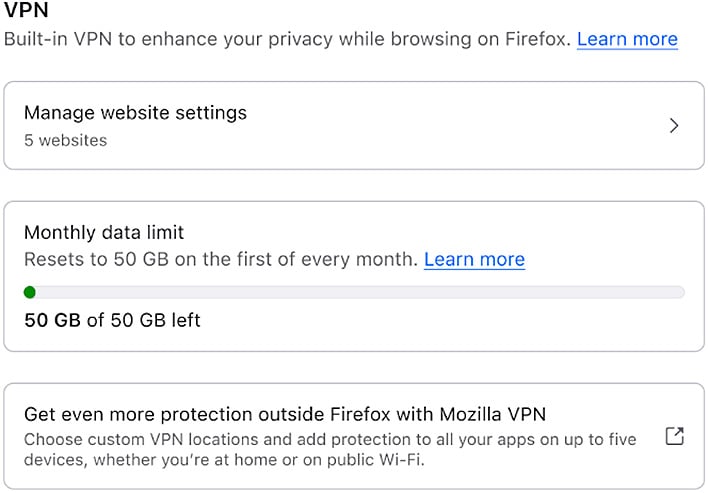
After all that is complete, you should see a VPN icon in your browser's toolbar that acts as a one-click toggle. Beyond the initial prompts, there is nothing to download and no apps or extensions to install.
"Once it’s on, Firefox routes your browsing traffic through a proxy network that replaces your IP address before it reaches a website. The sites you visit see the proxy’s IP address rather than your own. Firefox already encrypts your traffic with HTTPS, but masking your IP adds another layer of privacy. You can mask the URLs you’re visiting from anyone trying to spy on your network traffic on public Wi-Fi, like while you’re enjoying a latte at your favorite coffee shop," Mozilla says.
What happens if you reach your 50GB monthly cap? At that point, VPN protection is disabled until the next cycle. You'll also see a confirmation to make sure you don't inadvertently surf unprotected without realizing it.
I'd like to say that I tested out Firefox's new built-in VPN and it works as advertised, but I'll have to wait for Mozilla to expand the roll out to more users, myself included. In the meantime, feel free to test it out yourself and drop a comment. Also see Mozilla's setup guide for more instructions.




