



Worried Your Home Network Could Be Hacked? This Tool Can Help


The GreyNoise IP Check tool, available through GreyNoise Labs, is a one-click utility to check your IP address for suspicious activity. This is especially useful for detecting botnets and other unsavory practices that aren't targeted at you exactly, but rather utilizing your devices for attacks elsewhere. GreyNoise's IP Checker and Visualizer can help you determine if a device on your network is being used for malicious purposes, exactly what that purpose is, and even when the behavior started. It's all very thorough.
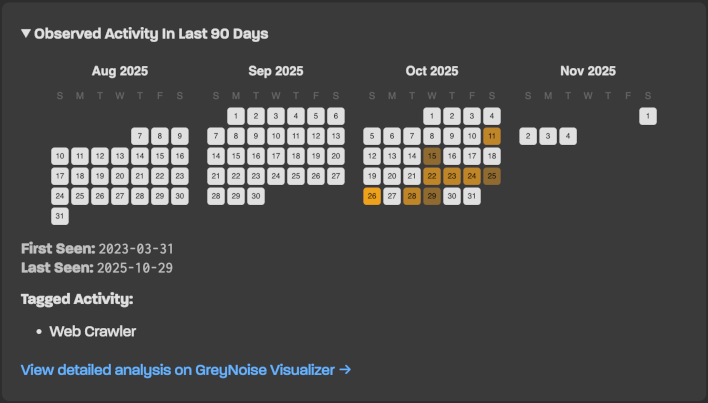
I'm not worried about the flag—and the reason I'm convinced it's false is because I've seen similar oddities before. Those messages were because I'm using a T-Mobile 5G Home Internet solution, which often flags me as being in a different city than I actually am. Why GreyNoise only picked up on that the second time I ran the checker, I can't be sure, but even taking their tool at face value, it would seem to have more to do with T-Mobile's wonky IP assignments than anything happening on my personal home network.
If you're on a wired cable or fiber broadband connection and receive a flag from this tool, though, you may have more to worry about if you receive a message like that. Be mindful that usage of a VPN or public hotspot can obviously disrupt the intended use of this service, and it's no substitute for good security practices and antivirus / antimalware software, etc.
All GreyNoise's IP Checker can do is inspect your network activity, not isolate or repair an infected device. The GreyNoise IPCheck tool should be considered one of the first steps to take when securing your home network—further steps include a properly-configured firewall and proper cybersecurity practices, including reputable security software.




