



Heads Up, Gamers: Windows 11's New Memory Feature Could Tank Your FPS


The push comes down to closing a major security gap at the deepest level of the operating system. Memory Integrity creates an isolated virtual sandbox to verify driver code before it executes in kernel memory. By strictly enforcing these checks, the feature prevents "Bring Your Own Vulnerable Driver" (BYOVD) attacks—a prevalent threat tactic where malware uses outdated or flawed third-party drivers to hijack the kernel and completely bypass standard Windows Defender protections.
While it's a legitimate security upgrade, this background virtualization layer can come at the cost of gaming performance, even on the latest processors. Running continuous memory security checks creates overhead on the processor, which can result in frame drops and micro-stutters, particularly in CPU-heavy or high-refresh-rate competitive titles. While modern CPUs with hardware-level virtualization support handle this burden better than older chips, many performance enthusiasts still choose to leave HVCI disabled to guarantee maximum frame rates and minimal system latency.
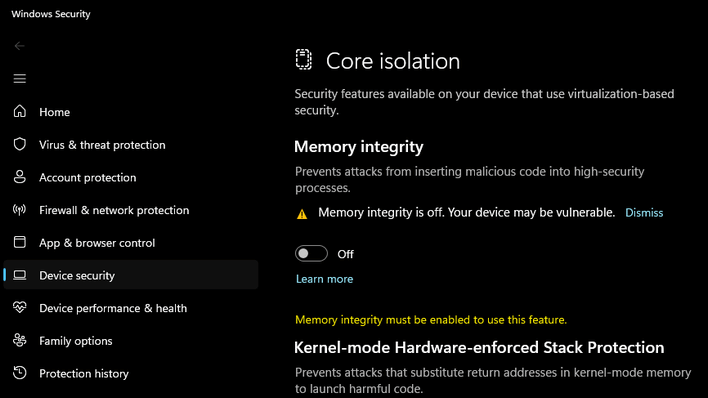
If you prefer to prioritize maximum gaming performance over kernel-level isolation, you can easily opt out before or after the update arrives. Open the Start menu, search for Core Isolation, and select the matching System Settings option. Under the Core Isolation menu, toggle the Memory integrity switch to Off. Because Microsoft's auto-enablement routine is designed to respect existing user preferences, setting this toggle manually supposedly ensures future updates won't quietly turn it back on behind your back.
My personal inclination toward suspicion and skepticism as well as my distrust of overbearing security measures leads me to doubt the necessity of this change, but at least Microsoft is claiming that it won't revert the change if you have manually configured this setting. (Of course, that's also what it said about Microsoft Edge desktop icons.) There are likely millions of everyday users who never open their security settings, though, and they might start wondering why their system is running more slowly in their favorite old game, like Guild Wars 2. Auto-enabling Memory Integrity establishes a stronger default baseline for the average user but it definitely won't be without its consequences for a few gamers out there.
Thanks to WindowsLatest for the spot!





