



Windows 11 Insider Preview Build 22000.65 Released, How To Download It Now


Microsoft introduced some pretty significant UI updates with Windows 11, along with some stringent hardware requirements (like the need for a TPM 2.0 module and an AMD Ryzen 2000 or newer processor, for example). With that said, here are the latest updates that are coming with Build 22000.65:
Changes and Improvements
- Start now has a search box to make it easier to find what you're looking for.
- Taskbar will now show across multiple monitors which can be enabled via Settings > Personalization > Taskbar.
- We have updated several system alert dialog boxes such as the alert for when the battery is running low on your laptop or when you change your display settings with the new Windows 11 visual design.
- The 'Power mode' settings are now available on the Power & battery page in Settings.
- Right clicking the desktop now directly has a Refresh option without needing to click "Show more options".
- Right clicking a .ps1 file in File Explorer now directly has a Run with PowerShell options without needing to click "Show more options".
- Available snap layouts when using smaller PCs in portrait orientation have been optimized for that posture. You can now choose to snap three apps on top of each other, instead of four quadrants.
- Based on the collaboration with the most popular GIF provider in China, weshineapp.com, GIF selections are now available for Windows Insiders in China via the emoji panel (WIN + .). If the location is set as China, then GIF data will appear from weshineapp.com.
- Right-clicking on the volume icon in the taskbar now includes an option to troubleshoot sound problems.
Given that this is still an early pre-release build of Windows 11, Microsoft also provided an extensive list of fixes for File Explorer, Search, and Widgets (among other apps). However, dozens of outstanding issues will need to be addressed in future Windows 11 builds (which you can see in full by visiting the Windows Insider Blog).
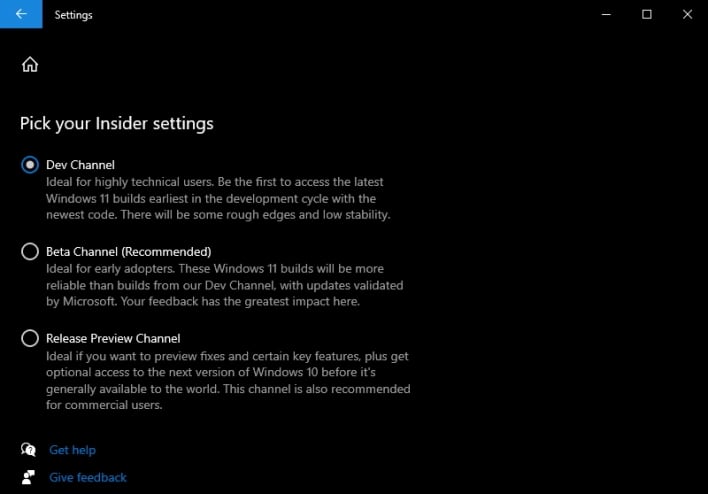
If you haven't already joined the Windows 11 Insider Program, here's how to get started:
- Open Settings by either searching for it or clicking the Windows icon in the lower left-hand corner and clicking the cog wheel.
- Navigate to "Update & Security"
- Scroll down until you find "Windows Insider Program" and click it.
- Register with the program within this menu, and then when prompted, select the Dev Channel ring.
- Restart your computer, then navigate to "Windows Update" and check for updates. You will then begin to download Windows 11 v10.022000.65 (co_release).
In the comments section below, let us know what you think of Windows 11, including any issues you've encountered so far with this latest build.




