



Windows 11 Insider Build 22000.100 Released As Microsoft Refines Its Next-Gen OS


With Build 22000.100, Microsoft is focused on refining the UI and implementing a slew of fixes for outstanding issues. Going forward, we're not likely to see any dramatic changes build-to-build, as the Windows 10 successor inches closer to its [assumed] late October launch. However, as Microsoft outlined earlier this week, Teams integration is rolling out to select testers on the Dev Channel before a broader release in future builds.
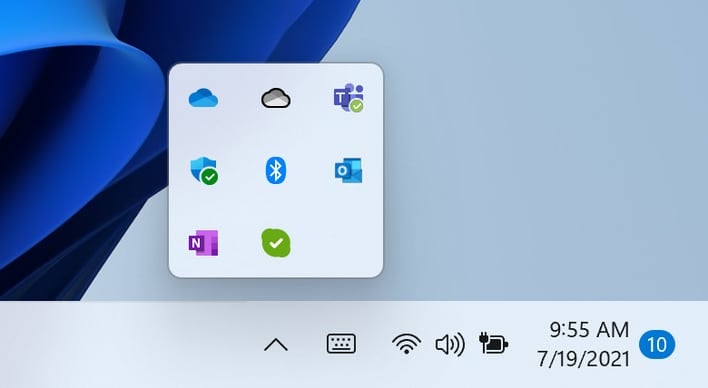
Given that Windows 11 is an evolution of the Windows 10 operating system, some of the UI elements of the former operating system hadn't yet been updated. An example of this is the hidden icons flyout, which Microsoft says now matches the UI theme of Windows 11. Another welcome change comes with how applications vie for your attention with an action that needs to be performed.
"In Windows 11, we have updated this design so that it still grabs your attention but with a calming treatment that minimizes the impact of unwarranted distractions," the Windows Team writes. "The subtle flashing eventually stops, and you will see a slightly red backplate and red pill under the app icon continuing to note a background activity needs your attention."
There are also other minor changes to the touch keyboard and Microsoft Store to enhance the user experience. Moreso than any previous Windows 11 Insider Preview build, there are dozens of fixes that were no doubt made possible by eager testers reporting back to Microsoft. Fixes are localized to the Taskbar, Settings app, File Explorer, Search, Widgets, and other miscellaneous UI operating system functions. Unfortunately, there are also still dozens of issues that need fixes from Microsoft and hopefully will be addressed in future builds.
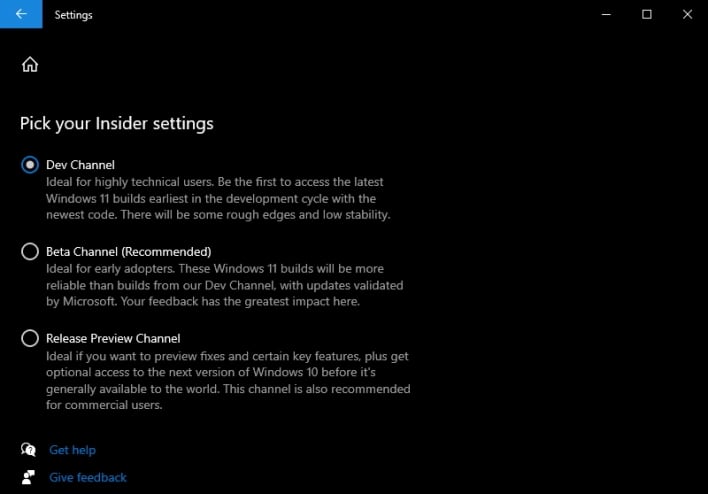
For those that still haven't jumped on the Windows 11 Insider Preview bandwagon, you can do so by following these simple steps:
- Open Settings by either searching for it or clicking the Windows icon in the lower left-hand corner and clicking the cogwheel.
- Navigate to "Update & Security"
- Scroll down until you find "Windows Insider Program" and click it.
- Register with the program within this menu, and then when prompted, select the Dev Channel ring.
- Restart your computer, then navigate to "Windows Update" and check for updates. You will then begin to download Windows 11 v10.022000.100.
According to recent reports, Windows 11 is slated to launch in October alongside Intel's 12th generation Alder Lake processor architecture.




