



Microsoft’s Windows 11 PC Health Check App Is Back And Better Than Ever


"Based on the feedback so far, we acknowledge that it was not fully prepared to share the level of detail or accuracy you expected from us on why a Windows 10 PC doesn't meet upgrade requirements," wrote Microsoft in June. It then removed the app as it integrated tweaks to make it more user-friendly.
The PC Health Check app is now back, and anyone (not just Windows Insiders) can download it to see if their system is worthy of Windows 11. As it currently stands, these are the basic requirements necessary to upgrade to Windows 11:
- Processor: 64-bit capable 1GHz processor (dual-core or better)
- RAM: 4GB
- Storage: 64GB
- System firmware: UEFI, Secure Boot capable
- TPM: Trusted Platform Module (TPM) version 2.0
- Graphics card: DirectX 12 compatible or later with WDDM 2.0 driver
- Display: High definition (720p) greater than 9 inches diagonally, 8 bits per color channel
The requirement that has stymied most users is the mandatory TPM 2.0 support. However, Microsoft has also caught flak by leaving out first-generation Ryzen 1000 and 7th generation and older Intel Core processors. Microsoft later updated its processor requirements to include the following 7th generation chips: Core X-Series, Xeon W-Series, and Core i7-7820HQ.
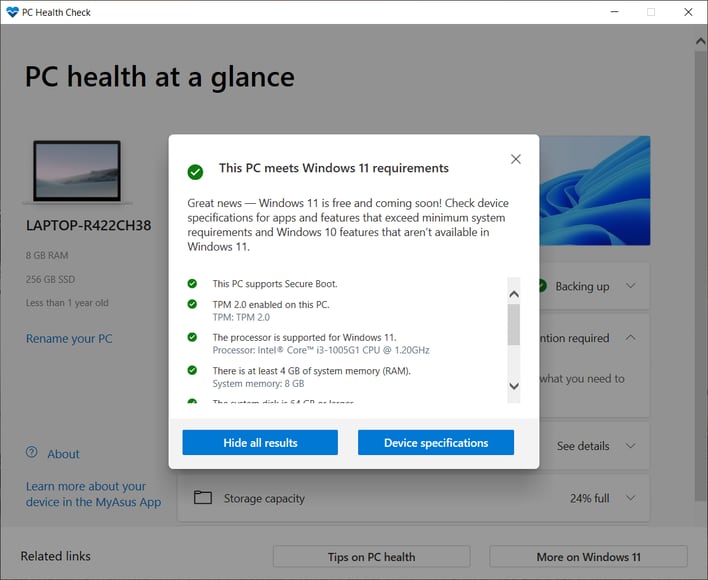
If you want to try out the PC Health Check App and make sure that you are prepared for the big upgrade, click the download link at the bottom of Microsoft's Introduction to Windows 11 website.




