



Google Details How Chrome Blocks Billions Of Abusive Android Alerts


If your phone has been spared an endless barrage of sketchy pop-ups, phishing scams, and fake security warnings lately, you have Google's multi-layered browser defenses to thank.
In a recent security deep dive, Google claims that Chrome’s anti-abuse mechanisms successfully block or reduce more than 7 billion unwanted notifications every single day on Android.
As malicious actors increasingly pivot to browser push notifications as a vector for malware and financial fraud, the company is lifting the hood on the technical machinery it deploys to keep those unwanted alerts from overwhelming Android users. Turns out, there is quite a bit going on behind the scenes.
That's understandable, as thwarting billions of deceptive push notifications is a tall task that requires more than a single line of defense. Google describes its strategy as a "Swiss cheese" defense model, relying on multiple overlapping security systems—including Chrome Security, Firebase Cloud Messaging (FCM), and Safe Browsing—that work in tandem.
"Our goal is to ensure that if abuse slips through one layer, another is there to catch it. This approach allows us to halt abuse at the source, preventing deceptive content from reaching users while maintaining a healthy balance between utility and security," Google says.
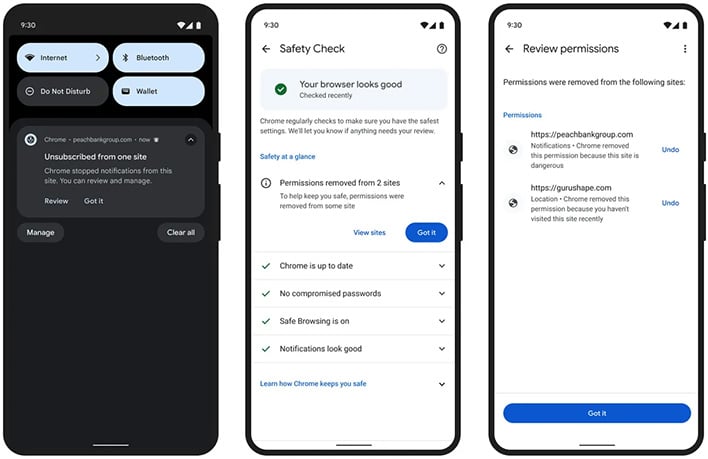
The alternative is to essentially play a futile game of whack-oa-mole. Instead, Chrome's architecture targets bad actors at the permission level with a series of key automated defenses that include:
- Automatic Permission Stripping: Chrome automatically revokes notification permissions from websites that remain inactive for extended periods or repeatedly trigger suspicious-notification warnings.
- Seamless Unsubscribing: When a site's permissions are yanked, Chrome automatically unsubscribes the user, cutting off future spam.
- Safety Hub Oversight: Any automatically revoked permissions can be reviewed by users through Android’s Safety Hub. If a legitimate site is incorrectly flagged as malicious, the user can manually restore access.
- One-Tap Opt-Out: If an unwanted alert manages to slip past Chrome's defenses, Android users can tap "Unsubscribe" on the notification panel to block future messages.
Dealing with spammers is a daunting task for sure. They don't typically operate in singularity, and instead leverage sprawling networks of deceptive domains. To fight this, Google's mechanisms analyze the threat landscape via broader behavior signals, such as monitoring service-worker activity, the volume of notifications coming in, time spent on a site, and how aggressively a domain prompts users for permissions.
For websites that cross the line into disruptive behavior, Google applies strict infrastructure-level limits. Abusive domains can be capped at a maximum of 1,000 notification messages per minute through Firebase Cloud Messaging.
You can check out Google's full blog post for the entire lowdown, but suffice to say, there is a lot going on behind the scenes.




