


AMD's Radeon Software Bug Can Hammer SSDs Even When Your PC Is Idle


As first observed by /u/videoismylife and later documented by /u/Spardax_117, the culprit behind the heavy disk activity is the AMD External Events Utility (a background process called atieclxx.exe), which appears to have a bug that causes it to look for obsolete chipset driver components that were removed after the 26.3.1 version. Although this is a component of the graphics driver, on motherboards with AMD chipsets (i.e. all Socket AM4 and AM5 motherboards), the External Events Utility apparently keeps searching for driver components that are not present in newer driver releases, and that's what's causing the bug.
Left unchecked, that baseline chatter translates to dozens of gigabytes of unnecessary host writes to the system disk every single day. For smaller system drives or folks running their PCs 24/7, that's a fast track to burning through valuable P/E cycles on expensive NAND flash. However, not every Radeon system is exhibiting the bug, so don't panic just yet. If you want to verify whether your rig is suffering from ghost-writing:
- Hit Win + R, type resmon, and hit Enter to open the Windows Resource Monitor.
- Head over to the Disk tab.
- Expand Processes with Disk Activity and sort by write speed, keeping an eye out for continuous background chatter from atieclxx.exe.
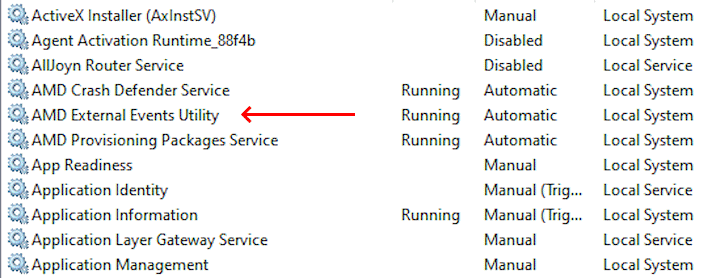
Alternatively, the easiest workaround is to simply disable the AMD External Events Utility; open up Windows Services (services.msc), locate the AMD External Events Utility, right-click to open Properties, set the startup type to Disabled, then reboot. Keep in mind that turning this off can break FreeSync functionality for some setups.
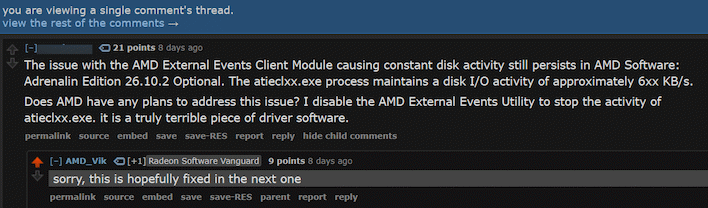
Fortunately, you shouldn't have to live with these workarounds for long. AMD has formally acknowledged the issue, with company representative "AMD_Vik" taking to Reddit to confirm that the team has tracked down the interaction causing the loop. According to AMD's communications, the upcoming Adrenalin 26.11.1 driver update should contain the official fix. Until that package officially drops later this month, it's worth a quick five-minute check of your Resource Monitor just to make sure your SSD isn't quietly pulling an all-nighter.
Shout out to /u/videoismylife and /u/Spardax_117 for their work tracking this issue.