



New Windows 11 Cloud Recovery Restores PCs And Drivers Without A USB Drive


Windows has offered a 'Reset this PC' option for years, but it carries a fatal flaw. The tool leans on the existing installation to supply the files it needs, so a system wrecked by a botched update, malware, or unstable hardware frequently cannot reset itself at all. Cloud rebuild ignores the local mess altogether. Kicked off from the Windows Recovery Environment, it phones home to Windows Update, works out which build the machine should be running, and pulls down a fresh copy of the OS. In plain terms, it is a clean reinstall from the cloud, built for the moments when the installed copy of Windows is too broken to boot or reset itself.
The driver handling is what should make enthusiasts take notice. Anyone who has loaded Windows onto a brand new motherboard platform knows the sinking feeling of reaching the desktop with no internet because the OS shipped without the right network drivers. Cloud rebuild fetches hardware-specific drivers from Windows Update while the reinstall is still underway, so the machine boots into setup already online and ready to go. No more driver roulette.
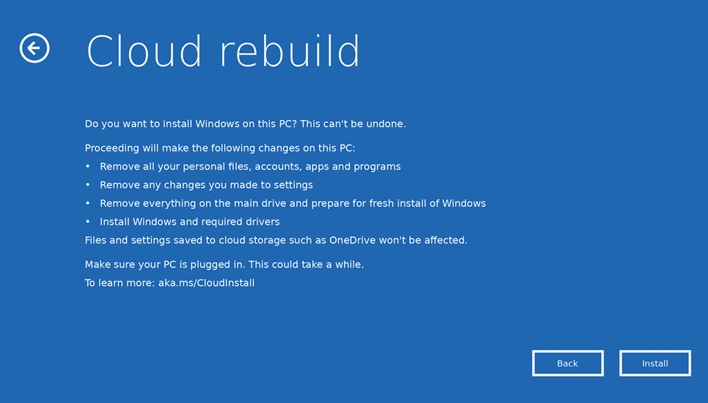
So what does it take to try it? Enrollment in the Insider program's Experimental channel, for starters. From there, when a PC fails to boot several times in a row, Windows automatically opens the recovery environment, and Cloud rebuild appears as an option under the Troubleshoot menu.
At this point getting online should be simple. A wired Ethernet connection works immediately with no setup, while Wi-Fi users can pick their WPA-2 Personal network and enter its password right from the recovery screen. There are a few notable gotchas, though. The PC's manufacturer must have baked a working network driver into the recovery environment, and a failure on that front throws error code 0x800704C6. The machine also needs to clear the usual Windows 11 hardware bar, and Microsoft says the most common stumbling block is a disabled TPM, which shows up as error code 0xc1900200.
Corporate IT crews get a partial win too. Devices managed through Microsoft Intune and Windows Autopilot can automatically re-enroll after a rebuild, with assigned apps and policies redeployed and user settings restored through Backup for Organizations. The catch is that remote initiation is not available in this preview. For now, a rebuild still has to be started locally from Windows Recovery Environment or an elevated command prompt, though Microsoft says Intune-based remote initiation is planned for a future release.
One warning stands out from the rest. Cloud rebuild wipes the system disk clean, taking every local file, application, account, and setting with it. Data synced to OneDrive survives, but anything living only on that NVMe drive is gone for good. Microsoft also cautions against powering off mid-rebuild, since an interruption can leave Windows unable to boot and right back to needing recovery media anyway. Between that and the feature's evaluation-only preview status, the trusty Windows installation flash drive has earned a stay of execution, though its days finally look numbered.





