



Valve Officially Adds Windows OS Support To Steam Machines


For select games that are unsupported by SteamOS due to anti-cheat incompatibility, a Windows installation is the only way to play those games on a Steam Machine. If your Steam Machine is your only desktop computer, you may also have software or workflows that don't translate easily to Linux. Those who want a Steam Machine for use as a compact workstation instead of a living room gaming PC will likely favor using Windows.
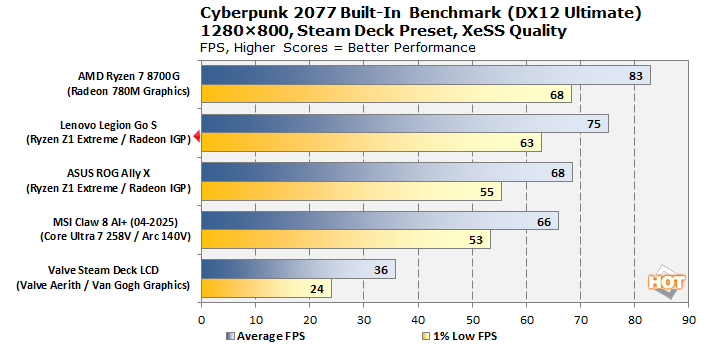
There are some downsides to using a Steam Machine as a Windows PC, however. The biggest will be reduced performance. With the Legion Go S, we observed that SteamOS offered higher gaming performance, and others have confirmed our findings. Particularly for low-power devices like the Steam Machine or low-TDP handhelds like the Steam Deck, SteamOS simply performs better, for games at least.
Additionally, Windows may also impact the living room PC user experience. Steam Big Picture should still work fine, particularly with the Steam Controller, but Windows' Xbox Full Screen Experience (FSE) only works with an XInput-supported gamepad like an Xbox controller.
There is also no indication that the Steam Machine's HDMI CEC feature (allowing users to power on the TV when waking the PC) will work on Windows, though that may be fixable via software tweaks or an additional adapter. (For those unaware, HDMI CEC is technically supported by all current GPU manufacturers, but Windows support is limited.)
Valve's documentation points out some additional issues as well. Since Valve's current SteamOS installer doesn't yet have a dual boot wizard, you may not be able to dual boot Windows and SteamOS. And if you can't connect your Steam Machine to ethernet, activation will have to wait until after installing WiFi drivers.
Valve is providing drivers as-is and support for Windows users will not be provided. Valve also urges users who run into issues to follow its recovery instructions to revert back to SteamOS.




