



Heads Up: The Disk Wipe Feature In Windows 11 And 10 Can Leave Your Data Behind


Earlier today, we reported on a circumstance in which NVMe SSDs can lose your data, which is a bad situation when you need to preserve said data. However, it turns out that both Windows 11 and 10 have the opposite problem. Sometimes you do want your data to disappear, as when wiping a device clean, but it appears Windows version 21H2 has trouble letting go of some files when wiped.
Both Windows 10 and 11 support OneDrive’s Known Folder Move (KFM) feature, which redirects the Desktop, Documents, and Photos folders to OneDrive without disturbing their regular location within File Explorer. When KFM is enabled, OneDrive Files on Demand adds a green check mark icon to these folders, indicating that the files are stored on the local drive, as well as in OneDrive. This feature is handy for moving to a new device, as the Desktop, Documents, and Photos folders on the new device will sync with the folders stored in OneDrive, bringing over all the files stored in those folders on your old device.
Both Windows 10 and 11 support OneDrive’s Known Folder Move (KFM) feature, which redirects the Desktop, Documents, and Photos folders to OneDrive without disturbing their regular location within File Explorer. When KFM is enabled, OneDrive Files on Demand adds a green check mark icon to these folders, indicating that the files are stored on the local drive, as well as in OneDrive. This feature is handy for moving to a new device, as the Desktop, Documents, and Photos folders on the new device will sync with the folders stored in OneDrive, bringing over all the files stored in those folders on your old device.
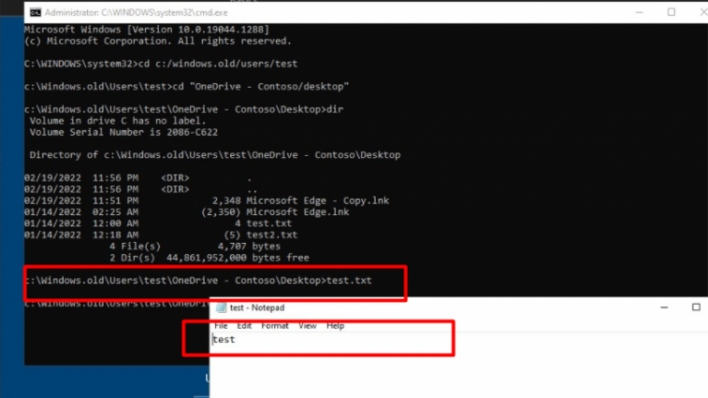
However, in the latest version of Windows, if you make use of OneDrive KFM to move to a new device, then wipe your old one, your files will survive the wipe. The Windows disk wipe feature has an option for retaining user data, but Windows 21H2 contains a bug that maintains old OneDrive data in the folder Windows.old, regardless of the disk wipe options you select. Rudy Ooms, a Microsoft MVP, found this alarming bug, and was able to confirm that it is specific to Windows 10 and 11 version 21H2. Windows 10 version 21H1 fully wipes the device as intended.
According to Rudy, Microsoft is aware of this bug and is working to fix it. In the mean time, Rudy has published a PowerShell Script that forces a full wipe to remove these lingering files, fixing the issue. You can find the fix, as well as Rudy’s detailed explanation, in his blog post.
According to Rudy, Microsoft is aware of this bug and is working to fix it. In the mean time, Rudy has published a PowerShell Script that forces a full wipe to remove these lingering files, fixing the issue. You can find the fix, as well as Rudy’s detailed explanation, in his blog post.



