



Check Your Drive Now - This Windows 11 Bug Steals 500GB Of Storage


First, open Settings, then Storage. Keep in mind that this bug only impacts the system drive where your operating system is installed, which is assigned to C: by default. Your other storage drives, if present, can be safely ignored when checking for this bug.
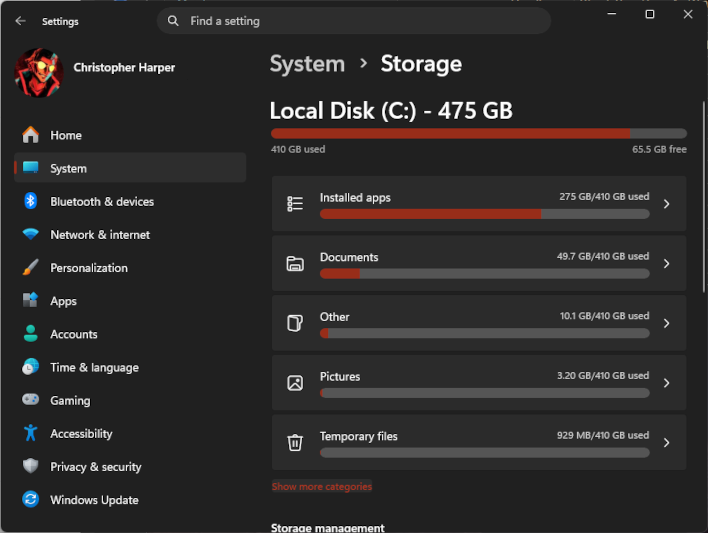
Once you're within the Storage menu and checking your C: drive's allocation, you'll want to click the "Show more categories" button to view on how much space your system files are taking up.
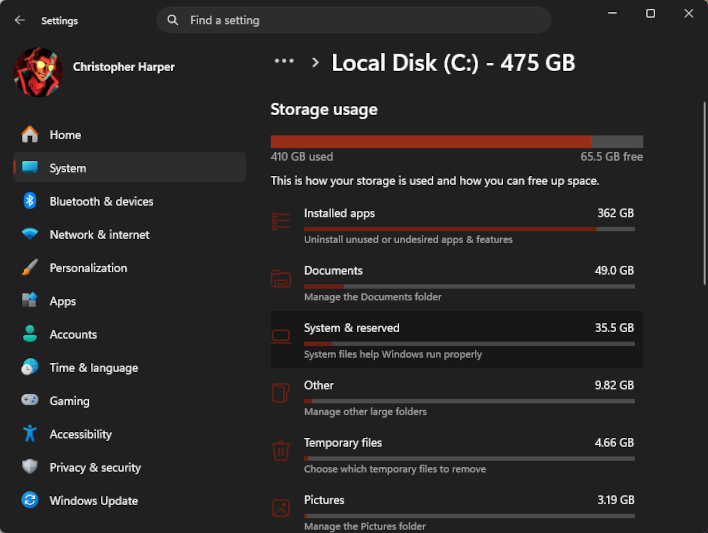
What you're looking for is an abnormally-high "System & reserved" allocation—this is fine.
Typically, System & reserved files on Windows 11 PCs take up 40 GB or less of storage space. If your "System & reserved" allocation is in that ballpark, you have nothing to worry about and can safely proceed. Major bugs or minor ones like this crop up occasionally with Windows updates, and when they do, a fix usually isn't too far behind.
If your system is impacted by this bug, how do you fix it? One way is to install the official fix from Microsoft, which is included in both the June 2026 optional update (Windows 11KB5095093) and the upcoming July 2026 Patch Tuesday update. You should be able to find it just by running Windows Update on your PC.
But if the bug has already devoured too much of your storage space for that fix to work, you may need to take more drastic measures. Per WindowsLatest, the fix then is to boot into the Windows Recovery Environment or Safe Mode and rename the offending "CapabilityAccessManager.db-wal" file within the "C:\ProgramData\Microsoft\Windows\CapabilityAccessManager" folder.
Doing this will cause Windows to automatically recreate a new version of the file. Simply deleting it without renaming it and allowing Windows to create a replacement could cause system stability issues, so don't be too trigger-happy.




