



Microsoft Hijacks Windows 10 Apps With Deceptive, Non-Removable Ads


When using Outlook.com accounts in the Outlook app, the banner ad promotes the complimentary mobile app, stating, "Get the free Outlook app on your phone". Likewise, if you're using a Gmail account within Outlook, the banner changes to say "Get your Gmail on your phone."
What's interesting, and perhaps a bit disingenuous is that by clicking on either banner will take you to an Outlook.com web address to download the mobile version of Outlook. While this might be expected if you're logged in with an Outlook account, Gmail users probably aren't expecting to be taken to the same Outlook.com address.
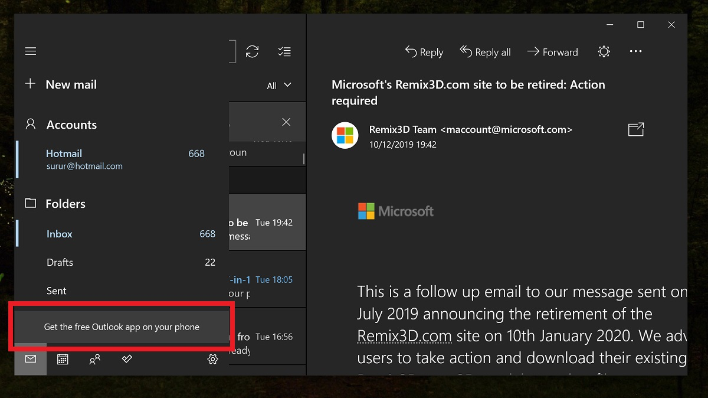
It's understandable why Microsoft is doing this: it wants users to use Outlook mobile versus the Google’s mobile Gmail app for their Gmail accounts. However, it is rubbing many users the wrong way. Some users are also taking offense to the fact that they are being shown ads at all for Microsoft apps when they have already paid for the Windows 10 operating system.
Making matters worse is the fact that the banner ads cannot be removed at all -- or at least we haven't seen any way that they can be defeated. The Windows community also hasn't come up with a solution yet, but we're certain that a registry key will be found soon enough to deactivate them. And even if that doesn't happen, perhaps cooler heads will prevail at Microsoft and the company will rescind them voluntarily.
For now, Microsoft is only stating, “The ads within the app itself will be displayed regardless of which email address you use it with. It is not removable, but you can submit it as a suggestion within the Feedback Hub on Windows 10."




