



Microsoft Preps New PowerLauncher PowerToy For Windows 10


PowerLauncher is described as a quick app launcher that is meant to supplant using commands like Win+R, Win+S or the Windows search bar. There are also other third-party alternatives that provide similar functionality like Launchy and Executor.
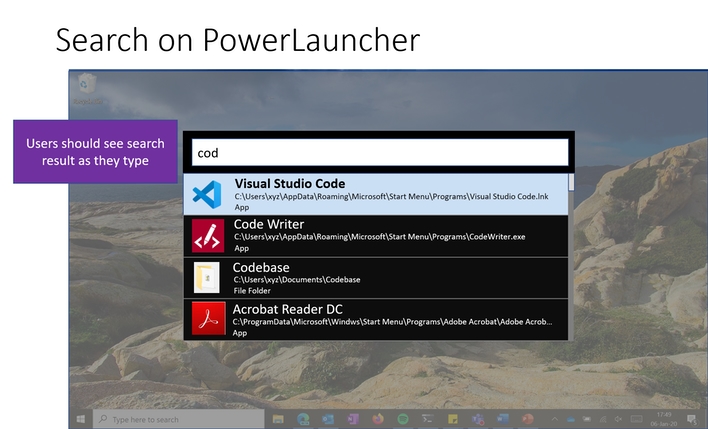
Microsoft admittedly calls its built-in search function slow -- at least compared to the run prompt -- and that is often slow to launch a chosen app. That's where PowerLauncher steps in. Users can search for and launch apps instantaneously with PowerLauncher.
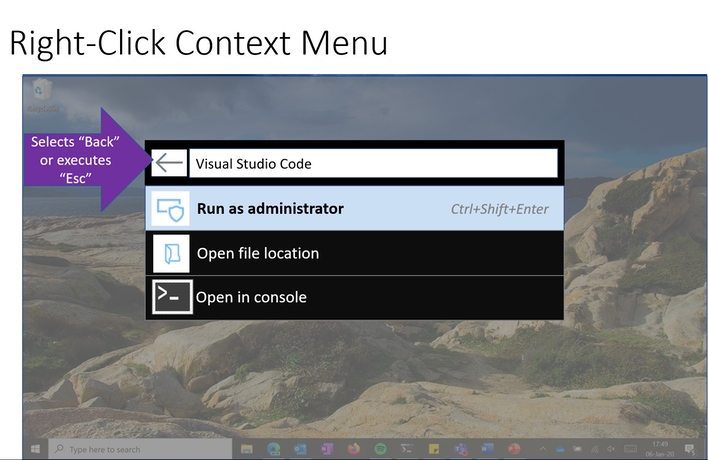
Users will begin seeing search results as soon as they start typing in the PowerLauncher text box, and there are auto-complete text suggestions. When hovering over search results, you'll see the full location patch of the executable, while a right-click context menu brings up the ability to Run as administrator, Open file location, or Open in console.
Microsoft will also offer a Settings page for PowerLauncher to change how the app responds (i.e. maximum number of results shown, default shell, etc.). You can read more about PowerLauncher over at GitHub.
The first PowerToys for Windows 10 launched back in early September, and includes utilities like FancyZones, Shortcut Guide, and PowerRename.




