



It Begins: Google Starts Pushing Out Strict New Sideload Rules


The most important thing for end users to know is that by default, there will be added friction when installing unverified apps on Android. Users will need to manually enable Advanced Flow if they want to do this, and be prompted to restart their phone and wait 24 hours before installing the apps. This is intended for protection against scams where users are coerced to install malicious applications right away and skip the warnings.
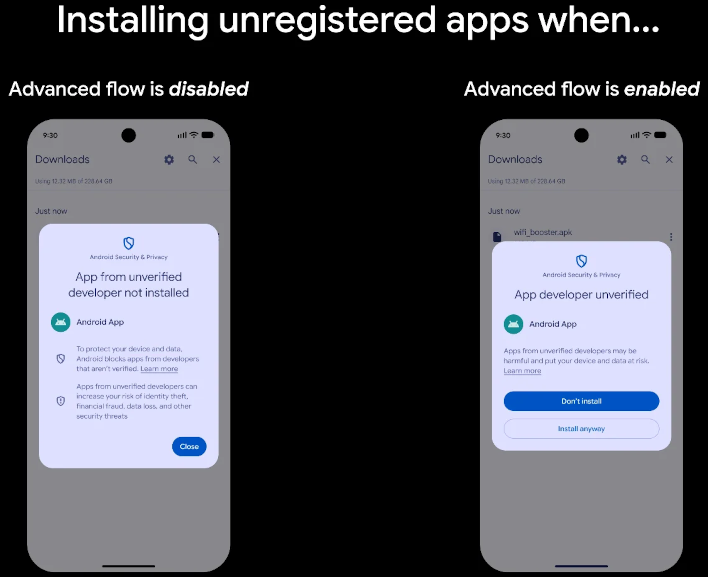
With Advanced Flow enabled, you have the option to either enable it for a week or permanently (until manually disabled). After enabling it, you'll have to restart your phone and wait the aforementioned 24-hour time before the ability to install apps from unlicensed sources opens up. If you choose the 7-day period, apps installed during it will remain on your phone afterwards but can't be updated without Advanced Flow re-enabled. Additionally, you have a 10-minute grace period after disabling Advanced Flow to re-enable it without triggering another 24-hour wait period.
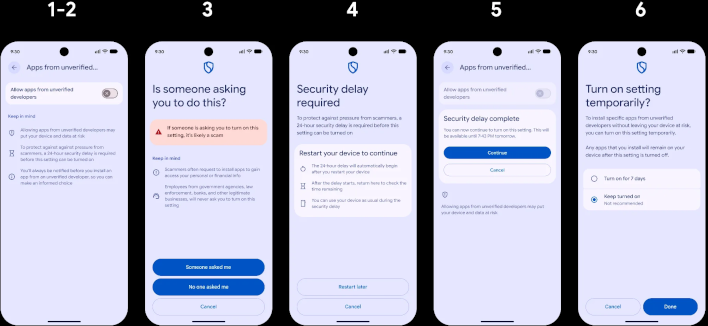
While Google's transparency on this matter has been good, Advanced Flow has triggered some criticism. To Google's credit, it does seem that the worst fears of unlicensed third-party app developers (which is that their apps won't be installable at all) won't come to pass. With Advanced Flow enabled, they should be about as easy to install as they've been--it just won't be instant. The 24-hour wait period is a serious inconvenience for power users, but it can be bypassed.
That's because users can still install apps over Android Debug Bridge (ADB, command line inputs over USB,) which ignores Advanced Flow settings entirely and works immediately. Google also emphasizes that Advanced Flow only restricts apps based on licensing, not third-party app installs in general. This means that most mainstream app stores (Galaxy Store, Palm Store, etc.) will still work just fine, and a number of non-Store apps will still install with no popup at all.




