



Firefox 76 Brings Security Updates To Lockwise Password Manager And Improved Zoom Support


For starters, security has been improved, as you will now be required to enter your device password before you can access the Logins and Passwords page within Lockwise. It’s a small change, but adds another critical layer of security for users. Once you enter your device password, you have access to your stored site credentials/passwords for a total of 5 minutes. After that 5-minute period expires, you will have to login once again with your device password.
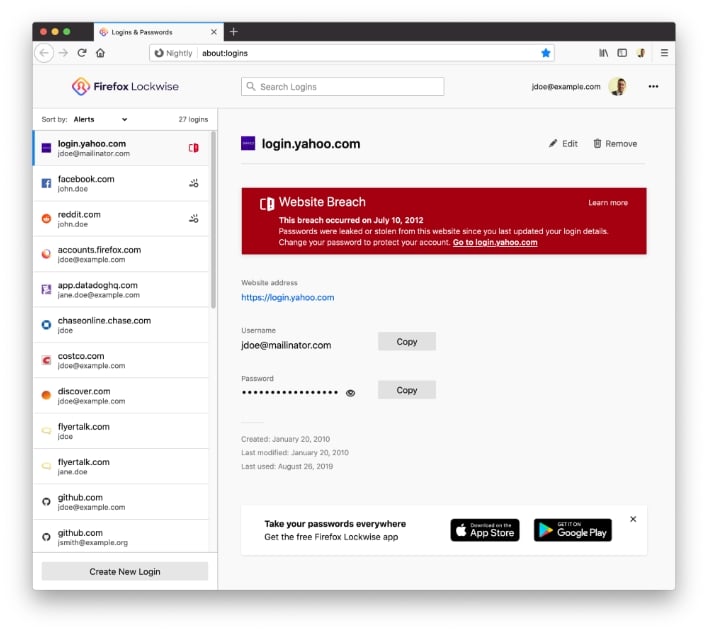
Once you access Logins and Passwords via Lockwise, you’ll see all of your accounts in the left pane. From there, you will be informed – for each account – if you’re using a vulnerable password that may have been compromised in a security breach. In addition, you’ll also be alerted if your account was involved in a website breach, in which both your login and password were compromised.
“This new feature automatically checks your encrypted list of passwords against the breached website information, helping you to stay on top of your online accounts that may have been compromised,” writes the Firefox team. If that wasn’t enough, Firefox’s Lockwise password generator is now available to use with even more websites in this latest update.

Another change is support for Audio Worklets. Audio Worklets enable Firefox 76 to natively handle “complex audio processing like VR and gaming on the web.” This means that you can now join Zoom calls without needing to download and install the separate Zoom client. WebRender, which offloads browser rendering to the GPU, is also being pushed out to a larger subset of Windows 10 users.
In addition, Firefox 76 also includes a number of security updates, and some minor UI updates to improve legibility and everyday use.




