



The ASUS ROG Phone 3 Has A Secret 160Hz Display Mode, Here’s How To Enable It


However, it wasn’t known during its unveil that 144Hz isn’t the upper limit for the ROG Phone’s display. In fact, ASUS has hidden another display mode that unlocks a higher 160Hz refresh rate that puts the ROG Phone 3 on a higher plane than any other smartphone.
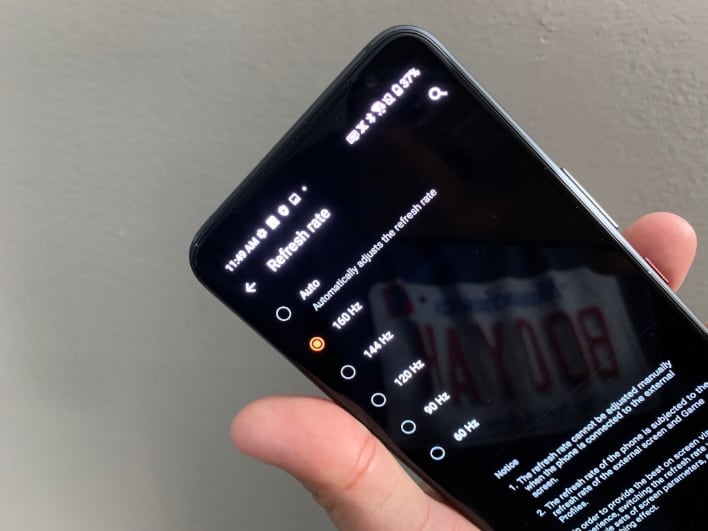
The 160Hz option was discovered by the code sleuths at XDA-Developers, and enabling the new mode is relatively simple (which is a good thing for those that want to test out the faster refresh rate).
- You’ll need to install the Android Debug Bridge (ADB) on your Windows, Linux, or Mac computer (check out this guide for setting up the ADB).
- Using the command prompt or terminal window, enter the following command: adb shell setprop debug.vendor.asus.fps.eng 1
- If you later want to disable the 160Hz mode, enter this command: adb shell setprop debug.vendor.asus.fps.eng 0
Once you’ve completed those steps, simply navigate to Settings --> Display --> Refresh Rate, where you’ll find the new 160Hz display option between “Auto” and “144Hz”. We should mention that ASUS probably left this option disabled in its stock firmware for a reason, so you should definitely proceed with caution. With that being said, the folks at XDA-Developers were able to confirm that a number of apps that support unlocked frame rates were able to achieve 160 fps with the new 160Hz display option including Pac-Man.
The new 160Hz option joins an already feature-packed device that has 16GB of LPDDR5 RAM, 512GB of UFS 3.1 internal storage, and an optional active cooler. You can check out our hands-on preview of the ASUS ROG Phone 3 right here.




