



Judgement Day: Google Chrome 68 Launches Marking All HTTP Sites As 'Not Secure'


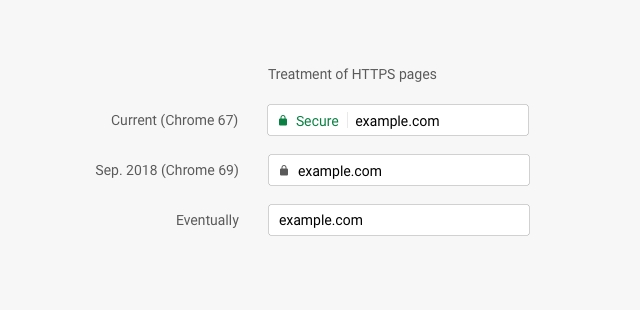
With Chrome 67 and earlier versions of Chrome, accessing a website that has fully embraced HTTPS will show a closed lock icon and the word "Secure" in green in the address bar. Visiting a site that still uses HTTP would show an "i" icon in the address bar. Clicking on the "i" would present the following prompt: "Your connection to this site is not secure".

With Chrome 68, Google lays it all out for everyone to see by presenting a "Not Secure" message beside the "i" icon. In a way, it's like Google is publicly shaming these websites to shift to HTTPS encryption.
"Chrome’s new interface will help users understand that all HTTP sites are not secure, and continue to move the web towards a secure HTTPS web by default," wrote Google in a February blog that foreshadowed today's Chrome 68 release. "HTTPS is easier and cheaper than ever before, and it unlocks both performance improvements and powerful new features that are too sensitive for HTTP."
At the time, Google said that over 68 percent of Chrome traffic on Android and Windows was protected by HTTPS, while that figure surpassed 78 percent on Chrome OS and macOS. In the past 5 months, we can only assume that those numbers have ticked upward as sites scramble to avoid getting branded as "Not Secure" by Google.
In addition to the mark of shame that comes from not using HTTPS, Google also penalizes non-secure websites in its search rankings. That fact alone should be enough incentive for sites to accelerate the move to HTTPS.
Starting with Chrome 69, Google will change how it displays "positive security indicators" for websites using HTTPS. Instead of the green lock with "Secure" text, Chrome 69 will instead simply show a standard lock icon in the address bar beside the website URL.

Then, with Chrome 70, the "i" icon with the "Not Secure" label will switch to a red "Not Secure" warning when you start entering in data on an HTTP website. All of this back and forth seems a bit confusing at first, but it appears that Google is marching towards a more unified presentation to allow users to be better informed about security profiles of the websites they visit.




