Logo   Banner   TopRight
TopUnder
Transparent
PNY XLR8 8800 GTX OC
Transparent
Date: Jul 05, 2007
Section:Graphics/Sound
Author: Michael Lin
Transparent
Introduction & Specifications
When we first took a look at the GeForce 8800 Ultra, back in May, we were left with some mixed feelings. On one hand it was, and still is, the undisputed graphics champ. On the other hand, it didn't introduce any new features and it wasn't a whole lot faster than its significantly cheaper sibling, and former graphics champ, the 8800 GTX. The nearly $250 price delta between the Ultra and the GTX was hard to justify since the Ultra is essentially just an overclocked GTX with a larger cooling apparatus.
 
Anyone looking for screaming top-end performance that isn't hell-bent on owning the absolute fastest graphics card on the market has a bevy of 8800 GTX cards to choose from. Although no GTX can match the Ultra in core clock, memory and shader clock frequency right out of the box, several factory overclocked 8800 GTXs come pretty close and a couple even manage to exceed the Ultra's stock frequency in one of the three areas. The PNY XLR8 8800 GTX OC is one such product.

PNY Technologies currently offers a full range of GeForce 8 series graphics cards from an affordable 8500 GT to a factory overclocked 8800 Ultra. Possibly the most interesting product in their entire product range is their factory overclocked 8800 GTX. The XLR8 8800 GTX OC is factory overclocked to near Ultra speeds and even exceeds the Ultra's stock core clock frequency, yet it's one of the cheapest factory overclocked GTXs currently available. We're putting PNY's XLR8 8800 GTX OC on our test bench and through its paces to find out if we can really get GeForce 8800 Ultra level performance for a GeForce 8800 GTX price.

small_PNY_8800_Box_Top.jpg small_PNY_8800_Box_Inside.jpg
PNY XLR8 Box
PNY XLR8 Inner Boxes

NVIDIA GeForce 8800 Series
Features & Specifications
NVIDIA unified architecture:
Fully unified shader core dynamically allocates processing power to geometry, vertex, physics, or pixel shading operations, delivering up to 2x the gaming performance of prior generation GPUs.


GigaThread Technology:
Massively multi-threaded architecture supports thousands of independent, simultaneous threads, providing extreme processing efficiency in advanced, next generation shader programs.

Full Microsoft DirectX 10 Support:
World's first DirectX 10 GPU with full Shader Model 4.0 support delivers unparalleled levels of graphics realism and film-quality effects.

NVIDIA SLI Technology:
Delivers up to 2x the performance of a single graphics card configuration for unequaled gaming experiences by allowing two cards to run in parallel. The must-have feature for performance PCI Express graphics, SLI dramatically scales performance on today's hottest games.

NVIDIA Lumenex Engine:
Delivers stunning image quality and floating point accuracy at ultra-fast frame rates.
16x Anti-aliasing: Lightning fast, high-quality anti-aliasing at up to 16x sample rates obliterates jagged edges.

128-bit floating point High Dynamic-Range (HDR):
Twice the precision of prior generations for incredibly realistic lighting effects - now with support for anti-aliasing.

NVIDIA Quantum Effects Technology:
Advanced shader processors architected for physics computation enable a new level of physics effects to be simulated and rendered on the GPU - all while freeing the CPU to run the game engine and AI.

NVIDIA ForceWare Unified Driver Architecture (UDA):
Delivers a proven record of compatibility, reliability, and stability with the widest range of games and applications. ForceWare provides the best out-of-box experience and delivers continuous performance and feature updates over the life of NVIDIA GeForce GPUs.

OpenGL 2.0 Optimizations and Support:
Ensures top-notch compatibility and performance for OpenGL applications.

NVIDIA nView Multi-Display Technology:
Advanced technology provides the ultimate in viewing flexibility and control for multiple monitors.

PCI Express Support:
Designed to run perfectly with the PCI Express bus architecture, which doubles the bandwidth of AGP 8X to deliver over 4 GB/sec. in both upstream and downstream data transfers.

Dual 400MHz RAMDACs:
Blazing-fast RAMDACs support dual QXGA displays with ultra-high, ergonomic refresh rates - up to 2048x1536@85Hz. 

Dual Dual-link DVI Support:
Able to drive the industry's largest and highest resolution flat-panel displays up to 2560x1600.

NVIDIA PureVideo HD Technology:
The combination of high-definition video decode acceleration and post-processing that delivers unprecedented picture clarity, smooth video, accurate color, and precise image scaling for movies and video.

Hardware Decode Acceleration:
Provides ultra-smooth playback of H.264, VC-1, WMV and MPEG-2 HD and SD movies.

HDCP Capable:
Designed to meet the output protection management (HDCP) and security specifications of the Blu-ray Disc and HD DVD formats, allowing the playback of encrypted movie content on PCs when connected to HDCP-compliant displays.

Spatial-Temporal De-Interlacing:
Sharpens HD and standard definition interlaced content on progressive displays, delivering a crisp, clear picture that rivals high-end home-theater systems.

High-Quality Scaling:
Enlarges lower resolution movies and videos to HDTV resolutions, up to 1080i, while maintaining a clear, clean image. Also provides downscaling of videos, including high-definition, while preserving image detail.

Inverse Telecine (3:2 & 2:2 Pulldown Correction):
Recovers original film images from films-converted-to-video (DVDs, 1080i HD content), providing more accurate movie playback and superior picture quality.

Bad Edit Correction:
When videos are edited after they have been converted from 24 to 25 or 30 frames, the edits can disrupt the normal 3:2 or 2:2 pulldown cadences. PureVideo HD uses advanced processing techniques to detect poor edits, recover the original content, and display perfect picture detail frame after frame for smooth, natural looking video.

Video Color Correction:
NVIDIA's Color Correction Controls, such as Brightness, Contrast and Gamma Correction let you compensate for the different color characteristics of various RGB monitors and TVs ensuring movies are not too dark, overly bright, or washed out regardless of the video format or display type.

Integrated SD and HD TV Output:
Provides world-class TV-out functionality via Composite, S-Video, Component, or DVI connections. Supports resolutions up to 1080p depending on connection type and TV capability.

Noise Reduction:
Improves movie image quality by removing unwanted artifacts.

Edge Enhancement:
Sharpens movie images by providing higher contrast around lines and objects.

Built for Microsoft Windows Vista:
NVIDIA's fourth-generation GPU architecture built for Windows Vista gives users the best possible experience with the Windows Aero 3D graphical user interface.

Discrete, Programmable Video Processor:
NVIDIA PureVideo HD is a discrete programmable processing core in NVIDIA GPUs that provides superb picture quality and ultra-smooth movies with low CPU utilization and power.


PNY_8800_Banner_250.jpg


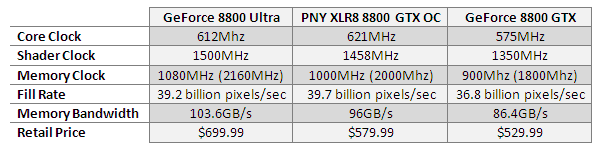
The PNY XLR8 8800 GTX OC has a list price of $579.99 and it is one of the more affordable factory overclocked 8800 GTXs currently available. The XL8 has its core, shader, and memory clock frequencies all overclocked at the factory, so it's ready to rumble right out of the box. It receives a 100MHz (200MHz effective) memory overclock, 108MHz shader overclock and a nice 46MHz overclock to its core. While 46MHz doesn't seem like a whole lot, consider that it makes the XLR8 9MHz faster than a stock 8800 Ultra. All this for about $120 off the price of the cheapest 8800 Ultras, which can currently be found for about $700. Overall, the XLR8's generous factory overclock could give it the muscle it needs to keep pace with a geniune 8800 Ultra.

XLR8-Comparison-Table.png

As previously mentioned, the XL8 isn't just well endowed for a 8800 GTX, but it also happens to be a good value in comparison to other GTXs. We had suspected that PNY skimpted on the packaging and bundle to bring the price down, but we were pleasantly surprised to find that this wasn't true. While you won't find any fancy peripherals or free software titles here, all of the essentials are included and the packaging is some of the best we have seen. The box's matte black finish with the gold leaf lettering looks great and the thick, metal-braced, double-boxed construction feels quite sturdy. Everything about the packaging speaks of class and exclusitivity, belying the XLR8's modest price (for a 8800GTX).

Although the bundle doesn't include any free games or software, the essentials are all here and you're provided with everything you need to get going. Included in the bundle is a short S-video cable, two DVI-to-VGA adapters, two dual-molex to 6-pin PCI-E power adapters and an VIVO adapter that has component video outputs . A suspiciously beefy "quick start" guide and a driver CD are also included in the package along with a coupon for System Mechanic 7 by Iolo Technologies.

Just like the accessory bundle, the driver disk has all the essentials. Included on the disk are drivers, Aadobe Acrobat Reader, DirectX 9, NVIDIA's Adrianne demo and a handfull of high resolution wallpapers. Also included on the driver disk is a collection of documentation in PDF format such as a digital version of the user guide and NVIDIA documentation such as driver release notes.

Transparent
Design and Features
Almost every GeForce 8800 GTX currently available is an identical copy of the NVIDIA reference design, generally differing only in the stickers that adorn their coolers and the color of their PCBs. PNY's XLR8 8800 GTX is no exception. One of the reasons for the reference design's mass adoption, besides to save on development costs, is that the reference design's cooler is effective and quiet enough for most applications. The 8800 GTX's monsterous GPU also runs far too hot for single slot or passive solutions to be viable. PNY's version of the NVIDIA's GeForce 8800 GTX reference design is a near exact replica. A side-by-side comparison reveals that they are identical and even the PCB's layout and color appears to be unchanged.
The PNY card's only visually differentiating feature are the stickers adorning its cooling apparatus. The cooling duct displays a large graphic of the highly stylized XLR8 logo which follows the same theme as the graphics found on the box the card is packaged in. The side of the cooler furthest away from the PCI-E slot also has a sticker on it. We thought that this was a nice touch since, unlike the main sticker on the face of the cooler, the sticker on the side would be clearly visible when installed inside a windowed case. Both the main and side stickers include "Overclocked" logos to remind you that your getting more than just a stock reference card replica when it comes to performance. Since it is essentially the same as the reference design, it also suffers from the same problems. The massive 10.5" long PCB is connected to a large double height cooler and this means that some people may encounter space constraint issues when using smaller cases. This is especially true for desktop, cube and mini-tower cases. Chances are, you won't be able to fit this beast into your mini-ATX system. Make sure you have room in your chosen enclosure before you plunk down your cash for this or any other 8800 GTX/Ultra, or get a bigger case.

Like the reference design and most other 8800 GTXs, the PNY XLR8 has dual-link, HDCP compatible DVI ports for primary output as well as a VIVO S-video port that can be connected to an adapter that will allow it to also output video component cables. The card has dual SLI 'fingers' and it draws power from two 6-pin PCI Express power receptacles.
Transparent
Our Test Systems & 3DMark06
HOW WE CONFIGURED THE TEST SYSTEMS: We tested all of the graphics cards used in this article on an nForce 680i SLI motherboard powered by a Core 2 Duo E6400 dual-core processor and 1GB of low-latency Corsair RAM. The first thing we did when configuring the test system was enter the BIOS and set all values to their default settings. Then we manually configured the memory timings and disabled any integrated peripherals that wouldn't be put to use. The hard drive was then formatted, and Windows XP Pro with SP2 and the April '07 DX9 update was installed. When the installation was complete, we then installed the latest chipset drivers available, installed all of the other drivers necessary for the rest of our components, and removed Windows Messenger from the system.  Auto-Updating and System Restore were also disabled, the hard drive was defragmented, and a 1024MB permanent page file was created on the same partition as the Windows installation. Lastly, we set Windows XP's Visual Effects to "best performance," installed all of the benchmarking software, and ran the tests.

The HotHardware Test System
Dual Core Test-bed


Processor -

Motherboard -


Video Cards -


Memory -


Audio -

Hard Drive
-

Hardware Used:
Core 2 Duo E6400 (2.13GHz)


nForce 680i SLI

PNY XLR8 GeForce 8800 GTX OC
GeForce 8800 Ultra
GeForce 8800 GTX
GeForce 7900 GT

Radeon X1950 XT

1024MB Corsair PC2-8500C3
2 X 512MB

Integrated on board

Western Digital "Raptor"

74GB - 10,000RPM - SATA


OS -
Chipset Drivers -
DirectX -

Video Drivers
-


Synthetic (DX) -
DirectX -
DirectX -
DirectX -
DirectX -
OpenGL -

OpenGL -
 
Relevant Software:
Windows XP Pro SP2
nForce Drivers v9.53
DirectX 9.0c (April '07 Redist.)

NVIDIA Forceware v158.22
ATI Catalyst v7.5


Benchmarks Used:
3DMark06
FarCry v1.4 *
F.E.A.R. v1.08
Half Life 2: Episode 1*
Prey v1.2*
Quake 4 v1.4*

* - Custom Test (HH Exclusive demo)

Performance Comparisons with 3DMark06
Details: www.futuremark.com/products/3dmark06


3DMark06
3DMark06 is the most recent addition to the 3DMark franchise. This version differs from 3Dmark05 in a number of ways, and includes not only Shader Model 2.0 tests, but Shader Model 3.0 and HDR tests as well. Some of the assets from 3DMark05 have been re-used, but the scenes are now rendered with much more geometric detail and the shader complexity is vastly increased as well. Max shader length in 3DMark05 was 96 instructions, while 3DMark06 ups that number to 512. 3DMark06 also employs much more lighting and there is extensive use of soft shadows. With 3DMark06, Futuremark has also updated how the final score is tabulated. In this latest version of the benchmark, SM 2.0 and HDR / SM3.0 tests are weighted and the CPU score is factored into the final tally as well.

3dMark06_Default.png


3dMark06_SM2.0.png
 

3dMark06_SM3.0.png

Our 3DMark benchmarks show that the PNY XLR8 8800 GTX OC is no slouch. It clearly out performs the vanilla 8800 GTX and puts up a good fight against the 8800 Ultra, just barely edging it out to take first place overall. A quick look at the Shader Model 2.0 test reveals that the XLR8's highly overclocked core gave it the edge over the Ultra. However, the Ultra's higher shader clock enabled it to oust the XLR8 in the Shader Model 3.0 test. This is a great start for the XLR8 but 3DMark is a synthatic benchmark.

Transparent
Half-Life 2: Episode 1


Performance Comparisons with Half Life 2: Episode 1
Details: http://www.half-life2.com/

Half Life 2: Episode 1
Thanks to the dedication of hardcore PC gamers and a huge mod-community, the original Half-Life became one of the most successful first person shooters of all time. Its subsequent sequel, Half-Life 2, was also hugely popular. Armed with the latest episodic update to HL2, Episode 1, we benchmarked the game with a long, custom-recorded timedemo that takes us through both outdoor and indoor environments. These tests were run at resolutions of 1,280 x 1,024 and 1,600 x 1,200 with 4X anti-aliasing and 16X anisotropic filtering enabled concurrently, and with color correction and HDR rendering enabled in the game engine as well.

Half-Life2_EP1.png
Half-Life 2, Episode 1 is our first "real-world" test and the PNY XLR8 8800 GTX OC doesn't dissapoint. Just like in our synthetic 3DMark test, the XLR8 dominates the stock 8800 GTX and puts up a good fight against the 8800 Ultra. Unlike in our 3DMark tests, the XLR8 ends up losing to the 8800 Ultra, this time. All three of the GeForce 8800 cards ended up with similar scores at both resolutions. The Radeon X1950 XT had a strong showing here as well since this benchmark tends to favor ATI cards. Despite that, the X1950 XT is still left in the dust by the 8800s.
Transparent
FarCry v1.4


Performance Comparisons w ith FarCry v1.4
Details: http://www.farcry.ubi.com/

FarCry
If you've been on top of the gaming scene for some time, you probably know that FarCry was one of the most visually impressive games to be released on the PC in the last few years.  Courtesy of its proprietary engine, dubbed "CryEngine" by its developers, FarCry's game-play is enhanced by Polybump mapping, advanced environment physics, destructible terrain, dynamic lighting, motion-captured animation, and surround sound. Before titles such as Half-Life 2 and Doom 3 hit the scene, FarCry gave us a taste of what was to come in next-generation 3D gaming on the PC. We benchmarked the graphics cards in this article with a fully patched version of FarCry using a custom-recorded demo run taken in the "Catacombs" area checkpoint. The tests were run at various resolutions with 4X AA and 16X aniso enabled concurrently.

FarCry.png

Our FarCry test shows a similar story as the Half-Life 2 test. Once again, the XLR8 stomps the standard 8800 GTX and loses to the 8800 Ultra. This time, there is more seperation between the three 8800 cards, especially at 1280x1024.

Transparent
F.E.A.R. v1.08


Performance Comparisons with F.E.A.R
More Info: http://www.whatisfear.com/us/

F.E.A.R
One of the most highly anticipated titles of 2005 was Monolith's paranormal thriller F.E.A.R. Taking a look at the game's minimum system requirements, we see that you will need at least a 1.7GHz Pentium 4 with 512MB of system memory and a 64MB graphics card in the Radeon 9000 or GeForce4 Ti-classes or better, to adequately run the game. Using the full retail release of the game patched to v1.07, we put the graphics cards in this article through their paces to see how they fared with a popular title. Here, all graphics settings within the game were set to their maximum values, but with soft shadows disabled (Soft shadows and anti-aliasing do not work together currently). Benchmark runs were then completed at resolutions of 1,280x960 and 1,600x1,200, with anti-aliasing and anisotropic filtering enabled.

FEAR.png 
Our F.E.A.R. test gives us a slightly different picture than what we saw with the previous benchmarks. Like in our synthetic 3DMark test, at 1280x1024 the XLR8 takes first place, beating out the standard 8800 GTX and the 8800 Ultra. However, at 1600x1200, the XLR8 is edged out by the 8800 Ultra, although it still stomps all over the vanilla 8800 GTX. As with our previous benchmarks, the Radeon X1950 XT and the GeForce 7900 GT, which we have included in our tests for the sake of comparison, are thoroughly defeated.
Transparent
Quake 4 v1.4


Performance Comparisons w ith Quake 4
Details: http://www.quake4game.com/

Quake 4
id Software, in conjunction with developer Raven, recently released the latest addition to the wildly popular Quake franchise, Quake 4. Quake 4 is based upon an updated and slightly modified version of the Doom 3 engine, and as such performance characteristics between the two titles are very similar.  Like Doom 3, Quake 4 is also an OpenGL game that uses extremely high-detailed textures and a ton of dynamic lighting and shadows, but unlike Doom3, Quake 4 features some outdoor environments as well. We ran this these Quake 4 benchmarks using a custom demo with the game set to its "High-Quality" mode, at resolutions of 1,280 x 1,024 and 1,600 x 1,200 with 4X AA and 8X aniso enabled simultaneously.

Quake-4.png

OpenGL performance has always been a strong point for NVIDIA-based cards and Quake 4 is no exception. Here we see the GeForce 7900 GT close the gap between it and the Radeon X1950 XT. As expected, the XLR8 once again beats the vanilla 8800 GTX, but is edged out by the significantly more expensive 8800 Ultra. Quake 4 is one of the biggest wins for the 8800 Ultra. In every other benchmark so far, the XLR8 has either won outright or only lost to the 8800 Ultra by a FPS or two.
Transparent
Prey v1.3
 

Performance Comparisons with Prey
Details: http://www.prey.com/

Prey
After many years of development, Take-Two Interactive recently released the highly anticipated game Prey. Prey is based upon an updated and modified version of the Doom 3 engine, and as such performance characteristics between the two titles are very similar.  Like Doom 3, Prey is also an OpenGL game that uses extremely high-detailed textures and a plethora of dynamic lighting and shadows.  But unlike Doom3, Prey features a fare share of outdoor environments as well.  We ran these Prey benchmarks using a custom recorded timedemo with the game set to its "High-Quality" graphics mode, at resolutions of 1,280 x 1,024 and 1,600 x 1,200 with 4X AA and 16X anisotropic filtering enabled simultaneously.

Prey.png
 

Since both Quake 4 and Prey are built upon the Doom 3 engine, our Prey benchmark shows a very similar picture as our Quake 4 test. The XLR8 has certainly proved its superiority over the standard 8800 GTX in this and previous benchmarks. The 8800 Ultra takes overall first place in our Prey test, just like in our Quake 4 test. Despite the 8800 Ultra being slightly faster, many would consider the XLR8 to be the real winner, considering the $120 price difference between the two cards.
Transparent
Overclocking

Before we concluded our testing, we spent a little time overclocking the PNY XLR8 8800 GTX OC using the clock frequency slider available within the NVIDIA control panel after the nTune utility had been installed. To find the card's peak core and memory frequencies, we slowly raised their respective sliders until we begun to see visual artifacts on-screen while running a game or benchmark, or until our test system was no longer stable. nTune currently doesn't allow individual modification of the shader clock.

After some time, we finally arrived at a final overclock of 630 MHz for the core (up from 621 MHz) and 1100 MHz for the memory (up from 1000 MHz). This was the highest overclock we were able to achieve with perfect stability. Attempting to raise the core or memory frequency higher, even by 2-3MHz resulted in crashs and lock-ups during full-load scenarios such as benchmarking. Overall, we are quite impressed with the overclock we achieved.

Overclocking t he PNY XLR8 8800 GTX OC
Faster Than a 8800 Ultra

3dMark06_OC.png

PNY XLR8 8800 GTX OC Overclocked: 630MHz GPU / 1.1GHz Memory
PNY XLR8 8800 GTX OC Stock: 621MHz GPU / 1.0GHz Memory

  Prey_OC.png
PNY XLR8 8800 GTX OC Overclocked:630MHz GPU / 1.1GHz Memory
PNY XLR8 8800 GTX OC Stock: 621MHz GPU / 1.0GHz Memory

While we had the card overclocked, we re-ran a coupe of benchmarks to see how the higher clocks affected performance. Despite having already recieved a substantial overclock at the factory, the XLR8 still had quite a bit of headroom left. Our final overclock gave us core, shader and memory frequencies that were all substantially higher than those possessed by the vanilla 8800 GTX. The overclock even allowed the XLR8 to overtake the Ultra in clock frequency. Since there are no differences between the 8800 GTX and the 8800 Ultra, besides frequency, our overclocked XLR8 is superior in every way. The overclock allowed it to overtake the much more expensive 8800 Ultra in our Prey test, where it had previously lost to the Ultra. The XLR8 also consolidates its lead on the Ultra in our synthetic 3DMark test. 
Transparent
Performance Analysis & Conclusion
Performance Summary: In all of our benchmarks, the PNY XLR8 8800 GTX OC performed well, cranking out high scores throughout. The core, shader and memory factory overclocks the XLR8 feature gave it an undisputed edge over the vanilla 8800 GTX and allowed it to outpace the more expensive 8800 Ultra in several benchmarks. Overall, the PNY XLR8 8800 GTX OC's out-of-the-box performance is excellent and was only rivaled by the significantly more expensive 8800 Ultra in our tests.

PNY's decision to produce a relatively 'cheap' factory overclocked GeForce 8800 GTX was a good one in our opinion. The XLR8 8800 GTX OC performs very well right out of the box and it's one of the cheapest factory overclocked 8800 GTXs currently available. Although it doesn't have the highest factory overclock you can currently get on a 8800 GTX, the XLR8 gets pretty close and is highly competative, especially when you consider its price. Our unit also has some headroom left to spare, as we found out in our overclocking tests and it was able to achieve a final overclock that was just a tad faster than an 8800 Ultra.

Overall, we really liked the PNY XLR8 8800 GTX OC. The XLR8 offers near 8800 Ultra performance while managing to be one of the cheaper 8800 GTXs around. Despite its somewhat spartan bundle which lacks the usual free game or application, it isn't missing any essentials and everything you need to hook it up and get fragging is included in the box. If you're in the market for top-end performance but you can't quite stomach the 8800 Ultra's top-end price tag, check out the PNY XLR8 8800 GTX OC for a no frills, all thrills alternative.

  • Excellent Performance
  • DirectX 10 Support
  • SLI Support
  • Relatively Good Price Compared to Other GTXs
  • Massive Size
  • Requires A Beefy Power Supply

Discuss This Article And Share Your Thoughts With Others!


Content Property of HotHardware.com