|
|
| Introduction and Product Specifications | |||||||
|
When you work with computer hardware virtually everyday for years on end, it's easy to become desensitized as to how much technology really has changed. Take my history here at Hothardware.com as an example. It was October of 2000 when I submitted my first article and since that day, my artilce tally has reach triple digit status. Back then, Intel was getting ready for a November release of their Pentium 4 , ATI rolled out their first Radeon , and NVIDIA was pushing the GeForce 2 . Microsoft's Windows ME and 2000 were the Operating Systems of the day and when it came to TV on the PC, choices were limited with ATI's All-In-Wonder Pro 128 being the hottest hardware of it's kind. Back then, there were no Multimedia Center PCs or Digital Video Recorders and HDTV was still in its infancy. Fortunately for us, times have surely changed. Today, PCs can be the centerpiece of our digital media experience, DVRs are common offerings from cable companies and TV tuners for PCs have been delivering terrific image quality as of late, as seen with NVIDIA's DualTV and ATI's Theater 650 Pro . When it comes to HDTV, however, both offerings from the big two graphics giants are lacking. With NVIDIA's DualTV, HDTV is not an option and the Theater 650 Pro only supports OTA signals, leaving those in remote areas, where it's nearly impossible to pick up a signal, out in the cold. Factor in laptop users and the idea of TV on the PC gets even more limited. Today, we're going to review a TV-Tuner that addresses several areas where options have historically been limited. The OnAir USB HDTV Creator is a USB 2.0 based TV-Tuner solution from AutumnWave that supports analog and digital TV signals and is one of the few model available that can deliver HDTV over a cable connection rather that just OTA sources. As USB based product, the unit is compatible with any PC available, from the smallest laptop to a full-fledged gaming PC or workstation. Matched with an LG tuner and NVIDIA's PureVideo Silver decoder, the OnAir USB HDTV Creator brings a host of features that look impressive from the outset.
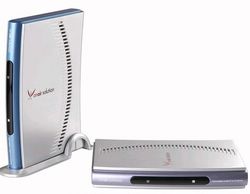
The package we received for evaluation included all of the necessary components to get up and running quickly. The package included the OnAir USB HDTV Creator tuner along with a stand for vertical positioning. The kit also included a requisite power adapter and a USB cable. The system also comes with an Infrared Remote Control and a setup CD that included required TV Tuner software, NVIDIA's PureVideo Silver, drivers, and WinDVD Creator 2.0 for DVD authoring. |
| The OnAir USB HDTV Creator Up Close | ||||
The front of the enclosure sports a power light at the upper black segment while a red light appears at the lower section as a signal is received from the remote control. The Rear console is equipped with Audio and Video RCA inputs as well as S-Video for video capture from external sources. The top port is for the power supply connection while the lower two connections provide a USB port for connecting to the PC and a standard CATV input. The outer shell is well ventilated with air slots on both sides of the shell. The underside has a circular perforation that look like a fan grille, however, the entire unit is passively cooled. Complementing the OnAir USB HDTV Creator is an infrared remote control. The design is simplistic, but that makes it all the more comfortable to work with. The upper half provides a power button to launch the tuner software while the Source button allows for easily cycling through the unit's Analog, Digital and external video options. The number pad allows for the direct keying in of channels while a standard channel and volume control is provided for cycling through channels and adjusting volume control. The circular pad makes for easy control through various menus and other on-screen options. The lower portion of the remote comes with options for pausing, recording, and seeking forward or backward through the video. Custom keys are included which can be programmed through software. The Screen button cycles through screen sizes while the audio button offers control of optional audio output settings where applicable. A sleep button can provide auto shut off functionality based on preset times and can be configured to power off the software or shutdown the PC. There is also a PC power button, although, in all of our testing, this simply turned off the software and never shutdown the PC as the name implied. |
| The OnAir USB HDTV Creator - Installation and Setup | ||||
Next, the OnAirCR USB HDTV software needed to be installed, which only took a little longer than the driver installation. During this process, the user needs to decide on a few options before the process can continue. There is the option to have the remote control software (known as OnAir USB HDTV Remocon) launch when Windows loads as well as whether the program schedule should launch as well. Once the software installation completed, the PureVideo installer automatically launched to install the PureVideo DVD Silver package with 5.1 audio support. After entering the requisite serial number and activation code, the PureVideo installer completed and we're ready to connect the unit to the PC. The last step was to run the InterVideo WinDVD Creator 2 installer for DVD authoring. For the purposes of this review, we'll keep our attention focused on the software required for operation and configuration the Autumnwave OnAir USB HDTV Creator. |
| OnAir Creator Software Continued | ||||
The OnAir Creator does offer extensive options to control how the software behaves. Color, Tint, Hue and Contrast adjustments are available as well as a zoom feature that scales up to 500%. There is a rudimentary File List Manager for file list control of recorded media and a signal viewer is provided to display signal to noise ratio in dB, which is useful for OTA signal reception. The software video input options include Digital and Analog for TV reception while Video and S-Video work to capture from external sources. The File option is used to playback recorded video. There is also D-VHS mode which can be configured for DTV Source, File Source and Tape Source. Closed Captioning is available from up to two channels and a dictionary mode can be enabled.
The Screen Size output can be set to Normal, Full Screen, Fit-to-Screen and Background . The Screen Ratio ranges from 4:3, 16:9, Pan and Custom, but lacks an auto option, requiring manual adjustment when the signal changes. There is a Sleep Timer which can close the program at set intervals ranging from 10 to 240 minutes in convenient increments.
|
| Image Quality | ||||||||||||||||
Analog - 720x480 @ 4:3
DTV - 704x480 @ 4:3
DTV-1280x720 @ 16:9
DTV-1920x1080 @ 16:9
When reviewing the various images from Analog to Digital 1080i, the progression in image quality improvement is clear in each step. The level of detail noticeably improves with each progression, even when viewing the thumbnails or the full sized screen shots with JPG compression. I can say that in each case, the image quality was certainly better than the screen shots represent, and the screen shots are impressive. |
| Overall Impressions and Conclusion | ||||
|
Performance Analysis: There is also the matter of Windows Media Center support. The analog tuner was detected by Vista's MCE component, but the HDTV tuner is not detectable. Additionally, it is not possible to record one channel while viewing another, which is a feature we sorely missed. Lastly, we found updating the software confusing. AutumnWave's website states that you must install the software from the CD before updating, which is fine, but when you run the installer from the web, the first thing the installer says is you must uninstall the old software before continuing. Additionally, the information on the website may be confusing to less savvy users. Users looking for a TV tuner card need a clear basic breakdown of what they are getting, in plain English. Those that are not enthusiasts but have a fair knowledge of PCs may struggle to figure out which model is best for them and what all of the features do. To their credit, we saw a number of instances in the forum where users were confused about information and AutumnWave responded that they rewrote certain documentation and posted it on their site. This is exceptional attention to customer requests and shows that they listen to their customers. On final note to report on is CPU utilization. When viewing a digital signal, the OnAir Creator software's CPU usage hovered in the 13% range with dips to 6% and spike up to 28%. With an analog signal, usage ranged from 4 to 34% with an average CPU usage around 12% in our tests. Granted, these will vary based on the system specs, but overall, these are respectable numbers.
Selling in the ballpark of $249, the AutumnWave OnAir USB HDTV Creator is reasonably priced for what it offers, and will surely impress with its ease of installation and image quality. On the hardware side of the equation, the product has a sleek, modern look with a fully functional remote control. We also found the image quality superb across the board, with HDTV 1080 really taking our breath away. However, impressive hardware and image quality is only part of the story. Overall, the OnAir USB HDTV Creator is hampered by stability issues and what we feel is lackluster software. With partial support for Windows MCE in Vista, stability problems in three systems tested and software that can be unintuitive and downright awkward, we found the product exciting at first, but soon our excitement turned to frustration. In the end, we think that if AutumnWave can get their software up to competitive levels and improve the stability of their product, the OnAir USB HDTV Creator has great potential and could possibly turn out to be a ground-breaking product. Currently, tuners that support HDTV over cable are a rarity, so AutumnWave has themselves a niche market for now. However, if another product comes along backed by strong drivers and intuitive software, they may find themselves in for a challenge.
|