Logo   Banner   TopRight
TopUnder
Transparent
ATI All-In-Wonder 2006
Transparent
Date: Mar 05, 2006
Section:Graphics/Sound
Author: Matt Beauvais
Transparent
Introduction

ATI's All-In-Wonder series has been popular with the multimedia enthusiast for quite some time now, delivering all the features of a TV Tuner, along with the performance of a dedicated graphics card. ATI has recently released their X1900 AIW series, which is a perfect card to get if you're a gamer and have the cash to spend. But what about those who are just looking for the features of an All-In-Wonder card, and consider gaming to be a side luxury?  For this end of the market, ATI presents you with their All-In-Wonder 2006. This budget level PCI-E card is based on ATI's Radeon X1300 core GPU and uses ATI's Theatre 200 chip. We would have liked to see ATI using their newer more powerful Theater 550 Pro chip. However driver advancements and ATI's H.264 decode acceleration algorithms help beef up processing with the Thearter 200. Still, there's no hardware MPEG-2 encode support, which ATI's Theater 550 Pro has.

In addition, AIW 2006 doesn't have the pixel pushing power of the AIW X1900 but priced in at around $200, we'll be focusing on it's feature set more so than it's gaming performance. We'll also be doing some testing to see how well the card is able to take the load off of the CPU during digital media playback, and judging it by it's overall value for its price range. Let's not get ahead of ourselves though, first we'll need to cover the specs.

ATI All-In-Wonder 2006
All the same features as the big boys, at fraction of the price

Features - ATI All-In-Winder 2006
• 90nm fabrication process
• Ultra-threaded architecture with fast dynamic branching
• 4 pixel shader units
• 128-bit GDDR3 memory interface
• Native PCI Express x16 bus interface
• Dynamic Voltage Control

Ring Bus Memory Controller
• Programmable intelligent arbitration logic
• Fully associative texture, color, and Z/stencil cache designs
• Hierarchical Z-buffer with Early Z test
• Lossless Z Compression (up to 48:1)
• Fast Z-Buffer Clear
• Z/stencil cache optimized for real-time shadow rendering
• Optimized for performance at high display resolutions, including widescreen HDTV resolutions

Ultra-Threaded Shader Engine
• Support for Microsoft DirectX 9.0 Shader Model 3.0 programmable vertex and pixel shaders in hardware
• Full speed 128-bit floating point processing for all shader operations
• Up to 512 simultaneous pixel threads
• Dedicated branch execution units for high performance dynamic branching and flow control
• Dedicated texture address units for improved efficiency
• 3Dc+ texture compression
_o High quality 4:1 compression for normal maps and two-channel data formats
_o High quality 2:1 compression for luminance maps and single-channel data formats
• Multiple Render Target (MRT) support
• Render to vertex buffer support
• Complete feature set also supported in OpenGL 2.0

Avivo Video and Display Engine
• High performance programmable video processor
_o Accelerated MPEG-2, MPEG-4, DivX, WMV9, VC-1, and H.264 decoding (including DVD/HD-DVD/Blu-ray playback), encoding & transcoding
_o DXVA support
_o De-blocking and noise reduction filtering
_o Motion compensation, IDCT, DCT and color space conversion
_o Vector adaptive per-pixel de-interlacing
_o 3:2 pulldown (frame rate conversion)
• Seamless integration of pixel shaders with video in real time
• HDR tone mapping acceleration
_o Maps any input format to 10 bit per channel output
• Flexible display support
_o Dual integrated dual-link DVI transmitters
_o DVI 1.0 / HDMI compliant and HDCP ready
_o Dual integrated 10 bit per channel 400 MHz DACs
_o 16 bit per channel floating point HDR and 10 bit per channel DVI output
_o Programmable piecewise linear gamma correction, color correction, and color space conversion (10 bits per color)
_o Complete, independent color controls and video overlays for each display
_o High quality pre- and post-scaling engines, with underscan support for all outputs
_o Content-adaptive de-flicker filtering for interlaced displays
_o Xilleon™ TV encoder for high quality analog output
_o YPrPb component output for direct drive of HDTV displays
_o Spatial/temporal dithering enables 10-bit color quality on 8-bit and 6-bit displays
_o Fast, glitch-free mode switching
_o VGA mode support on all outputs
• Compatible with ATI TV/Video encoder products, including Theater 550

Advanced Image Quality Features
• 64-bit floating point HDR rendering supported throughout the pipeline
_o Includes support for blending and multi-sample anti-aliasing
• 32-bit integer HDR (10:10:10:2) format supported throughout the pipeline
_o Includes support for blending and multi-sample anti-aliasing
• 2x/4x/6x Anti-Aliasing modes
_o Multi-sample algorithm with gamma correction, programmable sparse sample patterns, and centroid sampling
_o New Adaptive Anti-Aliasing feature with Performance and Quality modes
_o Temporal Anti-Aliasing mode
_o Lossless Color Compression (up to 6:1) at all resolutions, including widescreen HDTV resolutions
• 2x/4x/8x/16x Anisotropic Filtering modes
_o Up to 128-tap texture filtering
_o Adaptive algorithm with Performance and Quality options
• High resolution texture support (up to 4k x 4k)


TV-Tuner Requirements
_TV signal from amplified antenna or cable. Versions available for:
_NTSC (North America, Japan and Latin America)
_Universal PAL/Secam/DVB-T (Europe and International PAL/Secam/DVB-T countries)
_MulTView requires additional supported ATI PCI TV Wonder card, compatible motherboard and soundcard

*Features vary from country to country and depending on the television standard. Note that Latin American countries using the PAL M and PAL N standards including Argentina and Brazil are supported by the NTSC version.


Connectors
_DVI-I and VGA
_Stereo audio
_S-video
_Composite video inputs
_Composite video outputs
_External stereo connections to sound card's line input and output
_YPrPb Output adapter (available in North America)


Highlights:
_Watch up to 125 channels on your computer
_Personal Video Recorder functionality allows users to record programs on your hard drive, pause live TV and resume broadcasts on your schedule
_Listen to Stereo FM on your PC
_Gemstar GUIDE Plus+ provides free interactive programming guides to select, schedule and record your favorite shows
_Control your computer from a distance using your Remote Wonder PLUS or MCE Remote Control** (optional)
_Easily capture and edit your home videos and burn to DVD's/Video CD
_Enjoy dual tuner capabilities such as Picture-in-Picture with ATI's MultiView *
_Theatre 200 video decoder powers your PC with high quality video
_Transfer high-definition component video output via a YPrPb adapter
_DVB-T (Digital Video Broadcast-Terrestrial)portable and mobile TV support in Europe
_Windows XP Media Center Edition compatible

Includes free software:

• Adobe Premiere Elements 2.0


Transparent
Taking a closer look


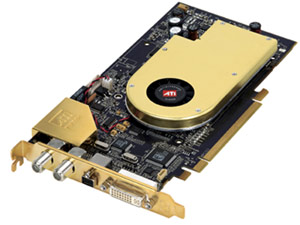
While it's not the longest card we've ever seen, it does have considerable length. With a core clock speed of 450MHz, the small cooler does a good job of keeping the card cool and staying quiet.  The card's 400MHz(800MHz DDR) memory doesn't get hot enough to warrant any sort of RAM heat-sinking. As a single slot cooler design however, all the hot air from the card will be expelled back into your case. If you are planning in putting this card into a small enclosure, make sure you have adequate ventilation. The ATI Theater 200 chip is located on the top left side of the PCB. Moving over to the front of the card, you'll notice the available inputs. The AIW 2006 is equipped with FM and TV Antenna connectors, 1 DVI Connection, 1 VGA Connection(requires output adapter), and 1 AV I/O Hub connector.

Inspecting The All-In-Wonder Radeon 2006 PCI-E
The answer to all your media dreams?


The card design is pretty basic in terms of AIW standards. The only problem we had, is the fact that we almost had to force it to fit in our test chassis. The TV Antenna and FM Radio connectors can give you a hard time, and while we were testing with a mid-tower ATX case, we're not sure how well it would fit into something smaller such as a HTPC case. Obviously, All-In-Wonder cards and a HTPC cases are a popular combination, so care should be taken to make sure there is proper clearance in your HTPC chassis of choice.

Package Contents
All the necessary connections and software


As you see here, consumers receive an input connection block(S-video, composite, and RCA stereo audio), Output connection block, Adobe Premier 2.0, and a CD Containing the necessary drivers and software(including ATI Multimedia Center 9.12, and Guide+) in the bundle. Also included is the Antenna/Cable for FM connector. It's basically the same All-In-Wonder package you'll get with the higher end models, with the exception of a remote control. The only main difference between this set, and say, the AIW X1900, is the GPU itself. Normally with video card packages, we like to see a game or two included, however with this being a lower-end card, we won't hold it against ATI for not including one.

Transparent
ATI's Multimedia Center

The main portal to everything the AIW 2006 has to offer is ATI's Multimedia Center software. Once the software is installed, you'll be given an additional task bar on the side of your screen. The bar can be undocked and moved to any part of the screen. From here you can select features such as TV, FM Radio, and CD Playback. You can also watch Video CDs(via VCD Player), and view all the media on your computer through the Library tab. ATI's TV viewing software is easy to navigate, responsive, and functional. You'll be allowed to change video options such as brightness and contrast, select recorded video quality, and even time record your shows. If you're recording high quality videos, make sure to have an ample amount of hard drive space however.

Taking the helm
ATI's Multimedia Center


Other features of the TV software include the ability to create a snapshot gallery, and set the TV signal as your background image. Also, as with most TV Tuners today, the AIW 2006 series allows you to rewind or time-shift live TV. This takes up a large amount of hard drive space though. You're allowed to select how much video the program will keep stored, so you can either keep the last 10, 20, 30, or even 60 minutes of video shown. Parental controls are also included, which gives you the ability to lock out the TV signal by using a changeable password.


You also have the ability to listen to FM Radio with the AIW 2006. The control panel is nearly an exact copy of the TV Function's control panel, so you'll have no trouble figuring it out. All the basic radio options are there, such as auto channel scan, channel record, and recorded sound quality. One feature we liked though, is the ability to schedule radio record times, just like with the TV software.

We liked using ATI's Multimedia Center, as it has some good features, and plenty of settings to play with. However one of the most important points to drive home, is the fact that the software is clean and runs without any hassles. We've run into poorly coded TV viewing software before, and it can really bring down the entire experience. These days, watching TV on your PC should be no harder than using a standard TV set, and you shouldn't be expected to put up with any hassles due to software limitations. Fortuneatly with ATI's MMC software, there doesn't seem to be any hint of that.

Transparent
Guide+ and Image Quality


Gemstar's Guide+
Move over TV Guide

Gemstar's Guide+ is basically a digital TV Guide but it's also a little more than that. You'll first need to enter your zip code, and select your cable provider when setting up Guide+, then it will download the channel listing information. You can browse to see what's on throughout the day, but you'll also be able to see what's playing four days ahead of time, which is great for time-recording shows. Program listings can be broken up into categories such as by station or title. You're also able to browse movies by genre, and shows by actors. Want to see what channels Bruce Willis is fighting on? All it takes is a few clicks of the mouse. There's also an excellent search feature as shown in the picture below. You'er given the options of filtering search results by category, station, time/date, rating, and parental guidance rating.


This software really improves the AIW 2006's appeal. Most TV Tuner's on the market come with some sort of channel browsing software, but we especially liked Gemstar's Guide+. It's clean, simple to understand, and best of all, it's free. That's right, no subscription fee.

Image Quality
Quality Images?

So how's the image quality with ATI's Theater 200 chip? It's not perfect, but it's decent enough. We've taken five different screenshots from various channels, using our analog cable connection. Image quality is a tricky thing however, as much of the quality can depend on signal strength and line quality. A quick warning to those of you using slower internet connections such as dial-up; we did not change the quality with the full sized images, so the file sizes are fairly large.


There's some noticeable noise and static in the background of all the images. However, those imperfections are much easier to notice when viewing on a computer monitor, than if you were to view it on your average TV. When viewing with a TV, the noise is a bit less noticeable, but still there. Image Quality certainly isn't 100% perfect here, but it's good enough for most. After a while the flaws are hardly noticeable unless you're really looking for them. Unfortunately this card still uses ATI's older Theater 200 chip. Based on previous reviews, we find ATI's Theater 550 Pro chip produces better image quality, with less noise and distortion.

Transparent
Test System & WMV-HD Decode Acceleration

HOW WE CONFIGURED THE TEST SYSTEMS: We tested our cards on an ASUS AV8 Deluxe motherboard, powered by an AMD Athlon 64 3000+ (Winchester Core) processor and 512MB of low-latency Mushkin Level 2 RAM. The first thing we did when configuring the test system was enter the BIOS and load the "High Performance Defaults."  The hard drive was then formatted, and Windows XP Professional with SP2 was installed. When the installation was complete, we installed the latest chipset drivers available, installed all of the other necessary drivers for the rest of our components, and removed Windows Messenger from the system. Auto-Updating and System Restore were also disabled, the hard drive was defragmented, and a 768MB permanent page file was created on the same partition as the Windows installation. Lastly, we set Windows XP's Visual Effects to "best performance," installed all of the benchmarking software, and ran the tests. We tested at the two most popular resolutions according to a recent poll of our readers, using a mid-range system.

The HotHardware Test System
AMD Athlon 64 FX Powered

Processor -

Motherboard -


Video Cards -


Memory -


Audio -

Hard Driv
e -


Hardware Used:
AMD Athlon 3000+ (1.8GHz, Winchester Core)
ASUS AV8 Deluxe
Nvidia nForce 4 Chipset

XFX GeForce 6600 DDR2 256MB
ATI AIW 2006

512
MB Mushkin Level 2 PC3200 RAM
CAS 2

Integrated on board

Western Digital "Caviar"

80GB - ATA 100

Operating System -
Chipset Drivers -
DirectX -

Video Drivers
-


Synthetic (DX) -
DirectX -

DirectX -
OpenGL -
Relevant Software:
Windows XP Professional SP2
nForce Drivers v6.82
DirectX 9.0c

NVIDIA Forceware v81.98

ATI Catalyst v6.2


Benchmarks Used:
3DMark06 v1.0.2
Half Life 2*
Quake 4*

* - Custom Test (HH Exclusive demo)

Windows Media Video 9 Acceleration: Microsoft's Windows Media Video 9 (WMV9) HD format was accepted by the SMPTE HD-DVD consortium as a new HD format. The Windows Movie Maker software, which comes bundled with Windows XP, makes it easy for consumers to edit and save their favorite videos. These videos are saved in the .WMV format. Most of today's high-end GPUs include dedicated hardware to accelerate the playback of WMV and WMV-HD content for fluid full frame rate video even on systems with entry-to mid level CPUs. Previous generations of GPUs were not able to support WMV9 decode acceleration, so often times HD WMV9 content would drop frames when being played back on legacy hardware.

WMV-HD Decode Acceleration
So, what does Avivo do for me, today?

To document CPU utilization when playing back WMV HD content, we used the performance monitor built into Windows XP. Using the data provided by performance monitor, we created a log file that sampled the percent of CPU utilization every second, while playing back the 1080p versions of the "The Rules of Attraction" video available on Microsoft's WMVHD site. The data was then imported into Excel to create the graphs below. The graphs shows the CPU utilization for a GeForce 6600 and the All-In-Wonder 2006 using Windows Media Player 10, patched using the DXVA update posted on Microsoft's web site (Update Available Here), and using ATI's own player that is included in the MMC software suite.

ATI's built in decode acceleration technology is able to take away some of the strain normally put on the CPU. When put up against Nvidia's Purevideo technology, ATI's AVIVO seems to have done slightly better. If you have a powerful enough CPU, and are only watching video, it's possible you'll hardly notice the benefits of these two technologies. However, if you're multitasking and aren't using a top of the line system, the benefits will become more noticeable.

Transparent
3DMark 06

Performance Comparisons with 3DMark06 v1.0.2
Details: http://www.futuremark.com/products/3dmark06/

3DMark06
Futuremark recently launched a brand-new version of their popular benchmark, 3DMark06. The new version of the benchmark is updated in a number of ways, and now includes not only Shader Model 2.0 tests, but Shader Model 3.0 and HDR tests as well. Some of the assets from 3DMark05 have been re-used, but the scenes are now rendered with much more geometric detail and the shader complexity is vastly increased as well. Max shader length in 3DMark05 was 96 instructions, while 3DMark06 ups the number of instructions to 512. 3DMark06 also employs much more lighting, and there is extensive use of soft shadows. With 3DMark06, Futuremark has also updated how the final score is tabulated. In this latest version of the benchmark, SM 2.0 and HDR / SM3.0 tests are weighted and the CPU score is factored into the final tally as well.

We'll start off our round of performance benchmarking with Futuremark's 3DMark06. Neither card puts up an impressive score, though both being budget cards, there isn't much to expect. However, the ATI AIW 2006 isn't to far off from the 1348 score our 6600 managed to obtain. Though 3DMark06 is an excellent program for performance comparisons, it's just a synthetic benchmark, so let's continue our evaluation with same actual game benchmarks.

Transparent
Half-Life 2

Performance Comparisons with Half-Life 2
Details: http://www.half-life2.com/

Half Life 2
Thanks to the dedication of hardcore PC gamers and a huge mod-community, the original Half-Life became one of the most successful first person shooters of all time.  So, when Valve announced Half-Life 2 was close to completion in mid-2003, gamers the world over sat in eager anticipation. Unfortunately, thanks to a compromised internal network, the theft of a portion of the game's source code, and a tumultuous relationship with the game's distributor, Vivendi Universal, we all had to wait until November '04 to get our hands on this classic. We benchmarked Half-Life 2 with a long, custom-recorded timedemo in the "Canals" map, that takes us through both outdoor and indoor environments. This test was run using "Medium-Quality" settings at resolutions of 800 x 600 without any anti-aliasing or anisotropic filtering and with 4X anti-aliasing and 8X anisotropic filtering enabled concurrently.

Half-Life 2 has some impressive graphics, and thanks to an efficiently coded engine by Valve, budget cards can put up some decent scores in this game. We ran our games at a resolution of 800x600 since neither card is much of a powerhouse. We wanted to use a resolution where we could get playable frame rates, and at 800x600 using high quality settings, both cards did put up some excellent frame rates. The XFX GeForce 6600 DDR2 256MB is powerful enough to play the game a higher resolutions, however the AIW 2006 might have a harder time. Remember these are average frame rates, so when actually playing the game, you'll find a few occasions where the frame rate drops a noticeable amount as the action intensifies.

Transparent
Quake 4

Performance Comparisons with Quake 4
Details: http://www.quake4game.com/

Quake 4
id Software, in conjunction with developer Raven, recently released the latest addition to the wildly popular Quake franchise, Quake 4. Quake 4 is based upon an updated and slightly modified version of the Doom 3 engine, and as such performance characteristics between the two titles are very similar.  Like Doom 3, Quake 4 is also an OpenGL game that uses extremely high-detailed textures and a ton of dynamic lighting and shadows, but unlike Doom3, Quake 4 features some outdoor environments as well. We ran this these Quake 4 benchmarks using a custom demo with the game set to its "Medium-Quality" mode, at resolutions of 800 x 600 without anti-aliasing enabled and then again with 4X AA and 8X aniso enabled simultaneously.

While the AIW 2006 was able to handle HL2 well at medium quality settings, and a low resolution, it's not so lucky with Quake 4. ATI cards have generally had slower OpenGL performance than Nvidia's products, and that is certainly apparent with these test results. While a constant 41.9FPS is good enough for some people, this is just an average score, and you'll regularly see your frame rates drop into the 20's. You can also forget about using AA and AF with this game, the AIW 2006 just isn't up to it.

Transparent
Final Thoughts & Conclusion


ATI's AIW 2006 is what you'd traditionally expect from their All-In-Wonder series. You get the power of a dedicated video card, with the functionality of a TV Tuner. Well, power is a relative word to use in this article. As this card is built on ATI's X1300 chip, you can't expect to be blasting through games such as Quake 4 with AA and AF turned on and achieve solid frame rates, even at medium quality settings. Really, the main selling point of this card are its price, feature-set and functionality. If you're trying to find a good entry level card for an HTPC system, the AIW 2006 is worth looking into.

Of course we can't ignore another popular selling point for this card, its PCI-Express interface. Yes this card uses the new PEG slot type, which opens it up to a wide range of leading system architectures. Even though you can still find decent motherboards using the AGP format, PCI-E is the future, and AGP will eventually die out completely. This card is also built newer technology than ATI's previous AIW series, though still uses their Theater 200 chip. Instead of being based off of ATI's 9600 Pro, they've gone ahead and modeled after their X1300 card. Though gaming performance was moderate to weak, we can't really hold it against this card too much, as it never claims to be even a mid-range 3D performer. For around $200 you still get a base-level gaming card and a well rounded TV-Tuner with various A/V capabilities as well.

What this card aims for to be is a feature rich, budget solution geared towards someone who's just looking for the Multimedia features of the AIW series. On these terms, it delivers. While you'll get many of the same features from an AIW card as you would from a graphics card and separate TV tuner, it's nice to have them combined in one package and all in one chassis slot. All things considered, we believe this card will find it's way into many homes and businesses in the marketplace, especially within retail chains like Best Buy, CompUSA and others, where cost is king and $500 cards don't move nearly as well. Here, the ATI All-In-Wonder 2006 series provides excellent features, and a hassle free experience at a reasonable price-point.


_Excellent multimedia features
_No need for a separate
__Video card/TV Tuner
_Stable and easy to use software
_Guide+
_Light bundle
_Might not fit in all cases
_ATI Theater 200 chip, not the 550

Get into HotHardware's PC Hardware Forum Right Now!


Content Property of HotHardware.com