Logo   Banner   TopRight
TopUnder
Transparent
ATI TV Wonder 600 USB
Transparent
Date: Jul 10, 2007
Section:Graphics/Sound
Author: Paul Jastrzebski
Transparent
Introduction

Although TV tuners have been in the desktop PC space for more than a decade, only in the last couple of years have they started to become integrated and widely used in notebook computers. OEMs started to recognize that many consumers simply didn’t want large desktop systems.  But at the same time they wanted the multimedia features offered only by larger PCs, so many OEMs started working on ways to incorporate Video inputs and TV tuning into their notebook designs. After the introduction of Windows XP Media Center Edition in 2005, we saw many of these new multimedia notebook designs brought to market by companies like HP, ASUS, and Alienware among others, but the addition of TV tuning and video inputs added significant costs to these notebooks.


Not much later, a slew of companies like Diamond, Terratec, and Pinnacle Systems all brought to market USB 2.0 versions of their desktop TV tuners to give TV tuning and video input access to notebook users - or desktop users who didn't want to open up their systems - without any built in tuning or video capability. However, most of the products either suffered video quality issues or were too big and bulky to be used by the casual notebook user on the go.


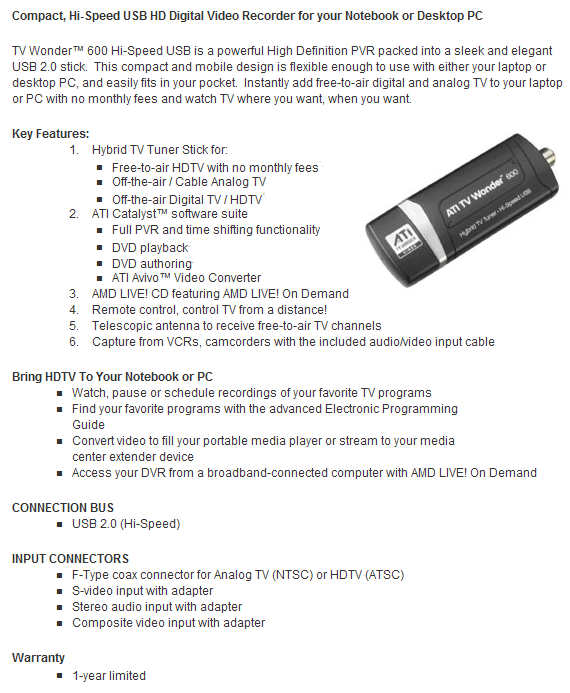
Today AMD has announced a brand new product, the ATI TV Wonder 600 USB, that they hope will appeal to all notebook users looking for TV tuning and video input capability. Only the size of a credit card, the TV Wonder 600 USB features support for OTA (over the air) HDTV, OTA digital TV, analog cable TV, and analog video capture. Will the TV Wonder 600 USB live up to ATI’s established reputation as a leader in PC TV tuning? Let’s take a closer look to find out.


ATI TV Wonder 600 USB
Feature Overview

specs.png
Transparent
ATI TV Wonder 600 USB

small_u6.jpg     small_u7.jpg    small_u9.jpg

At first glance, the ATI TV Wonder 600 USB resembles more a USB flash drive than a TV tuner. The tuner is roughly the size of a credit card and has an antenna / cable input on one side and USB 2.0 connection on the other. The USB connector is hidden by a cap that is removed when you are going to install the tuner into your PC . The device also features a mini port for its video in connections and an infrared receiver for the bundled remote control.

small_u5.jpg     small_u2.jpg    small_u3.jpg

We put the tuner side by side with a stick of Kingston’s HyperX DDR2 memory and as you can tell from the picture, the tuner is about two thirds the size of the DDR2 stick. The TV Wonder 600 USB comes with a credit card sized push button remote control that worked well up to around 10 feet away from the tuner. Also included is a digital OTA TV tuner that is capable of bringing in HDTV and digital TV stations if you're withing broadcast range.

small_u4.jpg     small_u1.jpg    small_u8.jpg


For analog video capturing, the TV Wonder 600 USB includes a dongle that includes the standard red, yellow, and white RCA inputs as well as an S-Video input. Due to its large size, the TV Wonder 600 USB will typically hamper the installation of any other USB devices to surrounding USB ports if it is plugged in directly into a USB port in your notebook. To get around this, ATI has also bundled in a USB port extender, allowing you to plug in the TV Wonder 600 USB to the extension which then plugs into the USB port on your system.

Transparent
Installation

Windows XP Installation:

For Windows XP users, ATI bundles the same full version release of the Catalyst Media Center we saw with the ATI TV Wonder 650 Combo PCIe. After installing the Catalyst Media Center suite with the ATI driver disk, the CMC boots up and guides you through the configuration of the TV Wonder 600 USB.

small_c2.jpg     small_c4.jpg     small_c3.jpg

The first step in the configuration is setting up the type of source, analog or digital, you will be connecting to your new TV Wonder. Afterward, the setup wizard automatically scans and lists the channels that are available to watch given your connection. Next, the software automatically downloads the two week television schedule of the zip code you are in, which is needed to set up scheduled recordings of your favorite shows.

small_c5.jpg     small_c6.jpg     small_c7.jpg

Once set up, the CMC interface is very clean and easy to use. You can watch live TV in the TV section, watch DVD movies in the DVD section, listen to local radio in the Radio section, and configure your tuner in settings. 

small_c8.jpg


Windows Vista Installation:

small_vi2.jpg     small_vi3.jpg    small_vi4.jpg

Installing the TV Wonder 600 USB in Windows Vista is very easy as well. Once the WDM driver installation is complete, you simply launch Windows Media Center and then click Setup when you are prompted by a New Tuner Found message.

small_vi5.jpg     small_vi55.jpg    small_vi6.jpg

Windows Media Center tests all possible TV signals and automatically configures the type of TV input your tuner is using. We initially set up our TV Wonder 600 USB with digital OTA input, with Windows Media Center automatically testing the signal strength of the various channels available in my area. After clicking next, you are able to watch live TV right on your system.

small_vi7.jpg

The TV Wonder 600 USB also supports DVR functionality, allowing you to schedule program recordings for television shows up to two weeks into the future. After prompting you for your zip code, Windows MediaC enter and Catalyst Media Center simply download your local TV schedule, allowing you to pick and chose the shows you want to record.


Overall, installation of the TV Wonder 600 USB was very simple. After getting Catalyst Media Center up and running, configuring the tuner through the integrated setup wizard was very easy. Windows Vista installation was also fast and painless, with Windows Media Center simply recognizing a new tuner was installed in your system and automatically setting it up for you.

Transparent
Image Quality

As mentioned in our TV Wonder 650 Combo PCIe review, we said that image quality with PC TV Tuners is very subjective and can depend on how good the source of your material is. For example, the cable signal in our area is relatively weak. Because the coax cable signal is spread out throughout the lab, the power of the signal at each end is degraded, which can lead to noisy or unclear pictures. This noise is sometimes hard to notice on standard television sets, but easily becomes apparent when viewing the picture on a high resolution computer monitor. With that said, we took a notebook with the TV Wonder 600 USB connected right to it to a coax signal amplifier to gain access to the best possible signal for our analog cable screen captures. The digital antenna screen captures are taken using TV Wonder 600’s bundled antenna. The images shown below were running in full screen mode under ATI’s Catalyst Media Center on an ASUS Z96JS notebook.

Analog Cable

small_a1.jpg     small_a2.jpg    small_a3.jpg

small_a4.jpg     small_a5.jpg    small_a6.jpg


Digital Antenna

small_d1.jpg     small_d2.jpg    small_d3.jpg

small_d4.jpg     small_d5.jpg    small_d6.jpg


Digital Antenna - HD

small_j1.jpg     small_j3.jpg   small_h4.jpg

small_h7.jpg     small_h8.jpg    small_h9.jpg

Even at full screen mode, the TV Wonder 600 USB delivered excellent standard definition image quality as can be seen by the pictures above. The picture from the digital antenna was a bit clearer than the analog coax cable, but the analog cable was impressive in its own right. However, most impressive of all was when we found HD programming on our OTA digital antenna. We caught a few minutes of both Jay Leno and David Letterman’s late night talk shows, with both shows looking excellent in HD. The HD content on a high resolution screen just looks great, so good in fact that it makes watching the great quality standard definition content a little less dazzling.

Transparent
Conclusion

For a device roughly the size of a credit card, the TV Wonder 600 USB is surprisingly versatile and allows you to do a lot of different things to the device. First, it is a DVR (digital video recorder), you can schedule the device to record your favorite television shows up to two weeks in advance, without paying the monthly fees that TiVo and cable providers charge. Second, it is both an analog and digital TV tuner, allowing you to watch the TV already coming into your house, and the digital programming that is broadcast from local television stations. It also supports over the air high definition broadcasts, so if local stations broadcast television in HD, you can pick it up as well. Lastly, it is an analog video input device, allowing you to plug in S-Video or RCA feeds and capture their respective video source.


Because it is so small and can do so much, and should be available for about $100 in the coming weeks, the TV Wonder 600 USB will likely appeal to a large segment of the notebook owning population. We can envision business travelers that have long layovers at the airport setting up the TV Wonder 600 USB and watching local television stations. People without any room for television on their desk and only a notebook PC are another potential audience. So are those of us that don’t have TiVo but want DVR functionality. Desktop PC users are also in the mix, especially if they own a notebook and want to swap the tuner back and forth, something only possible with a USB 2.0 tuner like the TV Wonder 600.


ATI has always had a strong multimedia product line-up, and with the addition of the TV Wonder 600 USB, it will only get stronger. The device is small, works great, and is packed with the core features you would expect from a high end desktop television tuner. The installation of the device is a snap, and although ATI has done an excellent job with their Catalyst MediaC enter multimedia software suite, the TV Wonder 600 USB really shines when coupled with Windows Vista’s Windows Media Center. Image quality, both of standard definition and high definition, left us impressed.

  • Easy To Use
  • Very Good Image Quality
  • Includes Remote
  • Vista and XP Compatibility
  • Single Tuner
  • Blocks nearby USB ports when not using an extension cable

Discuss This Article And Share Your Thoughts With Others!


Content Property of HotHardware.com