|
|
| Introduction, Features and Specs | ||||||
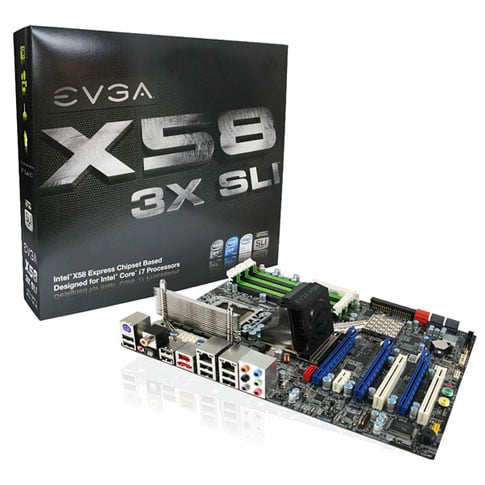
Intel's recent launch of the Core i7 processor and its accompanying chipset platform, was met with plenty of buzz and splash, due not only to the product's architectural enhancements but also its performance gains. However, the new serially enabled Core i7 also brought fairly significant platform changes as well. Though some folks may be resistant to it, most times, change is good. And Intel's new, more scalable QPI serial interface was long overdue. In fact, the Core i7 marks what could be considered one of the most significant changes in Intel's desktop processor architecture in many years. Though the new CPU requires a new processor socket and the new X58 Express chipset, end user migration to the new Core i7 desktop chip will be gradual at first but will build momentum as the platform matures into 2009.
The EVGA X58 3X SLI motherboard also supports all of the latest features inherent to Intel's X58 Express chipset, including triple channel DDR3 system memory. Here's a quick look at the X58 Express chipset block diagram, as a refresher. Noteably, 3-way SLI configurations are supported in this motherboard via a x16,x8,x8 lane configuration, in each of the board's three full length x16 slots. You can reference this diagram here from our recent overview of the technology for further details. However, with each of these lane configurations supporting full Gen2 PCI Express links, there is more than enough bandwidth to support the required graphics processing throughput.
EVGA bundles the X58 3X SLI with a healthy offering of connectors, cables and related hardware to support all of the salient features of this motherboard. In the kit you get an I/O backplane faceplate and three slot connectors for USB, Firewire and even RS232 serial connectivity (though we can't imagine anyone actually using this). You also get three 4-pin molex to SATA converter cables, six SATA cables, a single EIDE ribbon cable and both two-way and three-way SLI bridge connectors. EVGA also includes both a full manual and a quick install guide for reference and of course the standard drivers and utility CD is in there as well. On the CD is EVGA's ELEET tuning software for overclocking, which we'll cover in more detail later but it's safe to say the bundle is both cost-efficient and well put together, all told. |
| BIOS and Overclocking With EVGA ELEET | ||||||||
EVGA's X58 3X SLI motherboard employs a standard issue Phoenix Award BIOS that is dialed in with a myriad of options for enabling and disabling features and peripherals, as well as overclocking and voltage adjustments. Voltage levels of all the major interfaces around the CPU, chipset and system memory can be adjusted in extremely granular increments. As you can see we have the ability to to tweak CPU VCore, VTT, and PLL voltages, as well as QPI and IOH voltage levels. We found that minor adjustments in QPI voltage levels added stability when overclocking, along with the traditional Vcore tweaks. This BIOS also has the same basic individual per-core CPU clock ratio adjustments that we demonstrated in our Intel Core i7 video spotlight, as well as Intel's Turbo Mode, dynamic clock ratio adjustments that can be set. In the case of an Extreme edition processor, you can of course dial up the core clock multiplier to a higher setting, as well as turn it down. In addition, there are three available ratios to choose from for the QPI link speed up to 6.4GT/s. The system reference clock (which should no longer be considered an FSB clock) also drives timing for system memory which also can be dialed in with a number of clock ratio settings. The EVGA X58 3X SLI certainly has a wealth of tweakability under the hood for BIOS-driven overclocking and performance tuning. However, we found the board's bundled EVGA ELEET tuning software to be even more interesting.
If you got the chance to check out our initial Core i7 launch coverage, you'll know that Intel's new 45nm processor with integrated memory controller and QPI serial link, also has a lot of headroom with respect to clock speed. Fortunately, EVGA not only gives you the ability to push the Core i7 via traditional BIOS options, they also provide a really slick overclocking utility they call "ELEET" tuning software. Look closely at the screen shots below. Though you may pause with a double-take thinking that you're looking at screens from CPUID software, in fact EVGA ELEET is CPUID and a lot more.
It appears the folks at CPUID have been busy at work developing an SDK that allows not only for diagnostic read-out of processor, system memory and motherboard vital signs but also clock timing and system voltage adjustments to boot. EVGA obviously licensed this technology, has fleshed out a nice utility here and it's the first glimpse of an implementation like this that we have seen to date. This small footprint utility lets you look at all of the various health monitor readings that are available in the BIOS with voltage and temperature data, right down to the individual core level on a quad-core Core i7 processor. About the only control or reading you don't get with this software is fan speed.
And of course, with the help of a Thermalright Ultra-120 eXtreme RT cooler for the Core i7, we were able to execute on some pretty blistering overclock speeds with our Core i7 965 Extreme CPU. Though this processor's standard clock speed is 3.2GHz, we were able to hit 4GHz with this standard air cooler and EVGA's ELEET tuning software. We achieved this by bumping up the processor's reference clock speed (leaving the QPI link ratio at the 6.4GT/s setting) and bumping up both Vcore and QPI voltage settings by a couple of tenths of a volt. A QPI link voltage setting of around 1.25V actually proved to add a bit more stability under heavy overclocking conditions when using the method of bumping up the reference clock and thus the QPI clock as well. Again, all of this was accomplished in software and through the ease of a this simple desktop utility. The whole experience was quite enjoyable actually and made for quick work in determining top end clock speeds and stability ceilings. |
| Test System and SANDRA Tests | |||||||||||
![]() Test System Configuration Notes: When configuring our test systems for this article, we first entered their respective system BIOSes and set each board to its "Optimized" or "High performance Defaults". We then saved the settings, re-entered the BIOS and set memory timings for either DDR2-1066 (AMD) with 5,5,5,15 timings, DDR3-1333 with 7,7,7,20 timings (Intel Core 2), or DDR3-1066 with 7,7,7,20 timings (Intel Core i7). The hard drives were then formatted, and Windows Vista Ultimate was installed. When the Windows installation was complete, we updated the OS, and installed the drivers necessary for our components. Auto-Updating and Windows Defender were then disabled and we installed all of our benchmarking software, performed a disk clean-up, defragged the hard drives, and ran all of the tests.
We continued our testing with SiSoftware's SANDRA 2009, the System ANalyzer, Diagnostic and Reporting Assistant. We ran three of the built-in subsystem tests that partially comprise the SANDRA 2009 suite on the test motherboards (CPU Arithmetic, CPU Multi-Media, and Memory). ![]() ![]() ![]() In these quick synthetic benchmarks, as you'll note in the graphs, the EVGA X58 3X SLI is right on top of the Intel board, in terms of CPU performance. However, we did notice a slight variance in memory bandwidth, which isn't that surprising. X58 Express chipset-based boards and BIOSes are still very much being tuned from virtually all the major manufacturers. You'll likely see these variances tighten up a bit more as things mature. That said, let's journey on with respect to the numbers and see where the rest of the chips fall for this new board from EVGA. |
| Futuremark PCMark Vantage | ||||
![]()
We then ran our test motherboards through PCMark Vantage, Futuremark’s latest system performance metric built especially for Windows Vista. PCMark Vantage runs through a host of different usage scenarios to simulate different types of workloads, including High Definition TV and movie playback and manipulation, gaming, image editing and manipulation, music compression, communications, and productivity. Most of the tests are multi-threaded as well, so they can exploit the additional resources offered by multi-core CPUs. There aren't any major revelations to take away here with PCMark Vantage. However, our EVGA X58 3X SLI board did post the second highest PCMark score of the four X58 Express boards we tested. Beyond that the EVGA motherboard traded spots with the other boards in our mix, sometimes winnning a few, other times losing. |
| Cinebench and Kribibench | ||||||||
Cinebench R10 is an OpenGL 3D rendering performance test based on Cinema 4D. Cinema 4D from Maxon is a 3D rendering and animation tool suite used by 3D animation houses and producers like Sony Animation and many others. It's very demanding of system processor resources and is an excellent gauge of pure computational throughput.
This is a multi-threaded, multi-processor aware benchmark that renders a single 3D scene and tracks the length of the entire process. The rate at which each test system was able to render the entire scene is represented in the graph below.
Cinebench is solid gauge of raw CPU throughput with its software rendering workloads. As you can see, the EVGA X58 3X SLI is in the hunt with the rest of the Core i7 boards. On a side note, this tests also shows how much faster the new Intel Core i7 processor can be versus legacy Core 2 chips. Both the Core i7 Extreme 965 chip and the Core 2 Extreme QX9770 are clocked at 3.2GHz, yet the Core i7 offers roughly a 28% performance advantage.
For this next batch of tests, we ran Kribibench v1.1, a 3D rendering benchmark produced by the folks at Adept Development. Kribibench is an SSE aware software renderer where a 3D model is rendered and animated by the host CPU and the average frame rate is reported. We used two of the included models with this benchmark: a "Sponge Explode" model consisting of over 19.2 million polygons and the test suite's "Ultra" model which is comprised of over 16 billion polys.
Like the Cinebench test, our Kribibench rendering test shows that the EVGA X58 3X SLI offers performance in lock-step with its X58-based competition. In fact, it was the fastest board by a slight margin under our Sponge Exploded model rendering workload. |
| LAME MP3 Multi-threaded Encoding | ||||
![]() In our custom LAME MT MP3 encoding test, we convert a large WAV file to the MP3 format, which is a popular scenario that many end users work with on a day-to-day basis to provide portability and storage of their digital audio content. LAME is an open-source mid to high bit-rate and VBR (variable bit rate) MP3 audio encoder that is used widely around the world in a multitude of third party applications.
In this test, we created our own 223MB WAV file (a hallucinogenically-induced Grateful Dead jam) and converted it to the MP3 format using the multi-thread capable LAME MT application in single and multi-thread modes. Processing times are recorded below, listed in seconds. Shorter times equate to better performance
In this test there was very little separation between the X58/Core i7-based motherboards in our test group. However, the EVGA board, for whatever reason, was able to complete the multi-threaded run a couple of seconds faster than the Gigabyte and Intel boards and offer a photo-finish win versus the Asus board. Obviously this performance variance in negligible though. It's also interesting to note that the Core i7 is close to 20% faster than the Core 2 Quad in this usage model. |
| 3DMark06 CPU and 3DMark Vantage CPU | ||||||||
3DMark06's built-in CPU test is a multi-threaded DirectX gaming metric that's useful for comparing relative performance between similarly equipped systems.
This test consists of two different 3D scenes that are processed with a software renderer that is dependent on the host CPU's performance. Calculations that are normally reserved for your 3D accelerator are instead sent to the CPU for processing and rendering. The frame-rate generated in each test is used to determine the final score.
Here again the four X58 boards we tested all clock in at about the same score with small variances between them. Honestly, this metric from 3DMark 06 is a bit nebulous in our opinion but we strive to give you lots of different looks at performance in our test results and this is just another angle to roll up and complete the picture.
3DMark Vantage's CPU Test 2 is a multi-threaded test designed for comparing relative game physics processing performance between systems. This test consists of a single scene that features an air race of sorts, with a complex configuration of gates. There are aircraft in the test that trail smoke and collide with various cloth and soft-body obstacles, each other, and the ground. The smoke spreads and reacts to the planes as they pass through it as well, and all of this is calculated on the host CPU.
The follow-on to 3DMark06, 3DMark Vantage, shows similar results in its CPU test module. Regardless, amongst the X58-based board we tested, there is less than a 5% differential between the fastest score recorded and the slowest score. On this test the EVGA X58 3X SLI board pulled up the rear but not by much. |
| Low-Resolution Gaming | ||||
For our next set of tests, we moved on to some in-game benchmarking with ET Quake Wars and Crysis. When testing processors and motherboards in these games, we drop the resolution to 800x600 and reduce all of the in-game graphical options to their minimum values to isolate CPU and memory performance as much as possible. However, any in-game effects, which control the level of detail for the games' physics engines and particle systems, are left at their maximum values, since these actually do place some load on the CPU rather than GPU.
These two benchmarks, by all rights, should show the same performance progressions we saw in the 3DMark06 and 3DMark Vantage tests and as you can see, they do correlate pretty well. Again, all of our X58-based boards, along with the EVGA X58 3X SLI, are tightly coupled performance-wise. This time the EVGA X58 3X SLI edges out even the Asus P6T and there is a much larger variance between the Core i7 and the Core 2 Quad systems we tested. |
| High-Resolution Gaming | ||||
We started our high-resolution 3D testing with ET: Quake Wars again. This time we have the resolution dialed up in the game to 1920X1200, the native resolution for our 24" test LCDs. We also turned up all quality settings and anisotropic filtering for textures to maximum levels. Benchmarks were then run with super-crisp 8X and 16X AA levels.
|
| Performance Summary and Final Thoughts | ||||
Performance Summary: The EVGA X58 3X SLI performed on-par with the other X58 Express motherboards we tested and with less than a 5% variance faster or slower, depending on the tests we ran. As a platform, Intel's Core i7 processor, coupled with this new motherboard from EVGA, offers a healthy performance gain (sometimes in excess of 25% or more) over legacy Core 2 processors and previous generation chipset platforms.
The EVGA X58 3X SLI is a solid example of the new round of motherboards for Intel's new Core i7 processor based on the X58 Express chipset. Though we have at least one major gripe with the board's awkward 8-pin ATX power connector location, the rest of our experience with the board was first class. One pleasant surprise was EVGA's re-branded ELEET tuning software with CPUID technology driving the interface. We were able to dial in an impressive overclock at 4GHz on standard air cooling with the ELEET tuning utility and were able to get their quickly with its intuitive control panel menu screens, all on the fly on a Vista desktop.
|