



NVIDIA GeForce 8800 GTS Refresh: Asus and XFX


NVIDIA’s G80 GPU has been sitting atop the 3D graphics food chain for well over a year now. It was way back in November of ’06 that the GeForce 8800 GTX and original 640MB GTS arrived – the first two graphics cards based on the G80 GPU. Sometime later, the more affordable 320MB GeForce 8800 GTS and current flagship GeForce 8800 Ultra arrived, but these two cards are based on the same GPU that powers NVIDIA’s initial 8800-series offerings.
Obviously, even though NVIDIA’s products still clearly outperform ATI’s at the high-end, it’s time for a refresh, if just to keep things exciting for consumers this holiday season. The first glimpse of what NVIDIA had in store came a little over a month ago in the form of the GeForce 8800 GT. The GeForce 8800 GT was based on a brand new GPU, internally codenamed the G92. G80 and G92 are fundamentally very similar, but in our coverage of the GeForce 8800 GT, we speculated that NVIDIA hadn’t unleashed the full potential of the GPU due to the odd number of stream processor partitions enabled in the GT - seven. As it turns out we were correct.
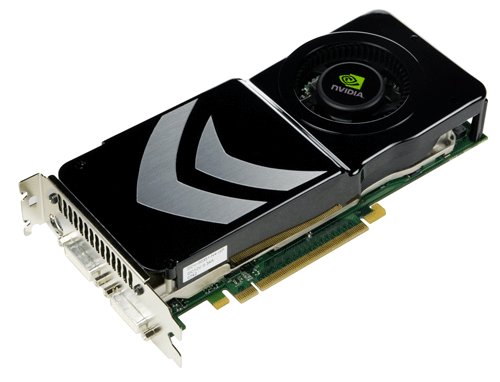
Today NVIDIA is launching yet another addition to the GeForce 8800 series, a new GTS card featuring 512MB of frame buffer memory and a G92 at its heart, with get this, 128 stream processors. There was an eighth stream processor partition lurking within the G92 all along...
|
|
|

| Fabrication: 65nm Number of Transistors: 754 Million Core Clock (Includes dispatch, texture units and ROPs): 650MHz Shader Clock (Stream Processors): 1.625GHz Stream Processors: 128 Memory Clock: 970MHz (1940 DDR) Memory Interface: 256-bit Memory Bandwidth: 62 GB/ps Frame Buffer Size: 512 MB ROPs: 16 HDCP Support: Yes HDMI Support: Yes Connectors: 2xDual-Link DVI-I 7-Pin TV Out RAMDACS: 400MHz Bus Technology: PCI Express 2.0 Max Board Power: 150 Watts NVIDIA unified architecture: Fully unified shader core dynamically allocates processing power to geometry, vertex, physics, or pixel shading operations, delivering up to 2x the gaming performance of prior generation GPUs. Full Microsoft DirectX 10 Support: World's first DirectX 10 GPU with full Shader Model 4.0 support delivers unparalleled levels of graphics realism and film-quality effects. NVIDIA SLI Technology: Delivers up to 2x the performance of a single graphics card configuration for unequaled gaming experiences by allowing two cards to run in parallel. The must-have feature for performance PCI Express graphics, SLI dramatically scales performance on today's hottest games. NVIDIA Lumenex Engine: Delivers stunning image quality and floating point accuracy at ultra-fast frame rates. 16x Anti-aliasing: Lightning fast, high-quality anti-aliasing at up to 16x sample rates obliterates jagged edges. 128-bit floating point High Dynamic-Range (HDR): Twice the precision of prior generations for incredibly realistic lighting effects - now with support for anti-aliasing. NVIDIA Quantum Effects Technology: Advanced shader processors architected for physics computation enable a new level of physics effects to be simulated and rendered on the GPU - all while freeing the CPU to run the game engine and AI. |
NVIDIA nView Multi-Display Technology: Advanced technology provides the ultimate in viewing flexibility and control for multiple monitors. Dual 400MHz RAMDACs: Blazing-fast RAMDACs support dual QXGA displays with ultra-high, ergonomic refresh rates - up to 2048x1536@85Hz. Dual Dual-link DVI Support: Able to drive the industry's largest and highest resolution flat-panel displays up to 2560x1600. NVIDIA PureVideo HD Technology: The combination of high-definition video decode acceleration and post-processing that delivers unprecedented picture clarity, smooth video, accurate color, and precise image scaling for movies and video. Discrete, Programmable Video Processor: NVIDIA PureVideo HD is a discrete programmable processing core in NVIDIA GPUs that provides superb picture quality and ultra-smooth movies with low CPU utilization and power. Hardware Decode Acceleration: Provides ultra-smooth playback of H.264, VC-1, WMV and MPEG-2 HD and SD movies. HDCP Capable: Designed to meet the output protection management (HDCP) and security specifications of the Blu-ray Disc and HD DVD formats, allowing the playback of encrypted movie content on PCs when connected to HDCP-compliant displays. Spatial-Temporal De-Interlacing: Sharpens HD and standard definition interlaced content on progressive displays, delivering a crisp, clear picture that rivals high-end home-theater systems. High-Quality Scaling: Enlarges lower resolution movies and videos to HDTV resolutions, up to 1080i, while maintaining a clear, clean image. Also provides downscaling of videos, including high-definition, while preserving image detail. Inverse Telecine (3:2 & 2:2 Pulldown Correction): Recovers original film images from films-converted-to-video (DVDs, 1080i HD content), providing more accurate movie playback and superior picture quality. Bad Edit Correction: When videos are edited after they have been converted from 24 to 25 or 30 frames, the edits can disrupt the normal 3:2 or 2:2 pulldown cadences. PureVideo HD uses advanced processing techniques to detect poor edits, recover the original content, and display perfect picture detail frame after frame for smooth, natural looking video. Video Color Correction: NVIDIA's Color Correction Controls, such as Brightness, Contrast and Gamma Correction let you compensate for the different color characteristics of various RGB monitors and TVs ensuring movies are not too dark, overly bright, or washed out regardless of the video format or display type. Integrated SD and HD TV Output: Provides world-class TV-out functionality via Composite, S-Video, Component, or DVI connections. Supports resolutions up to 1080p depending on connection type and TV capability. Noise Reduction: Improves movie image quality by removing unwanted artifacts. Edge Enhancement: Sharpens movie images by providing higher contrast around lines and objects. |

The new G92-based GeForce 8800 GTS 512MB card’s features and specifications are outlined above. Keep in mind, however, that these specifications are NVIDIA’s recommendations only. Most of their board partners will be offering cards clocked significantly higher than NVIDIA’s reference specifications.
As you can see, the GeForce 8800 GTS 512MB sports a total of 128 stream processors with a core GPU clock speed of 650MHz and a shader clock of 1625MHz (NVIDIA’s current GPUs have multiple clock domains within the chip, hence the different clock speeds for the core and shaders). The card’s 512MB of DDR3 memory rides along at 970MHz (1940MHz DDR) utilizing a 256-bit wide interface, which results in a little over 62GB/s of peak bandwidth.
Physically, the cards are 9 inches in length with dual-slot coolers. Overall board power is roughly 150W max, which means GeForce 8800 GTS 512MB cards require only a single supplemental 6-pin PCI Express power connector.








