|
|
| Introduction and Specifications | ||||
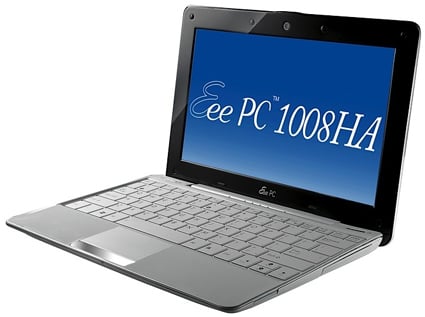
![]() Today, we're looking at the very first Eee PC netbook that looks nothing at all like its predecessors. In fact, we'd wager that Asus included this machine in its Eee PC line simply because of the brand recognition. Although, Asus isn't content with labeling this only an Eee PC. The Eee PC 1008HA is the first member of the burgeoning "Seashell" line, a family that already includes this machine and the to-be-released 1005HA. The 1008HA was originally unveiled in March at the CeBIT conference in Germany, but the ultra-slim laptop has just now started filtering out to the US market. ![]()
Hardware wise, there's both a lot and a little that differentiates this from the pack of other netbooks out there. As for design, it's easy to see that few alternatives can measure up, outside of maybe MSI's X-Slim X340. The 1008HE is slimmer and more beautiful in almost every way than the competition. Internally, however, you'll notice most of the same specifications you see on practically every other netbook to emerge within the past six months. Thus, we don't really anticipate its performance being "off the charts." Follow us through the pages to come as we inspect, critique and stress test Asus' most stunning Eee PC yet. |
| Design and Build Quality |
The new chassis is being deemed "Seashell," and it's finished in a special scratch-resistant "Infusion" coat. In order to accomplish a seamless overall look, Asus also added curved panels over the I/O ports, and even the AC adapter and input port have been shrunk in order to make things look more flush. Within, you'll find a keyboard that's 92% full-size along with an interesting dimple-laden trackpad that supports multi-touch gestures (just like the 1000HE). We can't applaud Asus enough for including this; we're still baffled by how many new notebooks ship without a multi-touch trackpad, and this relatively affordable netbook includes it. That said, it's still not a full blown multi-touch pad, as scrolling up/down still works only with a single finger on the right side of the pad. Still, it's better than most netbooks trackpads, so we'll take it. Naturally, a design such as this will include compromises. First off, there are only two USB 2.0 sockets. Additionally, there is no DisplayPort, HDMI or ExpressCard slot. The only video output is a VGA socket, but it's not your typical connector; in order to fit the port on a machine this thin, Asus had to use a proprietary output that turns to VGA via a dongle. Certainly not the most convenient, but at least it's there. Also, Asus did manage to include an Ethernet jack by redesigning the port to expand downward when a cable is inserted. If you'll recall, Apple's similarly thin MacBook Air has no Ethernet port and relies solely on Wi-Fi or WWAN to get connected. As with many other Asus machines, this one too includes its Super Hybrid Engine, which enables one-click access to changing power profiles based on your immediate needs. Also, 10GB of online-accessible Eee Storage accompanies the standard fare 160GB hard drive, though it's only free to access for 18 months. Afterwards, you'll be paying some of that hosting bill. All in all, the Eee PC 1008HA is rather short on ports, but it's not bad for what we'd consider an "ultrathin" notebook. A pair of USB 2.0 sockets, a modified VGA output, a 4-in-1 multi-format card reader, Gigabit Ethernet, audio in / out and an AC input are all that you will find, but that's certainly satisfactory on a machine this slim. The 10.1" WSVGA+ display is as glossy as ever, which is pretty standard for a netbook these days. In fact, the whole machine was glossy, and it didn't take long for our fingerprints to mar the otherwise fabulous finish. Its keyboard was as to be expected; the 92% full-size aspect is fine for short bursts, but it definitely feels cramped when typing for long periods of time. |
| Software and Accessories |
Asus offers the Eee PC 1008HA with Windows XP Home and GNU Linux, and our test unit arrived with WinXP. Extra software was scant, with just an application to access EEE Storage, Adobe Reader 8, a 30 day Microsoft Office trial, Skype, Microsoft Works and a Norton Security trial included. Asus does include its Super Hybrid Engine, which is an application that sits in the System Tray and enables users to easily switch from one power profile to another based on current usage scenarios. Also, the VGA dongle is included. It's a small cutout on the bottom of the machine -- you just pop it out, and the VGA adapter is right there. |
| User Experience |
As for actual usage, what can we really say? It's hardly different than any other netbook we've had the pleasure of using. Windows XP? Check. An Atom CPU? Check. 1GB of DDR2 RAM? Check. A 160GB hard drive? Check. A 10.1" display? You bet. Mind you, we understand that a lot of this has everything to do with Microsoft's Windows XP-Netbook limits, but don't expect the 1008HA to outperform the other guys just because it looks faster. Indeed, we found it to be exactly as responsive and potent as the Eee PC 1000HE, which includes the exact same 1.66GHz N280 processor, 1GB of memory and 160GB 5400RPM hard drive. As we mentioned in that review, this setup is plenty powerful to plow through basic, everyday tasks. Office duties, emailing, Web browsing and PowerPoint making are all very do-able here, as they should be. The only time we found the machine really strained was when we fired up a 720p / 1080p media clip, and based on that, we concluded that 3D gaming would absolutely not be possible on the underpowered GMA 950 graphics set. For basic computing chores, however, WinXP was adequately responsive and fan noise never became a serious issue. Sadly, it seems that very fact enabled the machine to get quite hot after a few hours of normal use. Sensitive legs, be warned! The extra-glossy display was a thorn in our side; we much prefer matte panels (as on the OCZ Neutrino), and we caught ourselves becoming distracted on a number of occasions by reflections when computing in brightly-lit rooms. As expected, the glossy panel severely impairs your view in direct sunlight, which is a real shame considering how perfect it is for coffee shop-sitters. Outside of that, however, the panel was impressive. Colors were bright, sharp and vivid, and brightness levels were absolutely passable. As with most netbooks, the speakers weren't anything to write home about, but they were fine for Windows alerts and the occasional jazz tune when in a pinch. The trackpad was a real standout here, with the multi-touch capabilities really winning us over. Considering just how small and cramped one's workspace is on a netbook, you need every competitive advantage you can get. The ability to zoom with your fingers and customize clicking commands is a really huge benefit here, and this fact alone would encourage us to recommend this netbook over any other one without a gesture-enabled trackpad. It makes a serious difference in productivity while at work, and there's simply no excuse for other PC makers to leave this critical inclusion out. The keyboard was enjoyable to type on, if not a touch cramped. After awhile, you adjust to the 92% full-size layout, but as we hinted at earlier, it's still not ideal for long typing sessions. Though, we should point out the full size right Shift key -- thanks, Asus! Not long after launching here in the US, Asus issued a minor BIOS update that supposedly enhances Wi-Fi performance. We tested before and after, and saw fantastic performance in both instances, so we suppose the update may not actually trigger a boost for everyone. We can't help but lament the fact that such a gorgeous machine is burdened with Intel's sluggish GMA 950 graphics chipset. This fact prevents the Eee PC 1008HA from being a serious contender in the multimedia notebook world, as users will have trouble even with heavy 720p files. It'll handle the average DVD and SD video clip fine, but high-def aficionados should steer clear in order to avoid disappointment. |
| Benchmarks | ||||
SiSoftware Sandra (the System ANalyser, Diagnostic and Reporting Assistant) is an information & diagnostic utility. It should provide most of the information (including undocumented) you need to know about your hardware, software and other devices. The Intel Atom N280 (1.66GHz) fared fine in Sandra's CPU-specific test. As we've mentioned, it exhibited plenty of power for basic multitasking and very light-duty multimedia playback, but it's certainly not potent enough to push any serious pixels in 3D gaming. Overall, results here were as expected, just barely beating the 1.6GHz Atom N270 that has found its way into most netbooks these days. In the CPU multimedia testing, the N280 held its own when compared to the marginally slower N270, but it still looks weak when compared to chips found in full-size notebooks. These tests make us long for a seriously revamped Atom or at least the dual core version that seems to be a rare find these days. On the Eee PC 1008HA, the 720p WMVHD clip was the only one that played
back "smoothly." The 720p H.264 and 1080p files froze in place and
refused to play back in what we would consider a "smooth" fashion. Intel's GMA950 integrated graphics core doesn't offer full video decode offload from the host processor. Part of the issue here could be CODEC optimization and the multimedia
player being used but in reality, the out-of-the-box experience in this
area was simply lacking, as expected frankly.As expected, the Eee PC 1008HE didn't exhibit the strongest scores here. But really, would you expect anything different from a single 1GB stick of DDR2 RAM? Thankfully, Windows XP isn't too much of a resource hog, so 1GB provides enough headroom for most tasks. Our 160GB Seagate Momentus 5400.5 5400RPM drive stacked up well against similar models in the benchmarks, but we did feel a bit of lag when booting up applications for the first time, particularly coming from an SSD-equipped Neutrino netbook. To test multimedia capabilities, we attempt to play back a 720p WMVHD clip, a 720p H.264 clip and a 1080p clip. |
| Power Consumption and Battery Life | ||||
The Asus Eee PC 1008HA arrives with a non-removable, rechargeable battery that is rated for six hours of usage in an ideal scenario. We should point out again that this battery cannot, under any circumstances, be removed by the end user. In other words, you'll have no way whatsoever to swap another, fully charged replacement battery in if the built-in cell dies. This is a potential deal-breaker for road warriors that find themselves going through a few Li-ions before finally happening upon an AC outlet. Truthfully, this isn't too much of an issue if you never work long days away from a power source, but it's certainly something to considering before pulling the trigger.
![]() Our Classic Test here does a great job of putting the netbook through a "real-world" work environment to see just how long your battery will last under pressure. The Eee PC 1008HA lasted just over three hours, which is far less than Asus' claims, but again -- if you turned off Wi-Fi, dimmed the LCD and didn't do very much, we could easily imagine this machine lasting for 4 to 4.5 hours. As you can see, the 1008HA falls well short of the mark set by the Eee PC 1000HE, but the 1000HE was designed specifically for stamina. It truly is the benchmark in this realm. Overall, we're pleased with three hours of life under real-world testing, but the inability to swap in a new battery still worries us a bit. |
| Summary and Conclusion | ||||
Performance Summary: In our SiSoftware Sandra suite of tests, the machine managed to perform exactly as we expected considering just how familiar this specification list has become. In other words, it's not significantly stronger or weaker than any other Windows XP-powered netbook out there, though it performs most similarly to the N280-equipped Eee PC 1000HE. Basic tasks were handled with relative ease (a minor amount of lag when multi-tasking; nothing out of the ordinary for a low-power netbook), though 3D gaming is a no-go. Select 720p clips (WMVHD) played back relatively smoothly, though 720p H.264 and 1080p multimedia clips could not play back at all on the weak GMA 950 graphics. ![]() The best comparison we have for the Eee PC 1008HE is its simpler, more toned-down sibling. The N280-equipped Eee PC 1000HE is largely the same machine with the exception of its vastly different exterior. The 1000HE is currently selling for around $390, while this 1008HA demands $429. $40 is a rather firm up-charge for a flashy design, and you even lose some functionality when selecting the Seashell over a more traditional layout. You get one less USB 2.0 port, far less battery life, a battery that cannot be removed or swapped out and a proprietary VGA port to deal with. Though, you get a machine that's noticeably lighter (2.42lbs. on the 1008HA versus 3.2lbs. on the 1000HE), thinner (if not a touch more flimsy) and a lot easier to look at. Basically, if you select this netbook over the fantastic Eee PC 1000HE, you'll be doing so for style alone. Overall, you get less functionality for your money, but if you're willing to shell out for beauty and don't mind having a battery that you cannot replace, the 1008HA will perform just the same. From a standalone perspective, the new Eee PC 1008HA is a real step forward in the netbook realm. Asus has proven that netbooks can be different and unique, and it has proven that you don't have to charge a massive price premium to mix things up. We can only hope that this type of thinking catches on. We're growing tired of seeing every new netbook ship with the same internal specifications and the same shouldn't be the case for exterior designs.
|