
|
|
| Introduction & Specifications | ||||||
![]() The Lenovo ThinkPad X300, released earlier this year, was quite an exciting product and Hot Hardware wasn't the only publication to award it an Editor's Choice (our review). With its svelte form-factor, LED backlighting, solid state hard drive and unique, ultra thin optical drive, the X300 is a standout product packed full of cutting edge technologies that is unmatched by many other notebooks in its class. Even Apple's lauded Macbook Air is no match, when it comes to pure utility and function. While the X300 may be a best-in-class product, with its relatively slow 1.2GHz Intel Core 2 Duo SL7100 processor and a $2,300 price tag, it probably isn't the most sensible purchase if power and function are your primary concerns. However, if you really want an ultraportable ThinkPad but just can't quite justify an X300, Lenovo has another option for you with the ThinkPad X200 we're looking at here today. Lets get things in perspective right away, the X200 isn't quite in the same league as the X300. The X200 is not as stylishly thin or technologically advanced as the X300 and its missing a few of the X300's novel features like an ultra compact optical drive. However the X200 still has plenty going for it, not the least of which is twice the processing power and half the price, compared to the X300. With a compact 12.1" chassis, full-power Core 2 Duo processor and ThinkPad durability at a starting price of $1,434, the ThinkPad X200 could just be an X300 for the rest of us. ![]()
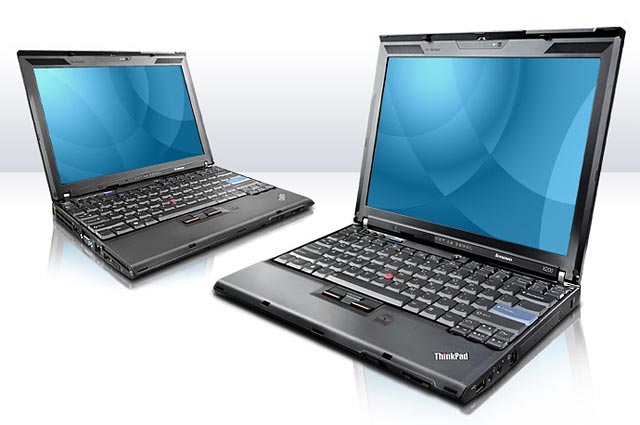
The Lenovo ThinkPad X200 isn't really meant to be a cheaper version of the X300. It actually is an evolutionary update for the ThinkPad X61, a lineage the X300 also shares to a lesser extent. In addition to a new model number in line with Lenovo's new naming convention, the X200 also packs a variety of upgrades over its predecessor, while maintaining the same focus on functionality, mobility and durability that made the X61 a best-in-class product in its own right. It is obvious from its feature list that the X200 isn't quite as advanced, in terms of its mechanical design, as the X300. Despite being of similar weight and size as the X300, the X200 doesn't have an internal optical drive, nor is it as thin and it doesn't even have a touchpad. It also sports a 12.1" screen like the X61, rather than the 13.3" LCD that the X300 is equipped with. However, the X200 isn't lacking in its base hardware specification, that's for sure. It incorporates all of the same communications, networking and connectivity options and features as the X300. In addition, it's also built on Intel's new Centrino 2 platform which offers support for the new Penryn-based Core 2 Duo mobile processor. The X200 is available with the Penryn P8000 series, which is an upgrade of the original Merom mobile Core 2 Duo processors and it offers 3MB L2 cache, a 1066MHz FSB, front-side bus throttling, and the SSE4 instruction set. Most impressive of all, it has a TDP of only 25W, 10W lower than Merom, despite packing more features and higher frequencies. The rest of the specifications will look familiar to anyone who has owned a ThinkPad X61. The X200 is roughly the same size and shape as the X61 although the lid design takes obvious design cues from the X300. The X200 is also a widescreen laptop while the X61 employed a standard 4:3 aspect ratio. Overall, the X200 looks like a solid update to the X61, at least on paper. Read on to find out if these updates translate into real-world improvements. |
| Design & Build Quality |
![]() The X200 is unmistakably a ThinkPad notebook. From the flat black paint and utilitarian design to the angled logo on the right palm rest, the X200 couldn't be anything else. While we wouldn't say they are necessarily "pretty", ThinkPads are certainly iconic and distinguished. At first glance, the X200 looks like a miniaturized version of a ThinkPad, shrunken to 3/4 the size of its 15.4" stablemates. This is true in many respects. Despite its smaller size, the X200 shares most of the same special features as the rest of ThinkPad product line. Features like a semi-rugged design, shock-mounted hard drive, fingerprint reader with full-disk encryption, spill-resistant keyboard with drainage channels and full-sized keys, are all standard equipment. While it may be tempting to think of the X200 as a 12.1" version of the 13.3" X300, it is in fact a direct descendent of the X61. This is both clearly evident in the X200's design and its specifications. The X300 tries to be as compact and feature-rich as possible, sacrificing raw computing power to present a fully featured notebook in an amazingly compact frame. The X200, just like the X61 before it, takes the opposite approach, sacrificing some size and features to preserve computing power. Despite being thicker than the X300, the X200 doesn't offer a built-in optical drive. Nor does it have a touchpad, instead relying exclusively on Trackpoint navigation. The X200 makes up for these deficiencies with a full-power Intel Penryn Core 2 Duo processor running at up to 2.4GHz with a 1066MHz front-side bus frequency. That is a significant improvement over the X300's special one-off ultra low voltage SL7100 processor, which only operates at 1.2GHz with a 800MHz FSB. Lastly, these trade-offs make the X200 a lot cheaper than the decidedly premium X300. ![]() Comparison of X-series Notebooks The X200 will be replacing the X61 and the two notebooks have more in common than the vastly different model numbers may suggest. The X200 is in essence an updated X61. The most prominent new features are an upgraded chipset and the use of a widescreen LCD. While the X61 used a standard 4:3 aspect ratio LCD, the X200 is equipped with a 16:10 widescreen. This makes the X200 an inch wider than the X61, but the rest of its dimensions remain largely unchanged. the X200 receives an upgrade to the Centrino 2 platform which should offer better overall performance and battery life than the Santa Rosa based X61. The X300 was the first ThinkPad X-series notebook to have an integrated webcam and now this feature has been brought to the X200 as an option. The wireless antenna setup has also been upgraded which will allow the X200 to eventually support a much greater variety of wireless technologies than the X61 is able to provide. At press time, many of the X200's connectivity options are not yet available for order but the X200 will eventually be available with new wireless technologies like WiMAX and wireless USB over Ultra Wide Band (UWB). The top and bottom panels on the exterior of the X200 are made of magnesium-alloy for its strength and relatively light weight. The entire notebook is covered by the lightly textured flat black paint used on all ThinkPads. The paint is quite durable and resistant to scratches as well as blemishing. It's also nearly impervious to dust and fingerprints. Except in the case of serious scratches and dents, the X200 will look like new, even after a few thousand miles have been logged on it. While the top and bottom of the exterior of the notebook are covered by magnesium-alloy panels, the rest of the notebook is made of a durable plastic. The entire notebook is surprisingly sturdy considering how thin it is. With only 1.4" at its thickest point, the X200 doesn't have a lot of room for chassis materials and we were worried that this might lead to chassis flex. Thankfully the X200 remains rigid, even when being held by a single corner of its casing. Unlike the X300, the X200 doesn't have the benefit of LED backlights for its screen and instead relies on a standard cold cathode unit. This means the LCD is less resilient and more susceptible to screen flex. The lid of the X200 is only about 1/4" thick but it is well designed and the lid is fairly resistant to flex and bending. This is especially impressive since the lid, as with the notebook as a whole, is very thin. The connectors and inputs are located on the left and right side of the notebook. On the left side are two USB 2.0 ports, a VGA-out port, the RJ45 Ethernet port, AC adapter plug and a 54mm ExpressCard slot. A switch tucked under the ExpressCard slot toggles all of the notebook's wireless devices. The X200's only cooling vent is also located on the left side of the notebook. The right side of the notebook has a third USB port, RJ11 modem port as well as the headphone and microphone ports. The opening for the hard drive bay is right next to the modem port. The hard drive bay is protected by a plastic panel that is locked in place by a screw. A standard Kensington lock port can also be found on the right side of the notebook. The front and rear of the notebook are devoid of ports and connections. The front of the notebook only has the lid locking latch while the rear of the notebook has the battery. Our sample came with the optional 9-cell battery which sticks out from the rear of the notebook by an inch. The standard battery is 4-cell and sits flush with the rear of the notebook. A 6-cell battery is also available as an option. While tethered to a wall, the X200 is powered by a very compact 65W travel adapter and a larger 90W unit is available as an option. Another classic ThinkPad feature is the integration of liquid drainage channels in the keyboard. These small channels direct liquid to drainage outlets at the bottom of the notebook. Any spills are channeled out the bottom of the notebook instead of pooling in the keyboard and potentially spilling inside the notebook, which could cause irreparable damage. The X200 has a total of three drainage outlets spread out around the bottom of the notebook. Overall, the design of the X200 is typical ThinkPad; tough, efficient and functional. It might not present the most pleasing silhouette, but it works very well and like all ThinkPads, it is semi-rugged and it appears to be very durable. The design quality of the X200 is top notch and it's built to last. |
| Upgrade Options & Docking Station | ||||
![]() As is the case for most ultraportable notebooks, upgrade options for the X200 are fairly limited. There is only one removable panel on the back of the notebook and it hides a pair of DDR3 SO-DIMM slots. Our sample came with a 2GB single stick which left the second slot open and ready for upgrades. The position of the SO-DIMM slots make them very easy to access and upgrading the memory couldn't be easier. The hard drive is accessible from the right side of the notebook. A single screw secures a small plastic panel that hides the hard drive, a standard 2.5" SATA unit, which can then be slid out from the side of the notebook. A 54mm ExpressCard slot is located on the left side of the notebook for additional expandability. The hard drive is mounted in a 2-piece rubber mounting bracket. The rubber helps dampen the hard drive to reduce noise and vibration, it also helps to protect the drive during a fall. A large metal heatspreader is attached to the bottom of the drive. A plastic tab is attached to the heatspreader which is used to pull the drive out of the drive bay. These are the only easily accessible upgrade options. The processor, wireless adapters and mini-PCI slots are all hidden deep within the chassis and can't be accessed from an easily removable panel.
The X200 UltraBase
docking station is very similar to the one for the X61. It connects to
the bottom of the X200 and connects via a docking station connector at
the bottom of the notebook. The UltraBase offers additional
expandability and features that can come in handy. It has the usual
extra USB ports, VGA-out port, microphone and headphone ports, ethernet
port and security lock slots. These ports are already available
natively on the X200, but their presence on the docking station allows
you to connect a monitor, speakers and a set of input devices directly
to the docking station. This is really convenient since you won't need
to disconnect and reconnect these items from the X200 every time you
sit at your desk, just connect to the docking station and away you go.
The UltraBase also supports an ultra-slim, notebook style, optical drive. The optical drive bay supports all 'ultra-slim' sized optical drives from DVD burners to Blu-Ray. The UltraBase also features stereo speakers. This is a great feature since the X200 only natively offers a single mono speaker. It's also fairly light and portable. When connected to the X200, it essentually doubles its thickness. ![]() The UltraBase is an optional accessory that is a great compliment to the X200 for desktop use. It can be ordered for $219, either at the time or purchase or separately. |
| First-boot & Software | ||||||
![]() Lenovo includes a fair share of proprietary and after market software on the ThinkPad X200 with the intention of increasing productivity while boosting system security. The notebook came equipped with Windows Vista Business (32-bit) and a sizable collection of software including:
The list of pre-installed software may seem longer than usual but many of the included packages are standard necessities for an office machine and not simply bloat. Most of the multimedia software is only pre-installed if the X200 UltraBase docking station is included with the order since the UltraBase includes the optical drive that the X200 is missing. The rest of the software are part of the ThinkVantage suite included with all ThinkPad notebooks. First boot reveals a fairly busy desktop with numerous desktop shortcuts, an activated Vista Sidebar and a very cluttered taskbar. The system ships with a special Windows Sidebar widget pre-installed that can display a variety of system information such as wireless signal strength, battery status, display resolution and the next time the system is scheduled to update itself. While there certainly are a lot of programs pre-installed with the X200, there isn't much bloatware since most of the software is relatively useful and compact. Only the pre-installed Windows Live toolbar can be considered to be true bloat, since it is far from necessary and doesn't provide a valuable and otherwise missing function.
The ThinkPad ThinkVantage software suite is included with every ThinkPad notebook and has recently been upgraded with the introduction of the X300 and the X200 also receives this new version. The ThinkVantage Productivity Center can be launched from shortcuts within Windows or by pressing the blue ThinkVantage button next to the volume controls above the keyboard. ThinkVantage Power Manager offers custom power profiles to help maximize the performance based on the system's intended use. Not only can the system be optimized for Maximum Battery Life or Video Playback, the interface shows the effects the power profile will have on the system's Performance, Temperature, Fan sound level and Power Usage. The software also offers advanced settings along with a status indicator of how much charge time remains. There is also an option called Battery Stretch that, when enabled, can control various component behavior to eke out the most battery life possible. Lastly, a battery maintenance option provides for draining the battery completely to prevent degradation, if the system is mainly run on A/C power. One of the more robust proprietary software packages is the ThinkVantage Productivity Center, which offers a broad range of features and functionality. First, the software works as a front-end, integrating other ThinkVantage titles into a simple menu that is sorted by the category of software. The software does a nice job of tying all of the individual titles together into an intuitive interface that shouldn't be daunting, even for the less experienced user. The menu offers quick links for easy access to Wireless configuration, backup options, maintenance procedures and support. The ThinkVantage Access Connections provides one-stop location for controlling all of the notebook's available networking and communications devices. One of the main features of the Access Connections software is a visual representation of all of the WiFi networks within range as well as their signal strength and estimated distance from you. The ThinkVantage Fingerprint software controls access to the system log in, adding both security and convenience to logging onto the system. The ThinkPad Active Protection System is an accelerometer that detects when the notebooks is falling and shuts off the hard drive to protect it from impact as much as possible. The corresponding ThinkVantage Active Protection System software allows you to manage and adjust settings related to this system. The ThinkVantage System Update utility works to ensure the software and system drivers are all current while ThinkVantage Rescue and Recovery is a full-featured backup and recovery software package for enhanced data protection. Overall, the ThinkVantage suite remains one of the most impressive and comprehensive software suites included with a notebook by any OEM we've seen to date. It offers a wide range of useful utilities that can help you use and maintain your notebook and it does this with minimal system resources. You can learn more about the ThinkVantage software suite at the ThinkVantage website, where you can read information about each of the components as well as view a presentation about the benefits of the ThinkVantage suite. |
| Test Setup & 3DMark06 CPU | ||||||||||||
![]()
To start out our testing, we began with a focus on CPU performance, utilizing FutureMark 3DMark06's CPU performance module. 3DMark06's test is a multi-threaded "gaming related" DirectX metric that's useful for comparing relative performance between similarly equipped systems. This test consists of different 3D scenes that are generated with software and hardware GPU renderers, which is also dependant on the host CPU's performance. In its CPU tests, the calculations normally reserved for your 3D accelerator are instead sent to the central processor. ![]() Out of our test systems, the X200 packs the biggest processing punch. The X200 is equipped with an Intel Core 2 Duo P8x00 series processor which are the new Penryn 45nm cores. Not only does the X200 have the highest clock frequency but it also has 3MB of L2 cache compared to the 2MB of the older Meroms. This allows the X200 to lead the pack in our first benchmark, 3DMark06's CPU module. The X200 has a significant performance advantage over the X300's ultra low voltage processor. |
| Futuremark PCMark Vantage | ||||
![]() For our next round of benchmarks, we ran the complete Futuremark PCMark Vantage test suite. This integral component of our testing toolbox provides a solid assessment of a system's overall performance.
"The PCMark Suite is a collection of various single- and multi-threaded CPU, Graphics and HDD test sets with the focus on Windows Vista application tests. Tests have been selected to represent a subset of the individual Windows Vista Consumer scenarios. The PCMark Suite includes CPU, Graphics, Hard Disk Drive (HDD) and a subset of Consumer Suite tests."
During our ThinkPad X300 review, we ran into some issues with running PCMark Vantage which is why the Memory and Overall performance number are missing from the graph above. The X200 exhibited similar problems initially but we were eventually able to coax it to successfully complete the entire benchmark suite. According to the PCMark Vantage's overall score, the X200 is the best performer out of our comparison machines. It received top scores in nearly every single PCMark module with the notable exception of the hard drive module. The X300 performed the best in the hard drive module by a significant margin but it was the only notebook in the group equipped with a solid-state drive. Out of the notebooks equipped with traditional mechanical drives, the X200 performed the best by a large margin. Overall, the X200 was the best performer of the lot, at least according to PCMark Vantage. The X200 packs the fastest processor and the newest chipset out of the group as well, so this isn't too surprising. |
| IGP Performance | ||||||||
![]() ThinkPads are not meant to be gaming machines and this is especially true of the ultraportable X-series. The X200 isn't equipped with a discrete graphics solution and instead relies on an Intel IGP which aren't known for their gaming prowess. Normally we would skip gaming-specific benchmarks for a notebook that is so clearly not meant for gaming, but since the X200 is built on Intel's new Centrino 2 platform, we just had to check out how the new IGP compares to the old one it replaces.
Previous to Centrino 2, Intel's state-of-the-art mobile platform was Santa Rosa which was equipped with the GMA X3100 IGP. For Centrino 2, Intel has upgraded the integrated graphics solution to the new GMA X4500HD. The X4500HD sports a number of new features compared to the X3100, the most notable of which are higher clock frequencies, DirectX 10 support and Shader Model 4.0 features. The X4500HD sports ten unified shader units compared to the X3100's eight and in combination with increased clock speeds, is supposed to grant the X4500HD a 300% performance improvement in 3DMark06 according to Intel. We decided to put these claims to the test in 3DMark06. We pitted the ThinkPad X200 up against an ASUS U2E in 3DMark06. The ASUS U2E is built on the Santa Rosa platform and is equipped with GMA 3100 graphics. Unfortunately, the U2E is also sporting a relatively weak Core 2 Duo U7500 1.06GHz processor which naturally puts it at a great disadvantage to the X200's comparatively massively powerful Core 2 Duo P8600 2.40GHz processor. We didn't have any other GMA 3100 equipped notebooks handy, so we were forced to make do with what we had. Regardless, these tests are all very GPU intensive, rather than CPU, so we're still able to garner some insight on the new chipset's performance.
Our test system limitations reduces the range of tests we could perform since the great difference in processor speed would bias any real-world gaming tests in favor of the X200. However, we feel the difference in processor performance shouldn't excessively impact a synthetic GPU benchmark such as this 3DMark06 Shader Model tests and the results would still be of value. As you can see in the graph above, the GMA X4500HD equipped Montevina (Centrino 2) platform performs significantly better than the GMA X3100 equipped Santa Rosa platform. The GMA X4500HD did indeed perform nearly three times better than the GMA X3100, as Intel claimed. Unfortunately in the grand scheme of things, the GMA X4500HD is still a very limited gaming platform. However, it should be more than enough graphics muscle for a primarily office productivity machine like the ultraportable ThinkPad X200. Just don't expect to blitz through a level or two of Crysis on your lunch break or in the terminal between flights.
While the Intel GMA X4500HD isn't much of a gaming chip, it does offer plenty of attractive multimedia features, many of which are new for the X4500HD and not found on the older X3100. The X4500HD is capable of HD video playback with full hardware decode from AVC, VC1 and MPEG2 formats. It can handle video up to 1080P and it also offers native Blu-Ray video playback support.
We played a 1080P WMV HD video on the X200 and it played back the video smoothly with only 15%-25% CPU utilization. We also tried a 1080P Quicktime HD video encoded in H.264 which required a bit more CPU utilization, around 40%-60%. We didn't notice any skipping, tearing or dropped frames with either video and the video quality was excellent. In both cases it is clear that some or all of the video decoding was being offloaded to the IGP and the notebook still felt quick and snappy while the HD video ran in the background. Unfortunately the ThinkPad X200's tiny 12.1" screen with a maximum resolution of 1280x800 isn't able to display 1080P HD content without the aid of an external monitor, nor can it play Blu-Ray disks without the UltraBase docking station or an external Blu-Ray drive, since it lacks an optical drive of its own. These limitations make HD video playback a somewhat moot point for the X200, but its hard to argue with extra features and you'll be ready for HD video at your desk, if you choose to get the necessary peripherals. |
| Battery Performance & Power Consumption | ||||
![]()
Rounding out our testing, we ran MobileMark 2007 to assess the notebook's overall battery life while running a series of applications through a testing script. The MobileMark 2007 reader test module "reads" and pages through a large PDF file continuously until the battery runs out. This test was run with the screen set to 25% brightness. ![]() Our ThinkPad X200 review sample came equipped with the optional extended 9-cell battery. The battery juts out from the rear or the notebook by about an inch and pushes the X200 to a weight of 3.58lb (1.63kg), compared to only 2.95lb (1.34kg) when equipped with the standard 4-cell battery, which sits flush. However, sacrificing weight and size for the 9-cell battery isn't without rewards. In our MobileMark battery test, the ThinkPad X200 managed an impressive 535 minutes (8.92 hours) before finally running out of juice. This put the rest of the notebooks in our test to shame. To further explore the ThinkPad X200's battery life, we also put it through a set of tests with the Battery Eater utility. ![]() We ran the Battery Eater Pro "classic" test as well as the reader test. The classic test is designed to stress the system to full-load until the battery runs out and it should give a good indication of the ThinkPad's absolute minimal battery life. We ran this test with the screen at 100% brightness. This test should represent the most punishing battery discharge scenario possible, since the processor, memory, and graphics subsystems are all stressed simultaneously. The X200 managed to last 158 minutes, just over two and a half hours. This is quite impressive especially since it would be highly unlikely any user would stress their X200 this much in normal usage on a constant basis. The Battery Eater reader test simulates reading a large text file at a moderate speed. This test was conducted with the screen set at 80% brightness. This test is very similar to MobileMark's test except we have set the screen brightness at a much higher level which should reduce the battery life. The X200 was able to last 488 minutes in this test, which is 47 minutes less than the MobileMark test. However the MobileMark test was conducted with the screen set to 25% brightness. Lastly, we also measured the length of time it takes for the ThinkPad X200 to fully recharge its battery. The X200 was able to fully charge its battery from a completely depleted state in 234 minutes with the standard 65 watt travel adapter. Battery charging is likely to take even less time with the optional 90 watt adapter available from Lenovo. |
| Performance Summary & Conclusion | ||||
![]() Performance Summary: The Lenovo ThinkPad X200 is a remarkably good performer for its class. In nearly all of our benchmarks the X200 was able to claim the top spot. The X200's Centrino 2 platform and Core 2 Duo P8600 2.40GHz processor lends it plenty of performance prowess and it excelled as a result in all of our benchmarks. Despite being a compact little ultraportable, the X200 packs a large performance punch and we found that it performed very well in all productivity and communications tasks. The X200 is also no slouch when it comes to multimedia. The new Intel GMA X4500 can off-load all of the major HD codecs off the CPU and decode them in hardware. This allows the X200 to playback 1080P HD video without noticeable slow-downs or frame stutter. Unfortunately performance is still poor in graphically intensive games, but this is par for the course on a business class machine like the X200 and not its primary focus anyway, obviously. Overall, the X200 is very well specified and if it weren't for its tiny 12.1" screen and minute physical dimensions, the X200's spec sheet could easily be mistaken for a full-size business-class notebook. The ThinkPad X-series has been a big contender in the ultraportable notebook arena for quite some time; a niche market traditionally occupied by frequent travelers and business types. Until recently, the average consumer wasn't too interested in ultraportable notebooks, which tended to be utilitarian and bland, not to mention prohibitively expensive and slow compared to their full-size contemporaries. However, the relatively recent introductions of ASUS' Eee PC and Apple's Macbook Air have cast a new light on the entire ultraportable notebook class, opening the gate to a slew of new consumers and repainting the traditionally business-oriented ultraportable as gadgets and techno-fashion accessories. Even the ThinkPad X-series produced a flashy halo product in the X300, or at least as flashy as ThinkPads can get.
While halo products like the Macbook Air and the ThinkPad X300 are nice to look at and dream about, they are ultimately sometimes too expensive and impractical for the mainstream user. While a road warrior may enjoy their significantly smaller footprint and light weight, they might not look too kindly on lower processing power or be able to stomach higher costs. In the end, many of us need a bit more power for a lot less money and the ThinkPad X200 is Lenovo's answer. The ThinkPad X200 is the successor and direct descendant of the ThinkPad X61. Built on Intel's new Centrino 2 platform, the X200 is well equipped with the latest technology. Powered by a standard-voltage Core 2 Duo Mobile Penryn processor with either 2.26GHz or 2.40GHz on tap, we found the X200 to be quite zippy in Windows Vista and our benchmarks show that it has plenty of power for all of your productivity and most of your multimedia needs as well. In terms of connectivity, the X200 shines, offering everything from WiMAX and wireless USB to Bluetooth and GPS. Although at the time of this publication, some of the more advanced options are not yet available for order. The X200 is very compact and light, although not quite as slim as the X300. The X200's portability is further enhanced by its excellent battery life and easy-access battery with the option for a big 9-cell battery that offers over 8 hours of juice. Like all ThinkPads, the X200 is also very tough and it has very high build quality. The magnesium alloy outer shell and roll-cage ensure that your X200 doesn't become cracked or crushed during the busy morning commute. Lastly, like the X61 that came before it, the X200 is reasonably priced and one can be yours for around $1,434. Unfortunately the X200 isn't completely without caveats. Like nearly all ultraportables, the X200 isn't much of a gaming powerhouse. Stuck with a GMA X4500 IGP and no discrete graphics options, the X200 can't run the latest games very well but then again gaming isn't an ultraportable notebook's primary purpose. Like the X61, the X200 also doesn't have a touchpad, instead relying solely on Trackpoint navigation. While some ThinkPad veterans may not mind, this could be a huge turn-off for many users and unfortunately the only solution is to use an external mouse. Finally, in order to keep costs low, the X200 doesn't share the X300's ultra-slim optical drive, instead relying on an optional external optical drive, like the Macbook Air. While the ThinkPad X200 isn't without faults, the most annoying of which may be the lack of a touchpad, its strengths greatly outweigh its few weaknesses and we think the X200 is an excellent notebook option amongst this new breed of ultra-light competition. With a combination of the X300's looks and the X61's processing power and sensibility, the X200 is quite an appealing product for gadget geeks, road warriors and business folks alike. With its excellent feature set, small size, light weight, excellent battery life and modest price tag, the X200 is a standout product to be sure. We heartily recommend that anyone in the market for a small, portable business notebook take a good, hard look at the ThinkPad X200.
|
